This PR closes#12632 by dimming the caption controls in the titlebar
when unfocused. Leaves them intact when in high contrast mode. The color
used is borrowed from PowerToys' unfocused color.
## Validation Steps Performed
Tested by hovering and unhovering in focused and unfocused states, as
well as in high contrast mode. States are consistent and applied
correctly. I did notice that clicking on the titlebar wouldn't put it
into focus unless I also moved my mouse though, but that is also present
in the release branch.
Closes#12632
(cherry picked from commit 8d94edd7b0445aa2221b1d1c7576b8b9dfd4797c)
Service-Card-Id: PVTI_lADOAF3p4s4AxadtzgkC_KQ
Service-Version: 1.23
This PR allows users to enable the tab bar in fullscreen mode.
A new setting; "showTabsFullscreen"; has been added which accepts a
boolean value. When `true`, then the tab bar will remain visible when
the terminal app is fullscreen. If the value is `false` (default), then
the tab bar is hidden in fullscreen.
When the tab bar is visible in fullscreen, the min/max/close controls
are hidden to maintain the expected behaviour of a fullscreen app.
## Validation Steps Performed
All unit tests are passing.
Manually verified that when the "launchMode" setting is "fullscreen" and
the "showTabsFullscreen" setting is `true`, the tab bar is visible on
launch.
Manually verified that changing the setting at runtime causes the tab
bar to be shown/hidden immediately (if the terminal is currently
fullscreen).
Manually verified that the new "showTabsFullscreen" setting is honoured
regardless of whether "showTabsInTitlebar" is set to `true` or `false`.
Closes#11130
As before, a minor refactor:
* I started off by removing the Monarch/Peasant with the goal of moving
it into and deduplicating its functionality with `WindowEmperor`.
* Since I needed a replacement for the Monarch (= ensures that there's
a single instance), I wrote single-instance code with a NT mutex
and by yeeting data across processes with `WM_COPYDATA`.
* This resulted in severe threading issues, because it now started up
way faster. The more I tried to solve them the deeper I had to dig,
because you can't just put a mutex around `CascadiaSettings`.
I then tried to seeif WinUI can run multiple windows on a single
thread and, as it turns out, it can.
So, I removed the multi- from the window threading.
* At this point I had dig about 1 mile deep and brought no ladder.
So, to finish it up, I had to clean up the entire eventing system
around `WindowEmperor`, cleaned up all the coroutines,
and cleaned up all the callbacks.
Closes#16183Closes#16221Closes#16487Closes#16532Closes#16733Closes#16755Closes#17015Closes#17360Closes#17420Closes#17457Closes#17799Closes#17976Closes#18057Closes#18084Closes#18169Closes#18176Closes#18191
## Validation Steps Performed
* It does not crash ✅
* New/close tab ✅
* New/close window ✅
* Move tabs between windows ✅
* Split tab into new window ✅
* Persist windows on exit / restore startup ✅
`ResizeWindow` event in `TerminalApi` is handled and bubbled to
`TerminalApi->ControlCore->TermControl->TerminalPage->AppHost`. Resizing
is accepted only if the window is not in fullscreen or quake mode, and
has 1 tab and pane.

Relevant issues: #5094
Because this holds onto the root element, `TerminalPage` gets "leaked"
on Windows 10 when a window is closed until another is opened.

## Validation Steps Performed
* Set a breakpoint in `Renderer::~Renderer`
* Open and close a window
* Breakpoint used to not get hit and now it does ✅
This changeset ensures that the message queue of frozen windows is
always being serviced. This should ensure that it won't fill up and
lead to deadlocks, freezes, or similar. I've tried _a lot_ of different
approaches before settling on this one. Introducing a custom `WM_APP`
message has the benefit of being the least intrusive to the existing
code base.
The approach that I would have favored the most would be to never
destroy the `AppHost` instance in the first place, as I imagined that
this would be more robust in general and resolve other (rare) bugs.
However, I found that this requires rewriting some substantial parts
of the code base around `AppHost` and it could be something that may
be of interest in the future.
Closes#16332
Depends on #16587 and #16575
This is my proposed solution to #15384.
Basically, the issue is that we cannot ever close a
`DesktopWindowXamlSource` ("DWXS"). If we do, then any other thread that
tries to access XAML metadata will explode, which happens frequently. A
DWXS is inextricably linked to an HWND. That means we have to not only
reuse DWXS's, but the HWNDs themselves. XAML also isn't agile, so we've
got to keep the `thread` that the DWXS was started on alive as well.
To do this, we're going to introduce the ability to "refrigerate" and
"reheat" window threads.
* A window thread is "**hot**" if it's actively got a window, and is
pumping window messages, and generally, is a normal thing.
* When a window is closed, we need to "**refrigerate**" it's
`WindowThread` and `IslandWindow`. `WindowEmperor` will take care of
tracking the threads that are refrigerated.
* When a new window is requested, the Emperor first try to
"**reheat**"/"**microwave**" a refrigerated thread. When a thread gets
reheated, we'll create a new AppHost (and `TerminalWindow`/`Page`), and
we'll use the _existing_ `IslandWindow` for that instance.
<sub>The metaphor is obviously ridiculous, but _you get it_ so who
cares.</sub>
In this way, we'll keep all the windows we've ever created around in
memory, for later reuse. This means that the leak goes from (~12MB x
number of windows closed) to (~12MB x maximum number of simultaneously
open Terminal windows). It's still not good.
We won't do this on Windows 11, because the bug that is the fundamental
premise of this issue is fixed already in the OS.
I'm not 100% confident in this yet.
* [x] There's still a d3d leak of some sort on exit in debug builds.
(maybe #15306 related)
* havent seen this in a while. Must have been a issue in an earlier
revision.
* [x] I need to validate more on Windows 11
* [x] **BAD**: Closing the last tab on Windows 11 doesn't close the
window
* [x] **BAD**: Closing a window on Windows 11 doesn't close the window -
it just closes the one tab item and keeps on choochin'
* [x] **BAD**: Close last tab, open new one, attempt to close window -
ALL windows go \*poof\*. Cause of course. No break into post-mortem
either.
* [x] more comments
* [ ] maybe a diagram
* [x] Restoring windows is at the wrong place entirely? I once reopened
the Terminal with two persisted windows, and it created one at 0,0
* [x] Remaining code TODO!s: 0 (?)
* [ ] "warm-reloading" `useTabsInTitlebar` (change while terminal is
running after closing a window, open a new one) REALLY doesn't work.
Obviously restores the last kind of window. Yike.
is all about #15384closes#15410 along the way. Might fork that fix off.
XAML/WinUI may pump the event loop internally. One of the functions
that does this right now is `DesktopWindowXamlSource::Close()`.

This is problematic in the previous code, because we'd set `_window`
to `nullptr` before calling `Close()` and so any of the `IslandWindow`
callbacks may be invoked during shutdown, which then try to potentially
access `_window` and end up crashing. This commit fixes the issue by
simply not nulling out the `_window` and calling `Close()` directly.

Furthermore, `NonClientIslandWindow` may directly access WinUI
objects in its message handlers which also crashes.

I've had this happen roughly ~1% of my test exits in a debug build
and every single time on a (artificial) very slow CPU.

## Validation Steps Performed
* Closing a window destroys the rendering instance ✅
`s/it's/its/`

Note that I didn't touch the several errors in the doc and doc/spec directories, since those seem to be dated and signed email excerpts, and I don't want to violate authorial integrity. Let me know if you would like me to fix those as well.

## References
p 57.  Murray, L.  (1824).  English grammar.  Philadelphia :  E. T. Scott.

I skimmed several hundred usages of the word "it's" in the code. This actually wasn't as tiresome as it sounds, since many of the code comments in this repo are entertaining and educational — the adjectives do not _necessarily_ apply in that order, but do _possibly_ apply in that order.
This reverts commit 19b6d35.
This re-enables support for Mica, and transparent titlebars in general. It also syncs the titlebar opacity with the control opacity for `terminalBackground`. It also somehow fixes the bug where the bottom few pixels of the max btn doesn't work to trigger the snap flyout.
Closes#10509
Does nothing for #13631
### To-done's
* [x] Check the mica API on 22000, windows 11 RTM
- this works on 10.0.22621.674, but that's not 22000
* [x] Check how this behaves on windows 10.
- For both, this API just no-ops. That's fine! we can just say "Mica is only supported on >=22621"
This is a follow-up of #13025 to make the members of `til::point/size/rect`
uniform and consistent without the use of `unions`. The only file that has
any changes is `src/host/getset.cpp` where an if condition was simplified.

## Validation Steps Performed
* Host unit tests ✅
* Host feature tests ✅
* ControlCore feature tests ✅
##### ⚠️ targeting 1.15
## Summary of the Pull Request
Adds support for Themes, a new type of customization for the Terminal. Themes allow the user to customize elements of the Terminal window itself. In this first iteration, this PR adds support for two main properties:
* enabling Mica as the window backdrop
* changing the tab row color (read: changing the titelbar color)
These represent the most important asks of theming in the Terminal. The properties added in this PR are:
* Theme color variants:
- `"#rrggbb"` or `"#aarrggbb"`
- `"accent"`
- `"terminalBackground"`
* Properties (_listed here in dot notation, but implemented as sub-objects_)
- `tabRow.background`: accepts a ThemeColor (above)
- `window.applicationTheme`: accepts one of `{"system", "light", "dark"}`
- `window.useMica`: accepts a boolean, defaults to false.
## References
* As first described in #3327
* spec'd in #12530
## PR Checklist
* [x] Sorta enables #10509, but doesn't close it. That'll need more comprehensive changes to the titlebar code.
* **update**: I totally disabled mica, but left the serialization code. It just seems silly without #10509.
* [x] Closes#1963
* [x] Closes#3774
* [x] Closes#12939
* [x] Does the bulk of the #3327 work, but I'm going to leave that open since that's become my megathread for everything related to theming.
* [x] I work here
* [x] Tests added/passed
* [ ] Requires documentation to be updated - **SURE DOES**
## Detailed Description of the Pull Request / Additional comments
### --> GO READ #12530 <--
Seriously.
These themes aren't customizable in the SUI currently. You can change the active theme, and the UI will show all of the defined themes, but they're not editable there.
They don't layer. You'll need to define your own themes.
Thay can't come from fragments. This is a really cool future idea, but not implemented in this v0.
The sub objects have some gnarly macros to generate a lot of the serialization code for you.
### TODOs
* [x] I still have yet to establish what the accent color algorithm is. This might be proprietary and require a ThemeHelpers workaround.
* [x] Make sure `terminalBackground` & the SUI result in something sensible
* [x] Make sure runtime BG changes work with `terminalBackground`. One time, they didn't. `printf "\x1b]11;rgb:ff/00/ff\x07"`
* [x] Acrylic Terminal BG's look weird, like, the opacity is always 50% or something. And the tab row looks all wrong then.
## Validation Steps Performed
This is the blob I've been testing with:
<details>
```jsonc
// "useAcrylicInTabRow": true,
"theme": "my dark",
// "theme": "Edge",
"theme": "orangey",
"theme": "WHITE",
// "theme": "terminal",
"themes": [
{
"name": "my dark",
"window": {
"applicationTheme": "dark",
"useMica": true,
},
"tabRow": {
"background": "#00000000",
},
},
{
"name": "Edge",
"tabRow": { "background": "accent" },
"window": { "applicationTheme": "system" }
},
{
"name": "orangey",
"window": {
"applicationTheme": "light",
"useMica": true,
},
"tabRow": {
"background": "#ff8800",
},
},
{
"name": "WHITE",
"window": {
"applicationTheme": "dark",
"useMica": true,
},
"tabRow": {
"background": "#FFFFFF",
},
},
{
"name": "terminal",
"window": {
"applicationTheme": "dark",
"useMica": false,
},
"tabRow": {
"background": "terminalBackground",
},
},
]
```
</details>
Previously this project used a great variety of types to present text buffer
coordinates: `short`, `unsigned short`, `int`, `unsigned int`, `size_t`,
`ptrdiff_t`, `COORD`/`SMALL_RECT` (aka `short`), and more.
This massive commit migrates almost all use of those types over to the
centralized types `til::point`/`size`/`rect`/`inclusive_rect` and their
underlying type `til::CoordType` (aka `int32_t`).
Due to the size of the changeset and statistics I expect it to contain bugs.
The biggest risk I see is that some code potentially, maybe implicitly, expected
arithmetic to be mod 2^16 and that this code now allows it to be mod 2^32.
Any narrowing into `short` later on would then throw exceptions.
## PR Checklist
* [x] Closes#4015
* [x] I work here
* [x] Tests added/passed
## Validation Steps Performed
Casual usage of OpenConsole and Windows Terminal. ✅
#4015 requires sweeping changes in order to allow a migration of our buffer
coordinates from `int16_t` to `int32_t`. This commit reduces the size of
future commits by using type inference wherever possible, dropping the
need to manually adjust types throughout the project later.

As an added bonus this commit standardizes the alignment of cv qualifiers
to be always left of the type (e.g. `const T&` instead of `T const&`).

The migration to type inference with `auto` was mostly done
using JetBrains Resharper with some manual intervention and the
standardization of cv qualifier alignment using clang-format 14.

## References

This is preparation work for #4015.

## Validation Steps Performed
* Tests pass ✅
This commit fixes some formatting bugs by upgrading clang-format and ensures
that our code is again formatted the same way Visual Studio 2022 would do it.
This commit makes the following changes to `til::point/size/rectangle`
for the following reasons:
* Rename `rectangle` into `rect`
  This will make the naming consistent with a later `small_rect` struct
  as well as the existing Win32 POINT/SIZE/RECT structs.
* Standardizes til wrappers on `int32_t` instead of `ptrdiff_t`
  Provides a consistent behavior between x86 and x64, preventing accidental
  errors on x86, as it's less rigorously tested than x64. Additionally it
  improves interop with MIDL3 which only supports fixed width integer types.
* Standardizes til wrappers on throwing `gsl::narrow_error`
  Makes the behavior of our code more consistent.
* Makes all eligible functions `constexpr`
  Because why not.
* Removes implicit constructors and conversion operators
  This is a complex and controversial topic. My reasons are: You can't Ctrl+F
  for an implicit conversion. This breaks most non-IDE engines, like the one on
  GitHub or those we have internally at MS. This is important for me as these
  implicit conversion operators aren't cost free. Narrowing integers itself,
  as well as the boundary checks that need to be done have a certain,
  fixed overhead each time. Additionally the lack of noexcept prevents
  many advanced compiler optimizations. Removing their use entirely
  drops conhost's code segment size by around ~6.5%.

## References

Preliminary work for #4015.

## PR Checklist
* [x] I work here
* [x] Tests added/passed

## Validation Steps Performed
I'm mostly relying on our unit tests here. Both OpenConsole and WT appear to work fine.
Adds snap layout support to the Terminal's maximize button. This PR is
full of BODGY, so brace yourselves.
Big thanks to Chris Swan in #11134 for building the prototype.
I don't believe this solves #8795, because XAML islands can't get
nchittest messages
- The window procedure for the drag bar forwards clicks on its client
area to its parent as non-client clicks.
- BODGY: It also _manually_ handles the caption buttons. They exist in
the titlebar, and work reasonably well with just XAML, if the drag bar
isn't covering them.
- However, to get snap layout support, we need to actually return
`HTMAXBUTTON` where the maximize button is. If the drag bar doesn't
cover the caption buttons, then the core input site (which takes up
the entirety of the XAML island) will steal the `WM_NCHITTEST` before
we get a chance to handle it.
- So, the drag bar covers the caption buttons, and manually handles
hovering and pressing them when needed. This gives the impression that
they're getting input as they normally would, even if they're not
_really_ getting input via XAML.
- We also need to manually display the button tooltips now, because XAML
doesn't know when they've been hovered for long enough. Hence, the
`_displayToolTip` `ThrottledFuncTrailing`
## Validation
Minimized, maximized, restored down, hovered the buttons slowly, moved
the mouse over them quickly, they feel the same as before. But now with
snap layouts appearing.
## TODO!
* [x] I'm working on getting the ToolTips on the caption buttons back. Alas, I needed a demo of this _today_, so I'll fix that tomorrow morning.
* [x] mild concern: I should probably test Win 10 to make sure there wasn't weird changes to the message loop in win11 that means this is broken on win10.
* [x] I think I used the wrong issue number for tons of my comments throughout this PR. Double check that. Should be #9443, not #9447.
Closes#9443
I thought this took care of #8587 ~as a bonus, because I was here, and the fix is _now_ trivial~, but looking at the latest commit that regressed.
Co-authored-by: Chris Swan <chswan@microsoft.com>
Fixes MSFT:34673647, at least I'm pretty sure. That's only ever hit a few
times externally, and internally it's hitting a lot on 1.9.1942 builds, which
doesn't really make any sense.
## Summary of the Pull Request
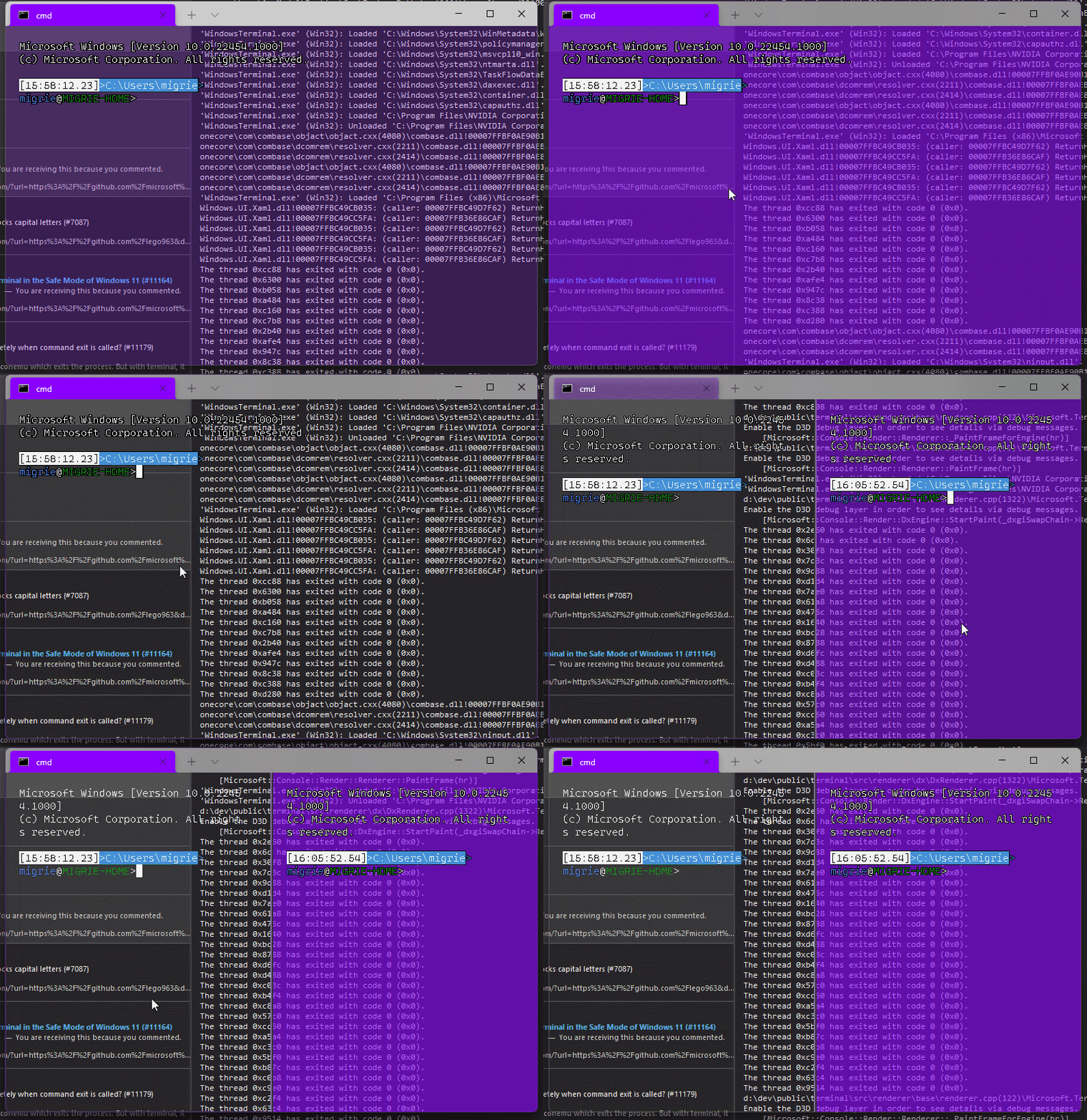
Adds support for vintage style opacity, on Windows 11+. The API we're using for this exists since the time immemorial, but there's a bug in XAML Islands that prevents it from working right until Windows 11 (which we're working on backporting).
Replaces the `acrylicOpacity` setting with `opacity`, which is a uint between 0 and 100 (inclusive), default to 100.
`useAcrylic` now controls whether acrylic is used or not. Setting an opacity < 100 with `"useAcrylic": false` will use vintage style opacity.
Mouse wheeling adjusts opacity. Whether acrylic is used or not is dependent upon `useAcrylic`.
`opacity` will stealthily default to 50 if `useAcrylic:true` is set.
## PR Checklist
* [x] Closes#603
* [x] I work here
* [x] Tests added/passed
* [x] https://github.com/MicrosoftDocs/terminal/pull/416
## Detailed Description of the Pull Request / Additional comments
Opacity was moved to AppearanceConfig. In the future, I have a mind to allow unfocused acrylic, so that'll be important then.
## Validation Steps Performed
_just look at it_
## Summary of the Pull Request
Basically undoes #10988 in favour of implementing it as described in #11018
## PR Checklist
* [x] Closes#11018
* [x] CLA signed. If not, go over [here](https://cla.opensource.microsoft.com/microsoft/Terminal) and sign the CLA
* [X] Tests added/passed
* [X] Documentation updated. If checked, please file a pull request on [our docs repo](https://github.com/MicrosoftDocs/terminal) and link it here: #xxx
* [X] Schema updated.
* [x] I work here
## Validation Steps Performed
- alt+space opens the system menu by default
- when alt+space is bound, the keys do not get send to terminal
- right-click on the tab bar didn't break (still opens system menu at the location of the cursor)
Add support for acrylic in the titlebar
## PR Checklist
* [x] CLA signed
## Detailed Description of the Pull Request / Additional comments
This seems to be a highly requested feature and seeing as #5772 was closed I thought it made sense to make a PR for this.

## Validation Steps Performed
Checked that acrylic works in both dark and light modes and switching between them still works. Also checked that acrylic in the tab row still works when tabs in titlebar is disabled.
## Summary of the Pull Request
Turns out, we'd only ever use the non-client size to calculate the size of the window, but not the actual position. As we learned in #10676, the nonclient area extends a few pixels past the visible borders of the window.
## PR Checklist
* [x] Closes#10583
* [x] I work here
* [ ] Tests added/passed
* [n/a] Requires documentation to be updated
## Validation Steps Performed
* [x] Works with the `IslandWindow`
* [x] Works with the `NonClientIslandWindow`
For inexplicable reasons, the top row of pixels on our tabs, new tab
button, and caption buttons is totally unclickable. The mouse simply
refuses to interact with them. So when we're maximized, on certain
monitor configurations, this results in the top row of pixels not
reacting to clicks at all.
To obey Fitt's Law, we're gonna hackily shift the entire island up one
pixel. That will result in the top row of pixels in the window actually
being the _second_ row of pixels for those buttons, which will make them
clickable. It's perhaps not the right fix, but it works.
After discussion, we think this is a fine fix for this. We don't think
anyone's going to miss the top row of pixels on the TabView. The original
bug is painful enough for the subset of users it impacts that this is an
acceptable trade. Should a better fix be found, we can absolutely do that
instead.
Closes#7422
## Summary of the Pull Request

This PR adds some special behavior to the window named "\_quake".
* When creating the quake window, it ignores "initialRows" and "initialCols" and opens on the top half of the monitor.
  - It uses `initialPosition` to determine which monitor this is
* It cannot be moved
* It can only be vertically resized on the bottom border.
* It's always in focus mode.
  - We should probably have an issue tracking "Allow showing tabs in focus mode"? Maybe?
  - This one element is maybe the one I'm least attached to

When renaming a window to "\_quake", it adopts all those behaviors as well. It does not exit focus mode when leaving QM, nor does it resize back. That seemed unnecessary.

## References

* As spec'ed in #9274
* See also #8888

## PR Checklist
* [x] In the pursuit of #653
* [x] I work here
* [ ] Tests added/passed
* [ ] Requires documentation to be updated, but I'm not gonna do any of that till quake mode is totally done.

## Detailed Description of the Pull Request / Additional comments

Note that this doesn't do things like:
* dropdown
* global hotkey summon
* summon to the current monitor
* summon to the current desktop

I'm doing #653 _very_ piecemeal, to try and make the PRs less egregious.

## Validation Steps Performed

* validated that center on launch still works
* validated that QM works on different monitors based on `initialPosition`
* validated entering/exiting QM behaves as expected

## TODO!
* [ ] When snapping the quake window between desktops with <kbd>win+shift+arrow</kbd>, the window doesn't horizontally re-size to the new monitor dimensions. It should.
<!-- Enter a brief description/summary of your PR here. What does it fix/what does it change/how was it tested (even manually, if necessary)? -->
## Summary of the Pull Request
In the focus mode the top border disappears upon resize. While this behavior is expected in the maximized / full screen mode, it should not happen in the focus mode.
<!-- Other than the issue solved, is this relevant to any other issues/existing PRs? -->
## References

<!-- Please review the items on the PR checklist before submitting-->
## PR Checklist
* [x] Closes https://github.com/microsoft/terminal/issues/7012
* [x] CLA signed
* [ ] Tests added/passed - nope, only manual testing
* [ ] Documentation updated - irrelevant
* [ ] Schema updated - irrelevant
* [ ] I've discussed this with core contributors already. If not checked, I'm ready to accept this work might be rejected in favor of a different grand plan. Issue number where discussion took place: #xxx

<!-- Provide a more detailed description of the PR, other things fixed or any additional comments/features here -->
## Detailed Description of the Pull Request / Additional comments
_GetTopBorderHeight method returns 0 when maximized or no title bar is visible. However the existence of top border has nothing to do with whether the title bar is visible. We want to leave the border as long as the window is not in some form of maximizing (maximized / full screen)
<!-- Describe how you validated the behavior. Add automated tests wherever possible, but list manual validation steps taken as well -->
## Validation Steps Performed
* Manual - dragging, resizing, maximizing both in focus and non focus modes + full screen testing
Took this as an easy starter. The method IslandWindow::SetAlwaysOnTop is
triggered once terminal settings are reloaded (in
TerminalPage::_RefreshUIForSettingsReload flow). This method calls
SetWindowPos without SWP_NOACTIVATE. As a result the window gets
activated, the focus is set and the cursor starts blinking.
Added SWP_NOACTIVATE in all SetWindowPos calls from IslandWindow and
NoClientIslandWindow (where it was missing). Please let me know if this
is an overkill - it is not required to fix the issue, however seems a
good practice, that might help if we decide to apply more settings
immediately.
## Validation Steps Performed
* Only manual testing - please guide me to the relevant UT framework, if
exists.
* Trying to reproduce this with VS attached doesn't work - the window
gets the focus in any case.
* Tested as a standalone application, by modifying different settings
(and comparing the results before and after the fix).
* Checked with Spy++ that no WM_ACTIVATE / WM_SETFOCUS is thrown upon
settings modification
* Applied terminal resizing, toggling full screen and focus mode to
check no regression was introduced.
Closes#7571
## Summary of the Pull Request
Add support for "focus" mode, which only displays the actual terminal content, no tabs or titlebar. The edges of the window are draggable to resize, but the window can't be moved in borderless mode.
The window looks _slightly_ different bewteen different values for `showTabsInTitlebar`, because switching between the `NonClientIslandWindow` and the `IslandWindow` is _hard_.
`showTabsInTitlebar` | Preview
-- | --
`true` | 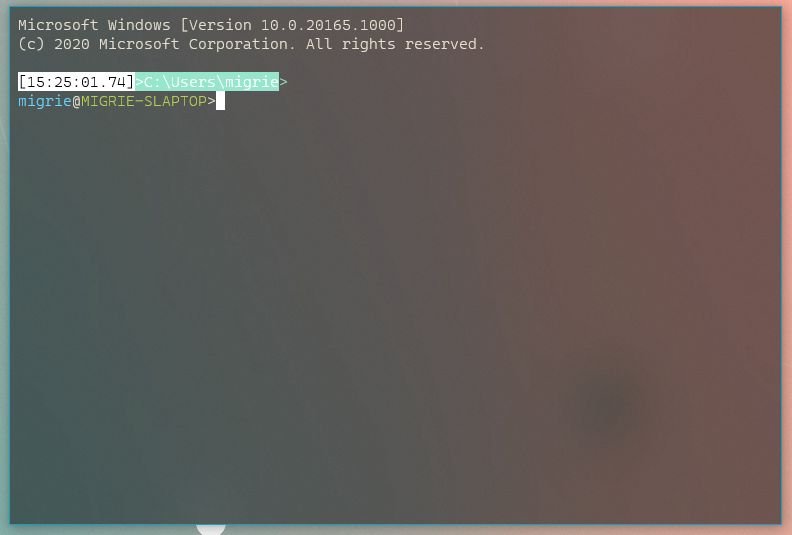
`false` | 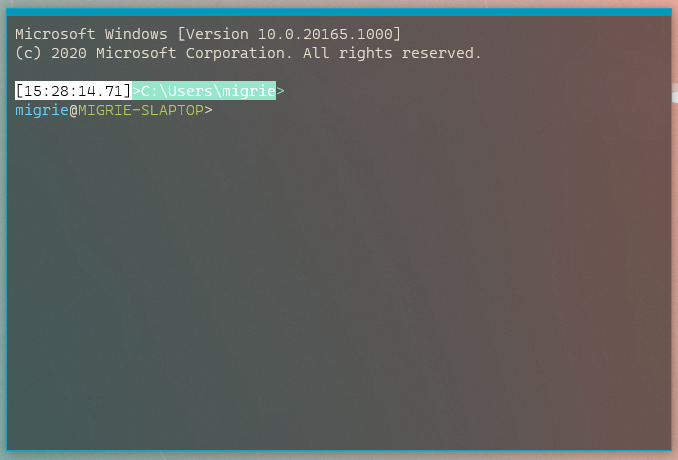
## PR Checklist
* [x] Closes#2238
* [x] I work here
* [ ] Tests added/passed
* [ ] Requires documentation to be updated
## Detailed Description of the Pull Request / Additional comments
* **KNOWN ISSUE**: Upon resizing the NCIW, the top frame margin disappears, making that border disappear entirely. 6356aaf has a bunch of WIP work for me trying to fix that, but I couldn't get it quite right.
## Validation Steps Performed
* Toggled between focus and fullscreen a _bunch_ in both modes.
<!-- Enter a brief description/summary of your PR here. What does it fix/what does it change/how was it tested (even manually, if necessary)? -->
## Summary of the Pull Request
Many places in this codebase has an equality comparison to the boolean FALSE. This adds unneeded complexity as C and C++ has a NOT operand for use of these in if statements. This makes the code more readable in those areas.

<!-- Other than the issue solved, is this relevant to any other issues/existing PRs? -->
## References

<!-- Please review the items on the PR checklist before submitting-->
## PR Checklist
* [X] CLA signed. If not, go over [here](https://cla.opensource.microsoft.com/microsoft/Terminal) and sign the CLA
* [X] Tests added/passed
* [ ] Requires documentation to be updated
* [ ] I've discussed this with core contributors already. If not checked, I'm ready to accept this work might be rejected in favor of a different grand plan. Issue number where discussion took place: #xxx

<!-- Provide a more detailed description of the PR, other things fixed or any additional comments/features here -->
## Detailed Description of the Pull Request / Additional comments
One boolean being compared to FALSE was only used once, with the boolean name being "b", so it is better off not existing at all.

<!-- Describe how you validated the behavior. Add automated tests wherever possible, but list manual validation steps taken as well -->
## Validation Steps Performed
Unit Testing passed, compiler refactoring
This pull request moves WindowUiaProvider back into Win32 interactivity
and deletes all mention of it from Windows Terminal. Terminal does not
have a single toplevel window that requires Console-like UIA, as each
Xaml control inside it is in charge of its own destiny.
I've also merged `IUiaWindow` and `IConsoleWindow` back together, as
well as `WindowUiaProviderBase` and `WindowUiaProvider`.
Things look a lot more like they did before we tore them apart.
## PR Checklist
* [x] Closes#3564
* [x] CLA
* [x] Tests added/passed (manual)
* [ ] Requires documentation to be updated
* [x] I've discussed this with core contributors already
## Validation
Carlos validated conhost and terminal on this branch.
## Summary of the Pull Request
Adds `"launchMode": "fullscreen"`, which does what it says on the box.
## PR Checklist
* [x] Closes#288
* [x] I work here
* [ ] Tests added/passed
* [n/a] Requires documentation to be updated
## Detailed Description of the Pull Request / Additional comments
It's important to let the winow get created, _then_ fullscreen it, because otherwise, when the user exits fullscreen, the window is sized to like, 0x0 or something, and that's just annoying.
## Summary of the Pull Request
This is an enormously trivial nit - when we launch maximized, we don't draw the maximize button in the "restore" state.
This PR changes the terminal to manually update the Maximize button on launch, once the titlebar is added to the UI tree.
## PR Checklist
* [x] Closes#3440
* [x] I work here
* [ ] Tests added/passed
* [n/a] Requires documentation to be updated
This pull request moves swaths of Cascadia to use `til::color` for color
interop. There are still some places where we use `COLORREF`, such as in
the ABI boundaries between WinRT components.

I've also added two more til::color helpers - `with_alpha`, which takes
an existing color and sets its alpha component, and a
`Windows::UI::Color` convertor pair.

Future direction might include a `TerminalSettings::Color` type at the
idl boundary so we can finally stop using UInt32s (!) for color.

## Validation Steps Performed
Tested certain fragile areas:
* [x] setting the background with OSC 11
* [x] setting the background when acrylic is in use (which requires
  low-alpha)
Also known as "Kill HRGN II: Kills Regions Dead (#5485)"
Copying the description from @greg904 in #4778.
--- 8< ---
My understanding is that the XAML framework uses another way of getting
mouse input that doesn't work with `WM_SYSCOMMAND` with `SC_MOVE`. It
looks like it "steals" our mouse messages like `WM_LBUTTONDOWN`.
Before, we were cutting (with `HRGN`s) the drag bar part of the XAML
islands window in order to catch mouse messages and be able to implement
the drag bar that can move the window. However this "cut" doesn't only
apply to input (mouse messages) but also to the graphics so we had to
paint behind with the same color as the drag bar using GDI to hide the
fact that we were cutting the window.
The main issue with this is that we have to replicate exactly the
rendering on the XAML drag bar using GDI and this is bad because:
1. it's hard to keep track of the right color: if a dialog is open, it
will cover the whole window including the drag bar with a transparent
white layer and it's hard to keep track of those things.
2. we can't do acrylic with GDI
So I found another method, which is to instead put a "drag window"
exactly where the drag bar is, but on top of the XAML islands window (in
Z order). I've found that this lets us receive the `WM_LBUTTONDOWN`
messages.
--- >8 ---
Dustin's notes: I've based this on the implementation of the input sink
window in the UWP application frame host.
Tested manually in all configurations (debug, release) with snap,
drag, move, double-click and double-click on the resize handle. Tested
at 200% scale.
Closes#4744Closes#2100Closes#4778 (superseded.)
## Summary of the Pull Request
When we're restoring from minimized, that `MonitorFromWindow` call is returning null. Curious that we're getting null here, when [MSDN states](https://docs.microsoft.com/en-us/windows/win32/api/winuser/nf-winuser-monitorfromwindow):
> If the window is currently minimized, MonitorFromWindow uses the rectangle of the window before it was minimized.
Turns out, `MONITOR_DEFAULTTONEAREST` just fixes this.
## References
* #4857 - original PR that added this code block
## PR Checklist
* [x] Closes#5209
* [x] I work here
* [ ] Tests added/passed
* [n/a] Requires documentation to be updated
## Validation Steps Performed
Verified manually
This commit introduces a github action to check our spelling and fixes
the following misspelled words so that we come up green.

It also renames TfEditSes to TfEditSession, because Ses is not a word.

currently, excerpt, fallthrough, identified, occurred, propagate,
provided, rendered, resetting, separate, succeeded, successfully,
terminal, transferred, adheres, breaks, combining, preceded,
architecture, populated, previous, setter, visible, window, within,
appxmanifest, hyphen, control, offset, powerpoint, suppress, parsing,
prioritized, aforementioned, check in, build, filling, indices, layout,
mapping, trying, scroll, terabyte, vetoes, viewport, whose
## Summary of the Pull Request
One of our great contributors already hooked up all the logic for this,
we just needed a theme library that could handle the request.
## PR Checklist
* [x] Fixes#4980
* [x] CLA signed
* [x] Tests added/passed
* [ ] Requires documentation to be updated
## Summary of the Pull Request
When the auto-hide taskbar setting is enabled, then we don't
always get another window message to trigger us to remove the drag bar.
So, make sure to update the size of the drag region here, so that it
_definitely_ goes away.
## References
## PR Checklist
* [x] Closes#4224
* [x] I work here
* [ ] Tests added/passed
* [n/a] Requires documentation to be updated
## Validation Steps Performed
Manually tested it
## Summary of the Pull Request
This fixes our calculation for the initial size of the window. WE weren't accounting for the height of the tabs, so the `initialRows` was consistently wrong.
## PR Checklist
* [x] Closes#2061
* [x] I work here
* [ ] Tests added/passed
* [n/a] Requires documentation to be updated
## Detailed Description of the Pull Request / Additional comments
For the tabs below the titlebar case, there's 6px (unscaled) of space that I cannot account for. I seriously have no idea where it's coming from. When we end up creating the first `TermControl` after startup, there's an inexplicable `6*scale` difference between the height of the `tabContent` and the `SwapChainPanel`'s size.
## Validation Steps Performed
Checked all six of the following cases:
* 1.0 DPI scaling, Tabs in Titlebar
* 1.25 DPI scaling, Tabs in Titlebar
* 1.0 DPI scaling, Tabs NOT in Titlebar, always show tabs
* 1.0 DPI scaling, Tabs NOT in Titlebar, DON'T always show tabs
* 1.25 DPI scaling, Tabs NOT in Titlebar, always show tabs
* 1.25 DPI scaling, Tabs NOT in Titlebar, DON'T always show tabs
## Summary of the Pull Request
When we are maximized or fullscreened, check for the presence of the taskbar in auto-hide mode. If the Terminal finds the taskbar on any side of the monitor, adjust our window rect by just a little bit, so that the taskbar can still be revealed by the user mousing over that edge.
## References
## PR Checklist
* [x] Closes#1438
* [x] I work here
* [ ] Tests added/passed
* [n/a] Requires documentation to be updated
## Detailed Description of the Pull Request / Additional comments
Note to future code archeologists:
This doesn't seem to work for fullscreen on the primary display. However, testing a bunch of other apps with fullscreen modes and an auto-hiding taskbar has shown that _none_ of them reveal the taskbar from fullscreen mode. This includes Edge, Firefox, Chrome, Sublime Text, Powerpoint - none seemed to support this.
This does however work fine for maximized.
## Validation Steps Performed
I'm maximized and fullscreened the Terminal a lot in the last two days.
checkpointing this since it's so close. It works for everything but fullscreen on my primary, 125% display which has the taskbar on top, and autohides. Every other case works fine.
## Summary of the Pull Request
Add a `SizeChanged` handler to the titlebar content UI element. It's possible that this element's size will change after the dragbar's. When that happens, the drag bar won't send another `SizeChanged` event, because the dragbar's _size_ didn't change, only it's position.
## References
We originally duped this issue to #4166, but after #4829 fixed that issue, this one persisted. They're all related, and _look_ like dupes, but they weren't.
## PR Checklist
* [x] Closes#4288
* [x] I work here
* [ ] Tests added/passed
* [n/a] Requires documentation to be updated
## Detailed Description of the Pull Request / Additional comments
## Validation Steps Performed
I had a solid 100% repro that doesn't repro anymore.
I've maximized, restored, resized, and generally played with the window a bunch.






