 826b8eafdf
* feat: pom.xml dependency resolver

* feat: manifest from packages

* feat: disable osv-scalibr's native loggin

* fix: parser test, update total parsers count'

* refactor: using manifest's NewPackageManifestFromLocal and AddPackage methods

* fix: tests, package enumertaion with new pom.xml parser

* fix: docker image with go 1.24.2

* feat(test): pom parser

* refactor: extracted commaon osv-scalibr's function in scalibr.go

* refactor: setting scalibr logger in init function

Created and maintained by https://safedep.io with contributions from the community 🚀






🔍 vet
vet is a tool for protecting against open source software supply chain attacks. To adapt to organizational needs, it uses
an opinionated policy expressed as Common Expressions Language and extensive
package security metadata including
- Code Analysis to guard against risks that actually matter
- Vulnerabilities from OSV
- Popularity based guardrails to prevent unvetted or risky packages
- Maintenance status of the package
- Extended License Attributes based compliance
- OpenSSF Scorecard based 3rd party OSS risk management
- Direct and Transitive dependency analysis for coverage
🐞 Malicious Code Analysis
vet is integrated with SafeDep Cloud for real time protection against
malicious open source packages through active code scanning and analysis. vet-action
seamlessly integrates vet in GitHub Action for proactive guardrails against malicious code from open sources.
🎯 Policy as Code
vet is built for users who intend to enforce guardrails against open source supply chain attacks using their opinionated
policies. Security guardrails can be built by expressing policies as CEL which vet enforces in CI/CD.
🔥 vet in action

🚀 Let's go!
- 🔍 vet
- 🚀 Let's go!
Installation
- You can also install
vetusing homebrew in MacOS and Linux
brew tap safedep/tap
brew install safedep/tap/vet
Other Installation Options
-
Download the binary file for your operating system / architecture from the Official GitHub Releases
-
Build from source
Ensure $(go env GOPATH)/bin is in your $PATH
go install github.com/safedep/vet@latest
- Use a pre-built container image
docker run --rm -it ghcr.io/safedep/vet:latest version
Note: Container image is built for x86_64 Linux only. Use a pre-built binary or build from source for other platforms.
Running Scans
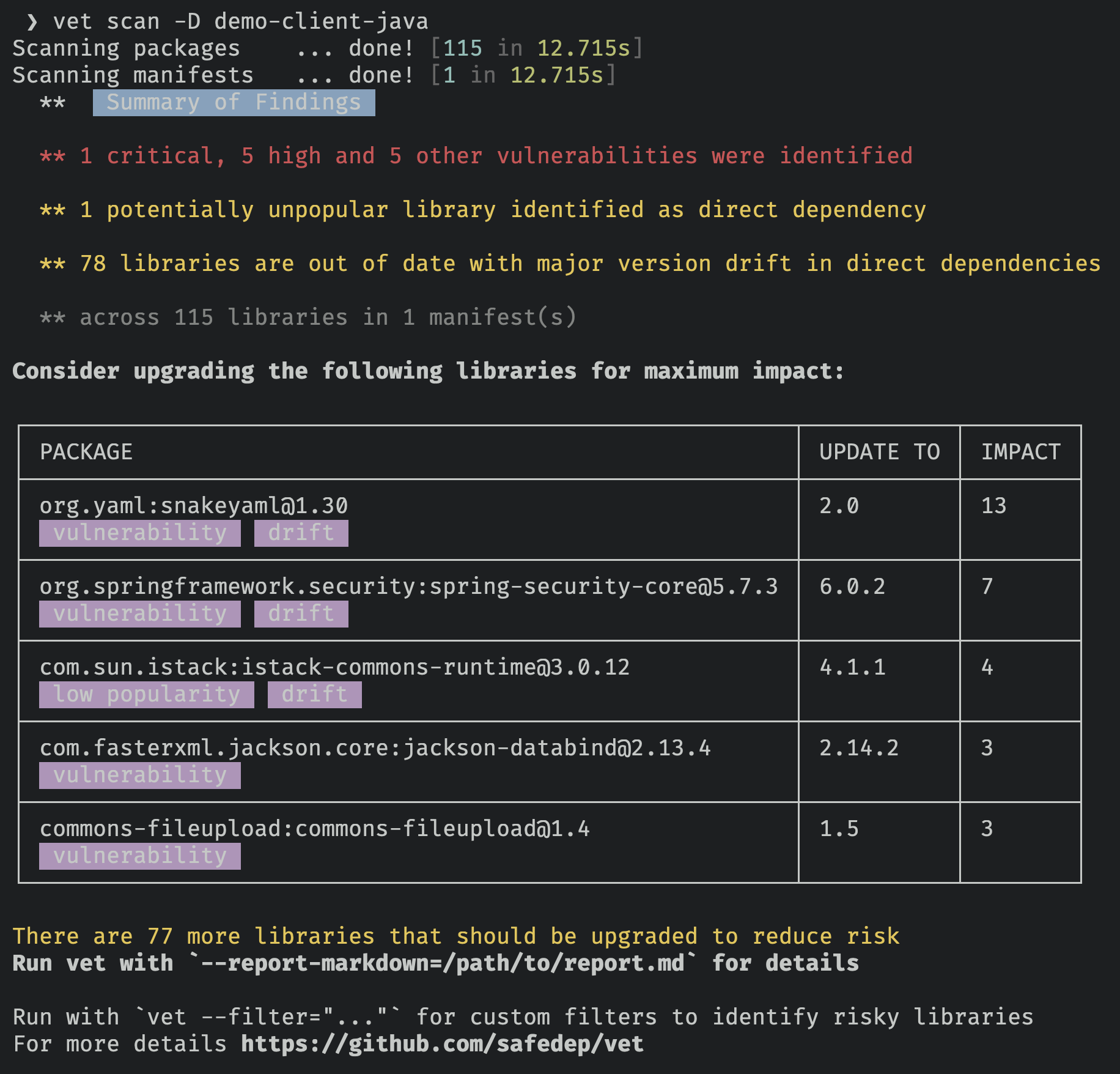
- Run
vetto identify open source risks by scanning your codebase
vet scan -D /path/to/repository
Scanning Specific Package Manifests
vet scan -M /path/to/pom.xml
vet scan -M /path/to/requirements.txt
vet scan -M /path/to/package-lock.json
Note: --lockfiles is generalized to -M or --manifests to support additional
types of package manifests or other artifacts in future.
Scanning Binary Artifacts
Scanning Java JAR files
- Scan a single JAR file
vet scan -M /path/to/app.jar
Suitable for scanning bootable JARs with embedded dependencies
- Scan a directory with JAR files
vet scan -D /path/to/jars --type jar
Scanning Python Wheels
vet scan -M /path/to/app.whl
Suitable for scanning Python wheels with embedded dependencies
Scanning SBOM
Scanning CycloneDX SBOMs
vet scan -M /path/to/cyclonedx-sbom.json --type bom-cyclonedx
Note: --type is a generalized version of --lockfile-as to support additional
artifact types in future.
Scanning SPDX SBOMs
vet scan -M /path/to/spdx-sbom.json --type bom-spdx
Note: SBOM scanning feature is currently in experimental stage
Scanning Github Repositories
Scanning Github Repositories
- Setup github access token to scan private repo
vet connect github
Alternatively, set GITHUB_TOKEN environment variable with Github PAT
- To scan remote Github repositories, including private ones
vet scan --github https://github.com/safedep/vet
Note: You may need to enable Dependency Graph at repository or organization level for Github repository scanning to work.
Scanning Github Organization
Scanning Github Organizations
You must setup the required access for scanning private repositories before scanning organizations
vet scan --github-org https://github.com/safedep
Note:
vetwill block and wait if it encounters Github secondary rate limit.
Other scanning options
List supported package manifest parsers
- List supported package manifest parsers including experimental modules
vet scan parsers --experimental
Policy as Code
vet uses Common Expressions Language
(CEL) as the policy language. Policies can be defined to build guardrails
preventing introduction of insecure components.
Vulnerability
- Run
vetand fail if a critical or high vulnerability was detected
vet scan -D /path/to/code \
    --filter 'vulns.critical.exists(p, true) || vulns.high.exists(p, true)' \
    --filter-fail
License
- Run
vetand fail if a package with a specific license was detected
vet scan -D /path/to/code \
    --filter 'licenses.exists(p, "GPL-2.0")' \
    --filter-fail
Note: Using licenses.contains_license(...) is recommended for license matching due
to its support for SPDX expressions.
vetsupports SPDX License Expressions at package license and policy level
vet scan -D /path/to/code \
    --filter 'licenses.contains_license("LGPL-2.1+")' \
    --filter-fail
Scorecard
Run vet and fail based on OpenSSF Scorecard attributes
vet scan -D /path/to/code \
    --filter 'scorecard.scores.Maintained == 0' \
    --filter-fail
For more examples, refer to documentation
Query Mode
Query mode helps querying the data gathered by vet multiple times without running the scan again.
Run scan and dump internal data structures to a file for further querying
vet scan -D /path/to/code --json-dump-dir /path/to/dump
Filter results using query command
vet query --from /path/to/dump \
    --filter 'vulns.critical.exists(p, true) || vulns.high.exists(p, true)'
Generate report from dumped data
vet query --from /path/to/dump --report-json /path/to/report.json
Reporting
vet supports generating reports in multiple formats during scan or query
execution.
| Format | Description |
|---|---|
| Markdown | Human readable report for vulnerabilities, licenses, and more |
| CSV | Export data to CSV format for manual slicing and dicing |
| JSON | Machine readable JSON format following internal schema (maximum data) |
| SARIF | Useful for integration with Github Code Scanning and other tools |
| Graph | Dependency graph in DOT format for risk and package relationship visualization |
| CycloneDX | Software Bill of Materials (SBOM) in CycloneDX format |
| Summary | Default console report with summary of vulnerabilities, licenses, and more |
CI/CD Integration
📦 GitHub Action
vetis available as a GitHub Action, refer to vet-action
🚀 GitLab CI
vetcan be integrated with GitLab CI, refer to vet CI Component
🐙 Malicious Package Analysis
vet supports scanning for malicious packages using SafeDep Cloud API
which requires an API key.
- To setup an API key for malicious package scanning
vet cloud quickstart
- Run a scan and check for malicious packages
vet scan -D /path/to/code --malware
Note: vet will submit identified packages to SafeDep Cloud for analysis and wait
for a timeout period for response. Not all package analysis may be completed
within the timeout period. However, subsequent scans will fetch the results if
available and lead to increased coverage over time. Adjust the timeout using
--malware-analysis-timeout flag.
Scanning Visual Studio Code Extensions
- Auto-discover and scan Visual Studio Code extensions in the local system
vet scan --vsx --malware
Scanning GitHub Actions
- Scan a single GitHub Actions workflow using
inspectcommand
vet inspect malware --purl pkg:github/safedep/vet-action@v1
- Scan all GitHub Actions workflows in a repository
vet scan -D .github/workflows --malware
- The same convention can be used to inspect any GitHub repository reference
vet inspect malware --purl pkg:github/safedep/vet@v1.9.5
Note: vet will resolve the commit hash for the given version and use it for malware analysis.
This is because GitHub repository tags are mutable and can be changed.
🔍 Malicious Package Query
If active analysis is not enabled using vet scan --malware flag, vet will fallback to query known
malicious packages data from community instance of Malysis service.
🛠️ Advanced Usage
📖 Documentation
-
Try out the interactive tutorial to get started with
vet -
Refer to https://safedep.io/docs for the detailed documentation

📊 Telemetry
vet collects anonymous telemetry to help us understand how it is used and
improve the product. To disable telemetry, set VET_DISABLE_TELEMETRY environment
variable to true.
export VET_DISABLE_TELEMETRY=true
🎊 Community
First of all, thank you so much for showing interest in vet, we appreciate it ❤️
- Join the Discord server using the link - https://rebrand.ly/safedep-community
💻 Development
Refer to CONTRIBUTING.md
Support
SafeDep provides enterprise support for vet
deployments. Check out SafeDep Cloud for large scale
deployment and management of vet in your organization.
🌟 Star History
🔖 References
- https://github.com/google/osv-scanner
- https://github.com/anchore/syft
- https://deps.dev/
- https://securityscorecards.dev/
- https://slsa.dev/
