
🙌 Refer to https://safedep.io/docs for the documentation 📖






Automate Open Source Package Vetting in CI/CD
vet is a tool for identifying risks in open source software supply chain. It
goes beyond just vulnerabilities and provides visibility on OSS package risks
due to it's license, popularity, security hygiene, and more. vet is designed
with the goal of enabling trusted OSS package consumption by integrating with
CI/CD and policy as code as guardrails.
- 🔥 vet in action
- Getting Started
- Policy as Code
- CI/CD Integration
- 🛠️ Advanced Usage
- 📖 Documentation
- 🎊 Community
- 💻 Development
- Star History
- 🔖 References
🔥 vet in action

Getting Started
-
Download the binary file for your operating system / architecture from the Official GitHub Releases
-
You can also install
vetusing homebrew in MacOS and Linux
brew tap safedep/tap
brew install safedep/tap/vet
- Alternatively, build from source
Ensure $(go env GOPATH)/bin is in your $PATH
go install github.com/safedep/vet@latest
- Also available as a container image
docker run --rm -it ghcr.io/safedep/vet:latest version
Note: Container image is built for x86_64 Linux only. Use a pre-built binary or build from source for other platforms.
Running Scan
- Run
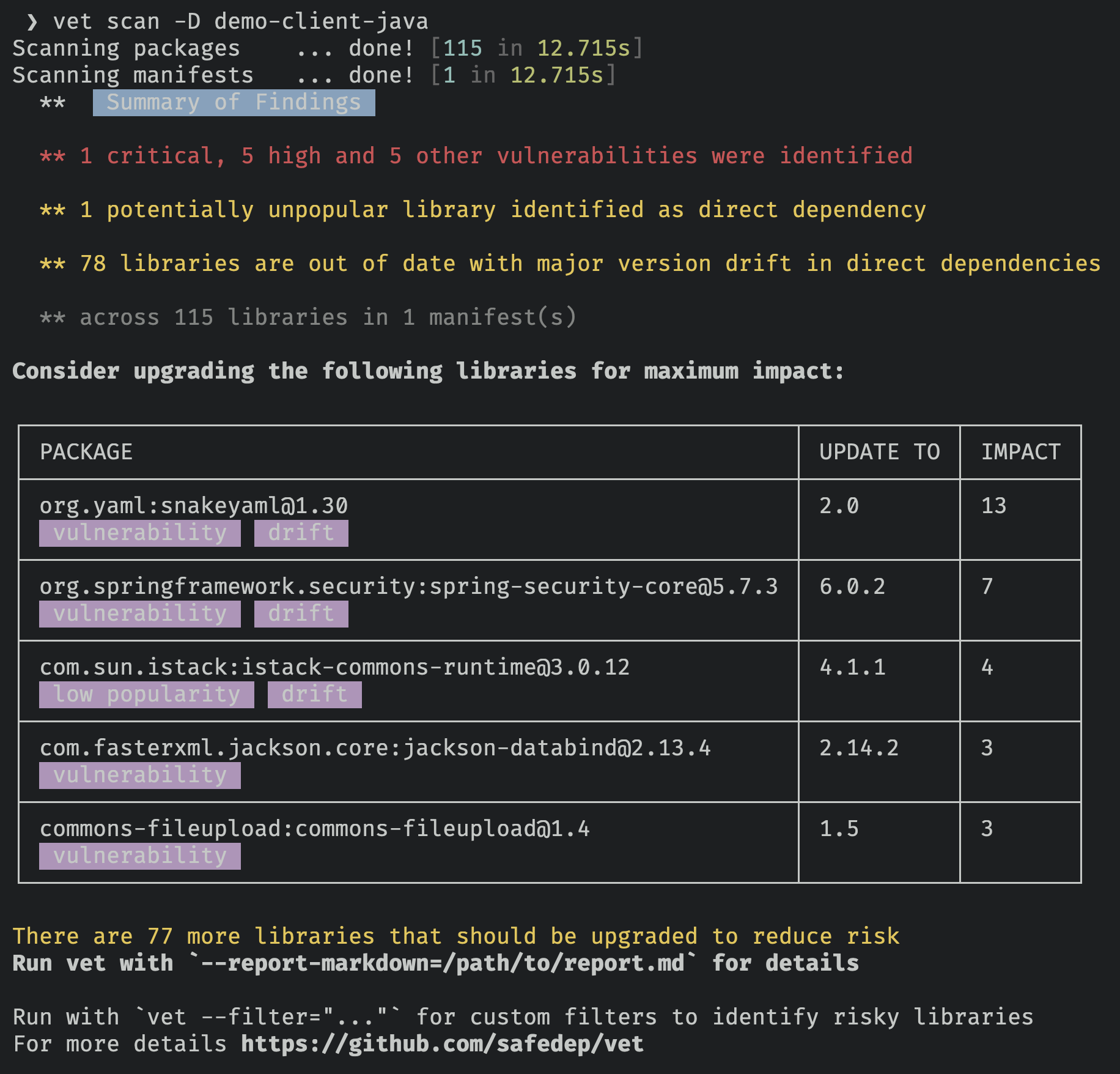
vetto identify risks by scanning a directory
vet scan -D /path/to/repository
- Run
vetto scan specific (supported) package manifests
vet scan --lockfiles /path/to/pom.xml
vet scan --lockfiles /path/to/requirements.txt
vet scan --lockfiles /path/to/package-lock.json
Scanning SBOM
- Scan an SBOM in CycloneDX format
vet scan --lockfiles /path/to/cyclonedx-sbom.json --lockfile-as bom-cyclonedx
- Scan an SBOM in SPDX format
vet scan --lockfiles /path/to/spdx-sbom.json --lockfile-as bom-spdx
Note: SBOM scanning feature is currently in experimental stage
Scanning Github Repositories
- Setup github access token to scan private repo
vet connect github
Alternatively, set GITHUB_TOKEN environment variable with Github PAT
- To scan remote Github repositories, including private ones
vet scan --github https://github.com/safedep/vet
Note: You may need to enable Dependency Graph at repository or organization level for Github repository scanning to work.
Scanning Github Organization
You must setup the required access for scanning private repositories before scanning organizations
vet scan --github-org https://github.com/safedep
Note:
vetwill block and wait if it encounters Github secondary rate limit.
Scanning Package URL
- To scan a purl
vet scan --purl pkg:/gem/nokogiri@1.10.4
Available Parsers
- List supported package manifest parsers including experimental modules
vet scan parsers --experimental
Policy as Code
vet uses Common Expressions Language
(CEL) as the policy language. Policies can be defined to build guardrails
preventing introduction of insecure components.
- Run
vetand fail if a critical or high vulnerability was detected
vet scan -D /path/to/code \
    --filter 'vulns.critical.exists(p, true) || vulns.high.exists(p, true)' \
    --filter-fail
- Run
vetand fail if a package with a specific license was detected
vet scan -D /path/to/code \
    --filter 'licenses.exists(p, p == "GPL-2.0")' \
    --filter-fail
- Run
vetand fail based on OpenSSF Scorecard attributes
vet scan -D /path/to/code \
    --filter 'scorecard.scores.Maintained == 0' \
    --filter-fail
For more examples, refer to documentation
CI/CD Integration
📦 GitHub Action
vetis available as a GitHub Action, refer to vet-action
🚀 GitLab CI
vetcan be integrated with GitLab CI, refer to vet-gitlab-ci
🛠️ Advanced Usage
📖 Documentation
- Refer to https://safedep.io/docs for the detailed documentation

🎊 Community
First of all, thank you so much for showing interest in vet, we appreciate it ❤️
- Join the Discord server using the link - https://rebrand.ly/safedep-community
💻 Development
Refer to CONTRIBUTING.md