The `DECAC` (Assign Colors) escape sequence controls which color table
entries are associated with the default foreground and background
colors. This is how you would change the default colors on the the
original DEC VT525 terminals.
But `DECAC` also allows you to assign the color table entries for the
"window frame", which in our case is mapped to the tab color (just the
background for now). So this now gives us a way to control the tab color
via an escape sequence as well.
DETAILS
-------
The way this works is there are now two new entries in the color table
for the frame colors, and two new aliases in the color alias table that
are mapped to those color table entries. As previously mentioned, only
the background is used for now.
By default, the colors are set to `INVALID_COLOR`, which indicates that
the system colors should be used. But if the user has set a `tabColor`
property in their profile, the frame background will be initialized with
that value instead.
And note that some of the existing color table entries are now
renumbered for compatibility with XTerm, which uses entries 256 to 260
for special colors which we don't yet support. Our default colors are
now at 261 and 262, the frame colors are 263 and 264, and the cursor
color is 265.
So at runtime, you can change the tab color programmatically by setting
the color table entry at index 262 using `OSC 4` (assuming you need a
specific RGB value). Otherwise if you just want to set the tab color to
an existing color index, you can use `DECAC 2`.
You can even make the tab color automatically match background color by
mapping the frame background alias to the color table entry for the
default background, using `DECAC 2;261;262` (technically this is mapping
both the the foreground and background).
This PR doesn't include support for querying the color mapping with
`DECRQSS`, and doesn't support resetting the colors with `RIS`, but
hopefully those can be figured out in a future PR - there are some
complications that'll need to be resolved first.
## Validation Steps Performed
I've added a basic unit test that confirms the `DECAC` escape sequence
updates the color aliases in the render settings as expected. I've also
manually confirmed that the tab color in Windows Terminal is updated by
`DECAC 2`, and the default colors are updated in both conhost and WT
using `DECAC 1`.
Closes#6574
Adds the `selectAll` action which can be used to select all text in the buffer (regardless of whether a selection is present).
## References
#3663 - Mark Mode
#4993 - [Scenario] Keyboard selection
## PR Checklist
* [x] Closes#1469
* [x] Tests added/passed
## Detailed Description of the Pull Request / Additional comments
I've made it such that selecting the "entire buffer" really just selects up to the mutable viewport. This seems like a nice QOL improvement since there's generally nothing past that.
When the user selects all, the viewport does not move. This is consistent with CMD behavior and is intended to allow the user to not lose context when selecting everything.
A minor change had to be made to the DxRenderer because this uncovered an underflow issue. Basically, the selection rects were handed to the DxEngine relative to the viewport (which means that some had a negative y-value). At some point, those rects were stored into `size_t`s, resulting in an underflow issue. This caused the renderer to behave strangely when rendering the selection. Generally, these kinds of issues weren't really noticed because selection would always modify a portion of the viewport.
Funny enough, in a way, this satisfies the "mark mode" scenario because the user now has a way to initiate a selection using only the keyboard. Though this isn't ideal, just a fun thing to point out (that's why I'm not closing the mark mode issue).
## Validation Steps Performed
- Verified using DxEngine and AtlasEngine
- select all --> keyboard selection --> start moving the top-left endpoint (and scroll to there)
- select all --> do not scroll automatically
## Summary of the Pull Request
This PR replaces the `TerminalDispatch` class with the `AdaptDispatch` class from conhost, so we're no longer duplicating the VT functionality in two places. It also gives us a more complete VT implementation on the Terminal side, so it should work better in pass-through mode.
## References
This is essentially part two of PR #12703.
## PR Checklist
* [x] Closes#3849
* [x] CLA signed.
* [ ] Tests added/passed
* [ ] Documentation updated.
* [ ] Schema updated.
* [x] I've discussed this with core contributors already. Issue number where discussion took place: #12662
## Detailed Description of the Pull Request / Additional comments
The first thing was to give the `ConGetSet` interface a new name, since it's now no longer specific to conhost. I went with `ITerminalApi`, since that was the equivalent interface on the terminal side, and it still seemed like a generic enough name. I also changed the way the api is managed by the `AdaptDispatch` class, so it's now stored as a reference rather than a `unique_ptr`, which more closely matches the way the `TerminalDispatch` class worked.
I then had to make sure that `AdaptDispatch` actually included all of the functionality currently in `TerminalDispatch`. That meant copying across the code for bracketed paste mode, the copy to clipboard operation, and the various ConEmu OSC operations. This also required a few new methods to the `ConGetSet`/`ITerminalApi` interface, but for now these are just stubs in conhost.
Then there were a few thing in the api interface that needed cleaning up. The `ReparentWindow` method doesn't belong there, so I've moved that into `PtySignalInputThread` class. And the `WriteInput` method was too low-level for the Terminal requirements, so I've replaced that with a `ReturnResponse` method which takes a `wstring_view`.
It was then a matter of getting the `Terminal` class to implement all the methods in the new `ITerminalApi` interface that it didn't already have. This was mostly mapping to existing functionality, but there are still a number of methods that I've had to leave as stubs for now. However, what we have is still good enough that I could then nuke the `TerminalDispatch` class from the Terminal code and replace it with `AdaptDispatch`.
One oddity that came up in testing, though, was the `AdaptDispatch` implementation of `EraseAll` would push a blank line into the scrollback when called on an empty buffer, whereas the previous terminal implementation did not. That caused problems for the conpty connection, because one of the first things it does on startup is send an `ED 2` sequence. I've now updated the `AdaptDispatch` implementation to match the behavior of the terminal implementation in that regard.
Another problem was that the terminal implementation of the color table commands had special handling for the background color to notify the application window that it needed to repaint the background. I didn't want to have to push the color table operations through the `ITerminalApi` interface, so I've instead moved the handling of the background update into the renderer, initiated by a flag on the `TriggerRefreshAll` method.
## Validation Steps Performed
Surprisingly this PR didn't require a lot of changes to get the unit tests working again. There were just a few methods used from the original `ITerminalApi` that have now been removed, and which needed an equivalent replacement. Also the updated behavior of the `EraseAll` method in conhost resulted in a change to the expected cursor position in one of the screen buffer tests.
In terms of manual testing, I've tried out all the different shells in Windows Terminal to make sure there wasn't anything obviously wrong. And I've run a bunch of the tests from _vttest_ to try and get a wider coverage of the VT functionality, and confirmed everything still works at least as well as it used to. I've also run some of my own tests to verify the operations that had to be copied from `TerminalDispatch` to `AdaptDispatch`.
Propagate show/hide window calls against the ConPTY pseudo window to the Terminal
## PR Checklist
* [x] Closes#12570
* [x] I work here
* [x] Manual Tests passed
* [x] Spec Link: →[Doc Link](https://github.com/microsoft/terminal/blob/dev/miniksa/msgs/doc/specs/%2312570%20-%20Show%20Hide%20operations%20on%20GetConsoleWindow%20via%20PTY.md)←
## Detailed Description of the Pull Request / Additional comments
- See the spec. It's pretty much everything I went through deciding on this.
## Validation Steps Performed
- [x] Manual validation against scratch application calling all of the `::ShowWindow` commands against the pseudo console "fake window" and observing the real terminal window state
<!-- Enter a brief description/summary of your PR here. What does it fix/what does it change/how was it tested (even manually, if necessary)? -->
## Summary of the Pull Request
Fixes#6028
Setting is "experimental.useBackgroundImageForWindow"
<!-- Other than the issue solved, is this relevant to any other issues/existing PRs? -->
## References
https://github.com/microsoft/terminal/issues/6028
<!-- Please review the items on the PR checklist before submitting-->
## PR Checklist
* [X] Closes#6028
* [X] CLA signed.
* [ ] Tests added/passed
* [ ] Documentation updated. I read CONTRIBUTING.md, but I'm not sure if a spec is needed for an experimental feature such as this one.
* [ ] Schema updated. I added a JSON key, not sure where I need to update it.
* [X] I've discussed this with core contributors already. Somewhat discussed in https://github.com/microsoft/terminal/issues/6028
<!-- Provide a more detailed description of the PR, other things fixed or any additional comments/features here
## Detailed Description of the Pull Request / Additional comments -->
<!-- Describe how you validated the behavior. Add automated tests wherever possible, but list manual validation steps taken as well -->
## Validation Steps Performed
Set ` "experimental.useBackgroundImageForWindow": true` and a bg image for one profile, then make splits and tabs and make sure the bg updates accordingly:

I also did the same with the setting off to make sure it still works correctly and didn't break. And I made sure opening the settings tab does not crash or show the bg image.
#4015 requires sweeping changes in order to allow a migration of our buffer
coordinates from `int16_t` to `int32_t`. This commit reduces the size of
future commits by using type inference wherever possible, dropping the
need to manually adjust types throughout the project later.

As an added bonus this commit standardizes the alignment of cv qualifiers
to be always left of the type (e.g. `const T&` instead of `T const&`).

The migration to type inference with `auto` was mostly done
using JetBrains Resharper with some manual intervention and the
standardization of cv qualifier alignment using clang-format 14.

## References

This is preparation work for #4015.

## Validation Steps Performed
* Tests pass ✅
Further builds on #12799. #12799 assumes that the connection is prepared to receive FocusIn/FocusOut events as input. For ConPTY we can be relatively sure of that, but that's not _technically_ correct. In the hypothetical world where the connection is not a ConPTY connection, then the other side might not be expecting those sequences.
This remedies the issue by
* ConPTY will always request focus event mode (from the terminal) when it starts up
* when a client tries to disable focus events in conpty, conpty is gonna note that internally, but never transmit that to the hosting terminal, to leave the terminal in focus event mode.
* `TerminalDispatch` and `ControlCore` are hooked up now to only send focus events when the Terminal is in focus event mode (which will be always for conpty)
* At this point, it was like, 4LOC in `terminalInput.cpp` to add support for focus events to conhost as well.
## checklist
* [x] closes#11682
* This combined with #12515 will finally close out #2988 as well, but we can do that manually.
* [x] I work here
* [ ] There aren't tests for this. There probably should be.
## Window shenanigans, part the third:

Hooks the Terminal's focus state up to the underlying ConPTY. This is LOAD BEARING for allowing windows created by console applications to bring themselves to the foreground.

We're using the [FocusIn/FocusOut](https://invisible-island.net/xterm/ctlseqs/ctlseqs.html#h3-FocusIn_FocusOut) sequences to communicate to ConPTY when a control gains/loses focus. Theoretically, other terminals could do this as well.

## References

#11682 tracks _real_ support for this sequence in Console & conpty. When we do that, we should consider even if a client application disables this mode, the Terminal & conpty should always request this from the hosting terminal (and just ignore internally to ConPTY).

See also #12515, #12526, which are the other two parts of this effort. This was tested with all three merged together, and they worked beautifully for all our scenarios. They are kept separate for ease of review.

## PR Checklist
* [x] This is prototype 3 for #2988
* [x] I work here
* [ ] Tests added/passed
* [n/a] Requires documentation to be updated

## Detailed Description of the Pull Request / Additional comments

This allows windows spawned by console processes to bring themselves to the foreground _when the console is focused_. (Historically, this is also called in the WndProc, when focus changes).

Notably, before this, ConPTY was _never_ focused, so windows could never bring themselves to the foreground when run from a ConPTY console. We're not blanket granting the SetForeground right to all console apps when run in ConPTY. It's the responsibility of the hosting terminal emulator to always tell ConPTY when a particular instance is focused.

## Validation Steps Performed

(gif below)
"Alternate scroll mode" is a neat little mode where the app wants mouse wheel events to come through as arrow keypresses instead, when in the alternate buffer. Now that we've got support for the alt buffer in the Terminal, we can support this as well.

* [x] Closes https://github.com/microsoft/terminal/issues/3321
* [x] I work here
* [ ] Tests would be nice

Tested manually with

```bash
printf "\e[?1007h" ; man ps
```
## Window shenanigans, part the first:

This PR enables terminals to tell ConPTY what the owning window for the
pseudo window should be. This allows thigs like MessageBoxes created by
console applications to work. It also enables console apps to use
`GetAncestor(GetConsoleWindow(), GA_ROOT)`  to get directly at the HWND
of the Terminal (but _don't please_).

This is tested with our internal partners and seems to work for their
scenario.

See #2988, #12799, #12515, #12570.

## PR Checklist
This is 1/3 of #2988.
Make a VTApiRoutines servicer that does minimal translations instead of
environmental simulation for some output methods. Remaining methods are
backed on the existing console host infrastructure (primarily input
related methods).

## PR Checklist
* [x] I work here
* [x] It's Fix-Hack-Learn quality so it's behind a feature gate so we
  can keep refining it. But it's a start!

To turn this on, you will have to be in the Dev or Preview rings
(feature staged).  Then add `experimental.connection.passthroughMode:
true` to a profile and on the next launch, the flags will propagate down
through the `ConptyConnection` into the underlying `Openconsole.exe`
startup and tell it to use the passthrough mode instead of the full
simulation mode.

## Validation Steps Performed
- Played with it manually in CMD.exe, it seems to work mostly.
- Played with it manually in Ubuntu WSL, it seems to work.
- Played with it manually in Powershell and it's mostly sad. It'll get
  there.

Starts #1173
Previously we would only call `SetWindowSize` and `TriggerRedrawAll` if the
viewport size in characters changed. This commit removes the limitation.
Since the if-condition limiting full redraws is now gone, this commit
moves the responsibility of limiting the calls up the call chain.
With `_refreshSizeUnderLock` now being a heavier function call
than before, some surrounding code was thus refactored.
## PR Checklist
* [x] Closes#11317
* [x] I work here
* [x] Tests added/passed
## Validation Steps Performed
Test relevant for #11317:
* Print text, filling the entire window
* Move the window from a 150% scale to a 300% scale monitor
* The application works as expected ✅
Regression tests:
* Text zoom with Ctrl+Plus/Minus/0 works as before ✅
* Resizing a window works as before ✅
* No deadlocks, etc. during settings updates ✅
## Summary of the Pull Request
The purpose of the `IRenderTarget` interface was to support the concept
of multiple buffers in conhost. When a text buffer needed to trigger a
redraw, the render target implementation would be responsible for
deciding whether to forward that redraw to the renderer, depending on
whether the buffer was active or not.
This PR instead introduces a flag in the `TextBuffer` class to track
whether it is active or not, and it can then simply check the flag to
decide whether it needs to trigger a redraw or not. That way it can work
with the `Renderer` directly, and we can avoid a bunch of virtual calls
for the various redraw methods.
## PR Checklist
* [x] Closes#12551
* [x] CLA signed.
* [ ] Tests added/passed
* [ ] Documentation updated.
* [ ] Schema updated.
* [x] I've discussed this with core contributors already. Issue number
where discussion took place: #12551
## Detailed Description of the Pull Request / Additional comments
Anywhere that had previously been getting an `IRenderTarget` from the
`TextBuffer` class in order to trigger a redraw, will now just call the
`TriggerRedraw` method on the `TextBuffer` class itself, since that will
handle the active check which used to be the responsibility of the
render target. All the redraw methods that were in `IRenderTarget` are
now exposed in `TextBuffer` instead.
For this to work, though, the `Renderer` needed to be available before
the `TextBuffer` could be constructed, which required a change in the
conhost initialization order. In the `ConsoleInitializeConnectInfo`
function, I had to move the `Renderer` initialization up so it could be
constructed before the call to `SetUpConsole` (which initializes the
buffer). Once both are ready, the `Renderer::EnablePainting` method is
called to start the render thread.
The other catch is that the renderer used to setup its initial viewport
in the constructor, but with the new initialization order, the viewport
size would not be known at that point. I've addressed that problem by
moving the viewport initialization into the `EnablePainting` method,
since that will only be called after the buffer is setup.
## Validation Steps Performed
The changes in architecture required a number of tweaks to the unit
tests. Some were using a dummy `IRenderTarget` implementation which now
needed to be replaced with a full `Renderer` (albeit with mostly null
parameters). In the case of the scroll test, a mock `IRenderTarget` was
used to track the scroll delta, which now had to be replaced with a mock
`RenderEngine` instead.
Some tests previously relied on having just a `TextBuffer` but without a
`Renderer`, and now they require both. And tests that were constructing
the `TextBuffer` and `Renderer` themselves had to be updated to use the
new initialization order, i.e. with the renderer constructed first.
Semantically, though, the tests still essentially work the same way as
they did before, and they all still pass.
When the dpi is changed, call `updateFont()` instead of `TriggerFontChange`, this
means that we continue to use the existing font features/axes
Closes#11287
Basically, this is the same as #12266, but for the `SearchBoxControl`. Trickily, the ControlCore is the one that knows if there were search results, but the TermControl has to be the one to announce it.

* [x] Will take care of #11973 once a11y team confirms
* [x] Tested manually with Narrator
* [x] Resolves a part of #6319, which I'm repurposing just to displaying the number of results in general.
* See also #3920
Since `AtlasEngine` prefers drawing without alpha for performance reasons,
calls to `EnableTransparentBackground` require a draw cycle.
This PR makes `Renderer::_NotifyPaintFrame` public and calls it.

Related to #9999.

## PR Checklist
* [x] I work here
* [x] Tests added/passed

## Validation Steps Performed

* Open Windows Terminal command palette
* Choose "Set background opacity..."
* Cycling through the items without selecting one
  changes background opacity immediately ✅
This commit correctly restores the previous opacity when the command palette
preview is cancelled. It includes an additional change in order to make the
`AdjustOpacity` setter consistent and symmetric with the `Opacity` getter.
## PR Checklist
* [x] Closes#12228
* [x] I work here
* [x] Tests added/passed
## Validation Steps Performed
* Open Windows Terminal command palette
* Choose "Set background opacity..."
* Cycle through the items without selecting one
* Press Escape
* Previous opacity is restored ✅
## Summary of the Pull Request
This PR moves the color table and related render settings, which are common to both conhost and Windows Terminal, into a shared class that can be accessed directly from the renderer. This avoids the overhead of having to look up these properties via the `IRenderData` interface, which relies on inefficient virtual function calls.
This also introduces the concept of color aliases, which determine the position in the color table that colors like the default foreground and background are stored. This allows the option of mapping them to one of the standard 16 colors, or to have their own separate table entries.
## References
This is a continuation of the color table refactoring started in #11602 and #11784. The color alias functionality is a prerequisite for supporting a default bold color as proposed in #11939. The color aliases could also be a way for us to replace the PowerShell color quirk for #6807.
## PR Checklist
* [x] Closes#12002
* [x] CLA signed.
* [ ] Tests added/passed
* [ ] Documentation updated.
* [ ] Schema updated.
* [ ] I've discussed this with core contributors already. If not checked, I'm ready to accept this work might be rejected in favor of a different grand plan. Issue number where discussion took place: #xxx
## Detailed Description of the Pull Request / Additional comments
In addition to the color table, this new `RenderSettings` class manages the blinking state, the code for adjusting indistinguishable colors, and various boolean properties used in the color calculations. These boolean properties are now stored in a `til::enumset` so they can all be managed through a single `SetRenderMode` API, and easily extended with additional modes that we're likely to need in the future.
In Windows Terminal we have an instance of `RenderSettings` stored in the `Terminal` class, and in conhost it's stored in the `Settings` class. In both cases, a reference to this class is passed to the `Renderer` constructor, so it now has direct access to that data. The renderer can then pass that reference to the render engines where it's needed in the `UpdateDrawingBrushes` method.
This means the renderer no longer needs the `IRenderData` interface to access the `GetAttributeColors`, `GetCursorColor`, or `IsScreenReversed` methods, so those have now been removed. We still need access to `GetAttributeColors` in certain accessibility code, though, so I've kept that method in the `IUIAData` interface, but the implementation just forwards to the `RenderSettings` class.
The implementation of the `RenderSettings::GetAttributeColors` method is loosely based on the original `Terminal` code, only the `CalculateRgbColors` call has now been incorporated directly into the code. This let us deduplicate some bits that were previously repeated in the section for adjusting indistinguishable colors. The last steps, where we calculate the alpha components, have now been split in to a separate `GetAttributeColorsWithAlpha` method, since that's typically not needed.
## Validation Steps Performed
There were quite a lot changes needed in the unit tests, but they're mostly straightforward replacements of one method call with another.
In the `TextAttributeTests`, where we were previously testing the `CalculateRgbColors` method, we're now running those tests though `RenderSettings::GetAttributeColors`, which incorporates the same functionality. The only complication is when testing the `IntenseIsBright` option, that needs to be set with an additional `SetRenderMode` call where previously it was just a parameter on `CalculateRgbColors`.
In the `ScreenBufferTests` and `TextBufferTests`, calls to `LookupAttributeColors` have again been replaced by the `RenderSettings::GetAttributeColors` method, which serves the same purpose, and calls to `IsScreenReversed` have been replaced with an appropriate `GetRenderMode` call. In the `VtRendererTests`, all the calls to `UpdateDrawingBrushes` now just need to be passed a reference to a `RenderSettings` instance.
This commit makes the following changes to `til::point/size/rectangle`
for the following reasons:
* Rename `rectangle` into `rect`
  This will make the naming consistent with a later `small_rect` struct
  as well as the existing Win32 POINT/SIZE/RECT structs.
* Standardizes til wrappers on `int32_t` instead of `ptrdiff_t`
  Provides a consistent behavior between x86 and x64, preventing accidental
  errors on x86, as it's less rigorously tested than x64. Additionally it
  improves interop with MIDL3 which only supports fixed width integer types.
* Standardizes til wrappers on throwing `gsl::narrow_error`
  Makes the behavior of our code more consistent.
* Makes all eligible functions `constexpr`
  Because why not.
* Removes implicit constructors and conversion operators
  This is a complex and controversial topic. My reasons are: You can't Ctrl+F
  for an implicit conversion. This breaks most non-IDE engines, like the one on
  GitHub or those we have internally at MS. This is important for me as these
  implicit conversion operators aren't cost free. Narrowing integers itself,
  as well as the boundary checks that need to be done have a certain,
  fixed overhead each time. Additionally the lack of noexcept prevents
  many advanced compiler optimizations. Removing their use entirely
  drops conhost's code segment size by around ~6.5%.

## References

Preliminary work for #4015.

## PR Checklist
* [x] I work here
* [x] Tests added/passed

## Validation Steps Performed
I'm mostly relying on our unit tests here. Both OpenConsole and WT appear to work fine.
Adds an action which can be used to change the opacity at runtime. This is a follow up to some of the other work I had been doing around opacity and settings previewing at the end of the year.
> edit: pseudo-spec
>
> * `adjustOpacity`:
> * `"opacity"`: (**required**) an integer number to set the opacity to.
> * `"relative"`: (defaults to `true`)
> * If false, set the opacity to the given value, which should be between [0, 100].
> * If true, then use `opacity` as a relative adjustment to the current opacity. So the implementation would get the current opacity for this pane, then add this action's opacity to that value. Should be between [-100, 100]
>
> This would allow both setting exactly 25% opacity with an action, and binding an action that increases/decreases the opacity one {amount}
It's preview-able too, which is neat.

* [x] Closes#11205
* [x] I work here
* [x] Docs updated: https://github.com/MicrosoftDocs/terminal/pull/477
When copying content from the terminal to the clipboard (with
formatting), a default background color needs to be set to fill the
unused area of the pasted block. Prior to this PR, that color was not
correctly set, so the pasted content did not match what was seen on
screen.
Windows Terminal previously used the default background from the initial
color scheme, so it didn't take palette changes into account.
OpenConsole did use the active default color, but didn't take the
reverse screen mode into account, so could end up using the foreground
rather than the background color.
In both case I've changed the code to lookup the runtime colors in the
same way that renderer does, so they should now match what is seen on
screen.
## Validation Steps Performed
I've manually confirmed that the background color is now correctly set
when copying from both Windows Terminal and OpenConsole.
Closes#11988
This PR attempts to minimize the amount of fiddling we do with the alpha
color components, by storing all colors with a zero alpha (the default
for `COLORREF` values) and then leaving it up to the renderer to adjust
the final alpha value as required (which it was already doing anyway).
This gets rid of the `argb.h` header file, which was originally being
used to produce `COLORREF` values with custom alpha components, and thus
is no longer required. Anywhere that was using the `ARGB` macro is now
using a standard `RGB` macro with a 0 alpha.
The `Utils::SetColorTableAlpha` method has also been removed, since that
was only really used to force an alpha of 255 on all the color table
entries, which isn't necessary.
There were also a number of places where we were using
`til::color::with_alpha`, to switch alpha components back and forth
between 0 and 255, which have now been removed. Some of these were
essentially noops, because the `til::color` class already applied the
appropriate alpha changes when converting from or to a `COLORREF`.
I've manually run a few attribute rendering tests to check that the
colors were still working correctly, and the default background color is
appropriately transparent when in acrylic mode.
Closes#11885
## Summary of the Pull Request
Currently, the TermControl and ControlCore recieve a settings object that implements `IControlSettings`. They use for this for both reading the settings they should use, and also storing some runtime overrides to those settings (namely, `Opacity`). The object they recieve currently is a `T.S.M.TerminalSettings` object, as well as another `TerminalSettings` object if the user wants to have an `unfocusedAppearance`. All these are all hosted in the same process, so everything is fine and dandy.
With the upcoming move to having the Terminal split into multiple processes, this will no longer work. If the `ControlCore` in the Content Process is given a pointer to a `TerminalSettings` in a certain Window Process, and that control is subsequently moved to another window, then there's no guarantee that the original `TerminalSettings` object continues to exist. In this scenario, when window 1 is closed, now the Core is unable to read any settings, because the process that owned that object no longer exists.
The solution to this issue is to have the `ControlCore`'s own their own copy of the settings they were created with. that way, they can be confident those settings will always exist. Enter `ControlSettings`, a dumb struct for just storing all the contents of the Settings. I used x-macros for this, so that we don't need to copy-paste into this file every time we add a setting.
Changing this has all sorts of other fallout effects:
* Previewing a scheme/anything is a tad bit more annoying. Before, we could just sneak the previewed scheme into a `TerminalSettings` that lived between the settings we created the control with, and the settings they were actually using, and it would _just work_. Even explaining that here, it sounds like magic, because it was. However, now, the TermControl can't use a layered `TerminalSettings` for the settings anymore. Now we need to actually read out the current color table, and set the whole scheme when we change it. So now there's also a `Microsoft.Terminal.Core.Scheme` _struct_ for holding that data.
- Why a `struct`? Because that will go across the process boundary as a blob, rather than as a pointer to an object in the other process. That way we can transit the whole struct from window to core safely.
* A TermControl doesn't have a `IControlSettings` at all anymore - it initalizes itself via the settings in the `Core`. This will be useful for tear-out, when we need to have the `TermControl` initialize itself from just a `ControlCore`, without being able to rebuild the settings from scratch.
* The `TabTests` that were written under the assumption that the Control had a layered `TerminalSettings` obviously broke, as they were designed to. They've been modified to reflect the new reality.
* When we initialize the Control, we give it the settings and the `UnfocusedAppearance` all at once. If we don't give it an `unfocusedAppearance`, it will just use the focused appearance as the unfocused appearance.
* The Control no longer can _write_ settings to the `ControlSettings`. We don't want to be storing things in there. Pretty much everything we set in the control, we store somewhere other than in the settings object itself. However, `opacity` and `useAcrylic`, we need to store in a handy new `RUNTIME_SETTING` property. We can write those runtime overrides to those properties.
* We no longer store the color scheme for a pane in the persisted state. I'm tracking that in #9800. I don't think it's too hard to add back, but I wanted this in front of eyes sooner than later.
## References
* #1256
* #5000
* #9794 has the scheme previewing in it.
* #9818 is WAY more possible now.
## PR Checklist
* [x] Surprisingly there wasn't ever a card or issue for this one. This was only ever a bullet point in #5000.
* A bunch of these issues were fixed along the way, though I never intended to fix them:
* [x] Closes#11571
* [x] Closes#11586
* [x] Closes#7219
* [x] Closes#11067
* [x] I think #11623 actually ended up resolving this one, but I'm double tapping on it here: Closes#5703
* [x] I work here
* [x] Tests added/passed
* [n/a] Requires documentation to be updated
## Detailed Description of the Pull Request / Additional comments
Along the way I tried to clean up code where possible, but not too agressively.
I didn't end up converting the various `MockTerminalSettings` classes used in tests to the x macros quite yet. I wanted to merge this with #11416 in `main` before I went too crazy.
## Validation Steps Performed
* [x] Scheme previewing works
* [x] Adjusting the font size works
* [x] focused/unfocused appearances still work
* [x] mouse-wheeling opacity still works
* [x] acrylic & cleartype still does the right thing
* [x] saving the settings still works
* [x] going wild on sliding the opacity slider in the settings doesn't crash the terminal
* [x] toggling retro effects with a keybinding still works
* [x] toggling retro effects with the command palette works
* [x] The matrix of (`useAcrylic(true,false)`)x(`opacity(50,100)`)x(`antialiasingMode(cleartype, grayscale)`) works as expected. Slightly changed, falls back to grayscale more often, but looks more right.
This PR merges the default colors and cursor color into the main color
table, enabling us to simplify the `ConGetSet` and `ITerminalApi`
interfaces, with just two methods required for getting and setting any
form of color palette entry.
The is a follow-up to the color table standardization in #11602, and a
another small step towards de-duplicating `AdaptDispatch` and
`TerminalDispatch` for issue #3849. It should also make it easier to
support color queries (#3718) and a configurable bold color (#5682) in
the future.
On the conhost side, default colors could originally be either indexed
positions in the 16-color table, or separate standalone RGB values. With
the new system, the default colors will always be in the color table, so
we just need to track their index positions.
To make this work, those positions need to be calculated at startup
based on the loaded registry/shortcut settings, and updated when
settings are changed (this is handled in
`CalculateDefaultColorIndices`). But the plus side is that it's now much
easier to lookup the default color values for rendering.
For now the default colors in Windows Terminal use hardcoded positions,
because it doesn't need indexed default colors like conhost. But in the
future I'd like to extend the index handling to both terminals, so we
can eventually support the VT525 indexed color operations.
As for the cursor color, that was previously stored in the `Cursor`
class, which meant that it needed to be copied around in various places
where cursors were being instantiated. Now that it's managed separately
in the color table, a lot of that code is no longer required.
## Validation
Some of the unit test initialization code needed to be updated to setup
the color table and default index values as required for the new system.
There were also some adjustments needed to account for API changes, in
particular for methods that now take index values for the default colors
in place of COLORREFs. But for the most part, the essential behavior of
the tests remains unchanged.
I've also run a variety of manual tests looking at the legacy console
APIs as well as the various VT color sequences, and checking that
everything works as expected when color schemes are changed, both in
Windows Terminal and conhost, and in the latter case with both indexed
colors and RGB values.
Closes#11768
This commit introduces "AtlasEngine", a new text renderer based on DxEngine.
But unlike it, DirectWrite and Direct2D are only used to rasterize glyphs.
Blending and placing these glyphs into the target view is being done using
Direct3D and a simple HLSL shader. Since this new renderer more aggressively
assumes that the text is monospace, it simplifies the implementation:
The viewport is divided into cells, and its data is stored as a simple matrix.
Modifications to this matrix involve only simple pointer arithmetic and is easy
to understand. But just like with DxEngine however, DirectWrite
related code remains extremely complex and hard to understand.

Supported features:
* Basic text rendering with grayscale AA
* Foreground and background colors
* Emojis, including zero width joiners
* Underline, dotted underline, strikethrough
* Custom font axes and features
* Selections
* All cursor styles
* Full alpha support for all colors
* _Should_ work with Windows 7

Unsupported features:
* A more conservative GPU memory usage
  The backing texture atlas for glyphs is grow-only and will not shrink.
  After 256MB of memory is used up (~20k glyphs) text output
  will be broken until the renderer is restarted.
* ClearType
* Remaining gridlines (left, right, top, bottom, double underline)
* Hyperlinks don't get full underlines if hovered in WT
* Softfonts
* Non-default line renditions

Performance:
* Runs at up to native display refresh rate
  Unfortunately the frame rate often drops below refresh rate, due us
  fighting over the buffer lock with other parts of the application.
* CPU consumption is up to halved compared to DxEngine
  AtlasEngine is still highly unoptimized. Glyph hashing
  consumes up to a third of the current CPU time.
* No regressions in WT performance
  VT parsing and related buffer management takes up most of the CPU time (~85%),
  due to which the AtlasEngine can't show any further improvements.
* ~2x improvement in raw text throughput in OpenConsole
  compared to DxEngine running at 144 FPS
* ≥10x improvement in colored VT output in WT/OpenConsole
  compared to DxEngine running at 144 FPS
ControlCore::FontFaceName() is called 10/s by TSFInputControl.
The getter was modified to cache the STL string in a hstring allowing
us to return a value without temporary allocations during runtime.

## PR Checklist
* [x] I work here
* [x] Tests added/passed

## Validation Steps Performed
* Font face and size changes properly update TSFInputControl ✔️
In #11180 we made `opacity` independent from `useAcrylic`. We also changed the mouse wheel behavior to only change opacity, and not mess with acrylic.
However, on Windows 10, vintage opacity doesn't work at all. So there, we still need to manually enable acrylic when the user requests opacity.
* [x] Closes#11285
SUI changes in action:

It's possible that we're about to be started, _before_
our paired connection is started. Both will get Start()'ed when
their owning TermControl is finally laid out. However, if we're
started first, then we'll immediately start printing to the other
control as well, which might not have initialized yet. If we do
that, we'll explode.
Instead, wait here until the other connection is started too,
before actually starting the connection to the client app. This
will ensure both controls are initialized before the client app
is.
Fixes#11282
Tested: Opened about 100 debug taps. They all worked. :shipit:
Missed this in #11180. I forgot to init the BG opacity with the renderer on startup, because that matters when you have `"antialiasingMode": "cleartype",`.
Repro json
```json
{
"commandline": "cmd.exe",
"guid": "{0caa0dad-35be-5f56-a8ff-afceeeaa6101}",
"hidden": false,
"opacity": 35,
"antialiasingMode": "cleartype",
"padding": "0",
"name": "Command Prompt"
},
```
* [x] Fixes#11315
This commit adds the ability to interact with subtrees of panes.
Have you ever thought that you don't have enough regression testing to
do? Boy do I have the PR for you! This breaks all kinds of assumptions
about what is or is not focused, largely complicated by the fact that a
pane is not a proper control. I did my best to cover as many cases as I
could, but I wouldn't be surprised if there are some things broken that
I am unaware of.
Done:
- Add `parent` and `child` movement directions to move up and down the
tree respectively
- When a parent pane is selected it will have borders all around it in
addition to any borders the children have.
- Fix focus, swap, split, zoom, toggle orientation, resize, and move to
all handle interacting with more than one pane.
- Similarly the actions for font size changing, closing, read-only, clearing
buffer, and changing color scheme will distribute to all children.
- This technically leaves control focus on the original control in the
focused subtree because panes aren't proper controls themselves. This
is also used to make sure we go back down the same path with the
`child` movement.
- You can zoom a parent pane, and click between different zoomed
sub-panes and it won't unzoom you until you use moveFocus or another
action. This wasn't explicitly programmed behavior so it is probably
buggy (I've quashed a couple at least). It is a natural consequence of
showing multiple terminals and allowing you to focus a terminal and a
parent separately, since changing the active pane directly does not
unzoom. This also means there can be a disconnect between what pane is
zoomed and what pane is active.
## Validation Steps Performed
Tested focus movement, swapping, moving panes, and zooming.
Closes#10733
Implements the following keyboard selection non-configurable key bindings:
- shift+arrow --> move endpoint by character
- ctrl+shift+left/right --> move endpoint by word
- shift+home/end --> move to beginning/end of line
- ctrl+shift+home/end --> move to beginning/end of buffer

This was purposefully done in the ControlCore layer to make keyboard selection an innate part of how the terminal functions (aka a shared component across terminal consumers).

## References
#715 - Keyboard Selection
#2840 - Spec

## Detailed Description of the Pull Request / Additional comment
The most relevant section is `TerminalSelection.cpp`, where we define how each movement operates. It's basically a giant embedded switch-case statement. We leverage a lot of the work done in a11y to perform the movements.

## Validation Steps Performed
- General cases:
   - test all of the key bindings added
- Corner cases:
   - `char`: wide glyph support
   - `word`: move towards, away, and across the selection pivot
   - automatically scroll viewport
   - ESC (and other key combos) are still clearing the selection properly
## Summary of the Pull Request
Clears selection render on paste
## PR Checklist
* [x] Closes#11227
* [x] CLA signed. If not, go over [here](https://cla.opensource.microsoft.com/microsoft/Terminal) and sign the CLA
## Detailed Description of the Pull Request / Additional comments
Added ```_renderer->TriggerSelection(); ``` similarly to the copy action few lines up in ```CopySelectionToClipboard``` function
## Validation Steps Performed
Manually tested
## Summary of the Pull Request
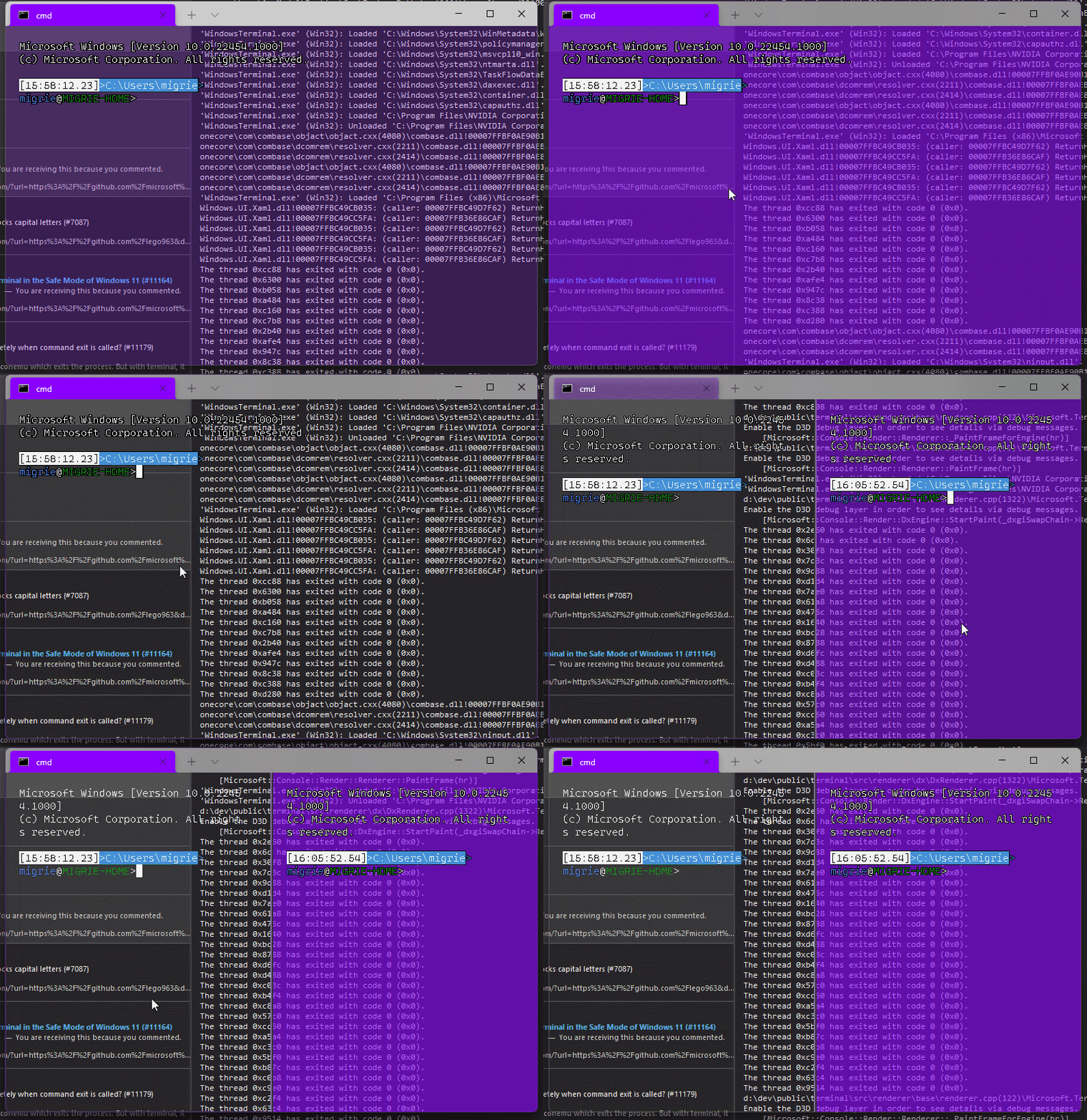
Adds support for vintage style opacity, on Windows 11+. The API we're using for this exists since the time immemorial, but there's a bug in XAML Islands that prevents it from working right until Windows 11 (which we're working on backporting).
Replaces the `acrylicOpacity` setting with `opacity`, which is a uint between 0 and 100 (inclusive), default to 100.
`useAcrylic` now controls whether acrylic is used or not. Setting an opacity < 100 with `"useAcrylic": false` will use vintage style opacity.
Mouse wheeling adjusts opacity. Whether acrylic is used or not is dependent upon `useAcrylic`.
`opacity` will stealthily default to 50 if `useAcrylic:true` is set.
## PR Checklist
* [x] Closes#603
* [x] I work here
* [x] Tests added/passed
* [x] https://github.com/MicrosoftDocs/terminal/pull/416
## Detailed Description of the Pull Request / Additional comments
Opacity was moved to AppearanceConfig. In the future, I have a mind to allow unfocused acrylic, so that'll be important then.
## Validation Steps Performed
_just look at it_
## Summary of the Pull Request
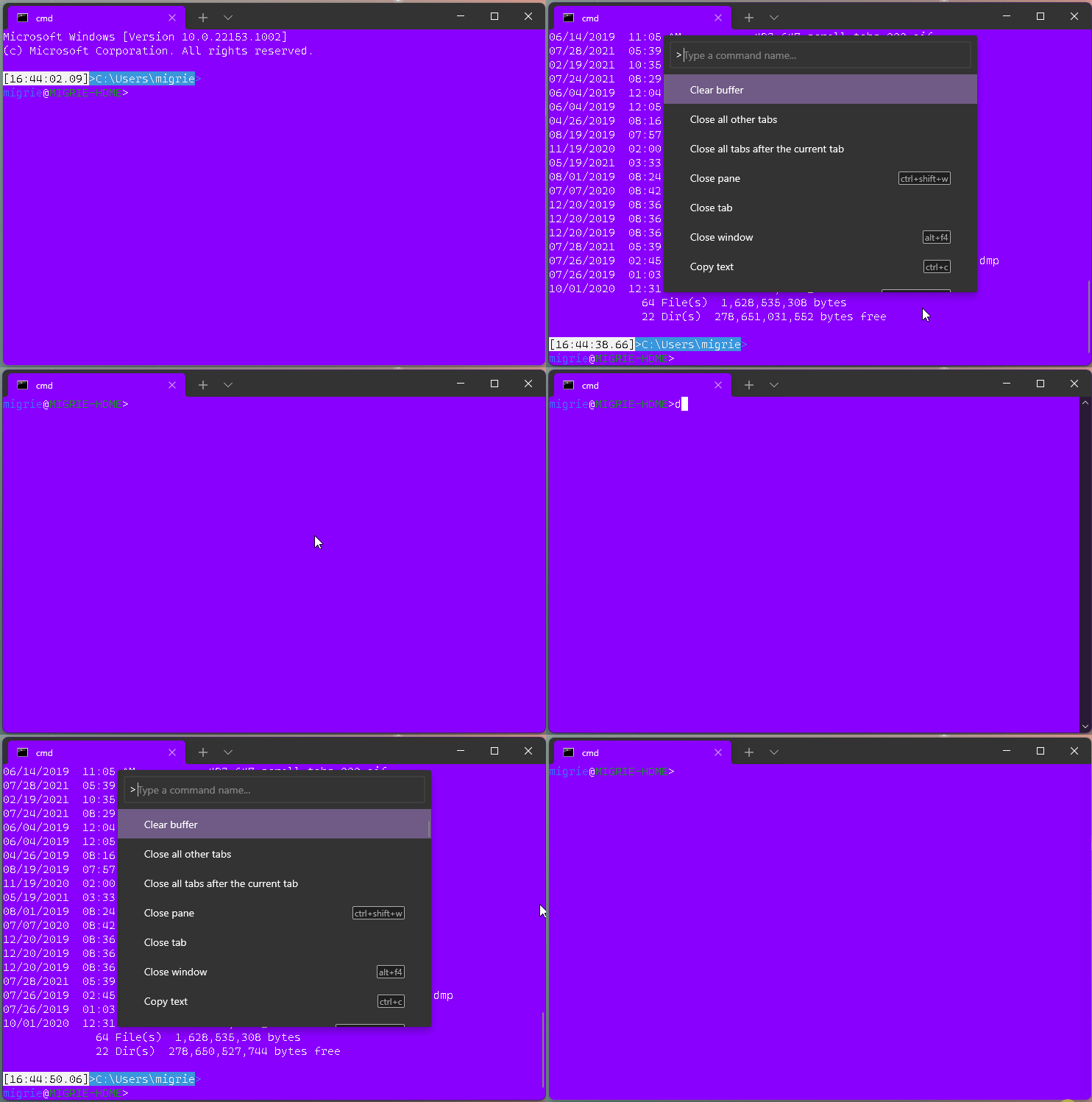
This adds a new action, `clearBuffer`. It accepts 3 values for the `clear` type:
* `"clear": "screen"`: Clear the terminal viewport content. Leaves the scrollback untouched. Moves the cursor row to the top of the viewport (unmodified).
* `"clear": "scrollback"`: Clear the scrollback. Leaves the viewport untouched.
* `"clear": "all"`: (**default**) Clear the scrollback and the visible viewport. Moves the cursor row to the top of the viewport (unmodified).
"Clear Buffer" has also been added to `defaults.json`.
## References
* From microsoft/vscode#75141 originally
## PR Checklist
* [x] Closes#1193
* [x] Closes#1882
* [x] I work here
* [x] Tests added/passed
* [ ] Requires documentation to be updated
## Detailed Description of the Pull Request / Additional comments
This is a bit tricky, because we need to plumb it all the way through conpty to clear the buffer. If we don't, then conpty will immediately just redraw the screen. So this sends a signal to the attached conpty, and then waits for conpty to draw the updated, cleared, screen back to us.
## Validation Steps Performed
* works for each of the three clear types as expected
* tests pass.
* works even with `ping -t 8.8.8.8` as you'd hope.
## Summary of the Pull Request
**Naive implementation** of exporting the text buffer of the current pane
into a text file triggered from the tab context menu.

**Disclaimer: this is not an export of the command  history,**
but rather just a text buffer dumped into a file when asked explicitly.

## References
Should provide partial solution for #642.

## Detailed Description of the Pull Request / Additional comments
The logic is following:
* Open a file save picker
  * The location is Downloads folder (should be always accessible)
  * The suggest name of the file equals to the pane's title
  * The allowed file formats list contains .txt only
* If no file selected stop
* Lock terminal
* Read all lines till the cursor
* Format each line by removing trailing white-spaces and adding CRLF if not wrapped
* Asynchronously write to selected file
* Show confirmation

As the action is relatively fast didn't add a progress bar or any other UX.
As the buffer is relatively small, holding it entirely in the memory rather than
writing line by line to disk.
This is on me. When I got rid of the `_updatePatternLocations` `ThrottledFunc` in the `TermControl`, I didn't add a matching call to `_updatePatternLocations->Run()` in this method.
In #9820, in `TermControl::_ScrollPositionChanged`, there was still a call to `_updatePatternLocations->Run();`. (TermControl.cpp:1655 on the right) https://github.com/microsoft/terminal/pull/9820/files#diff-c10bb023995e88dac6c1d786129284c454c2df739ea547ce462129dc86dc2697R1654#10051 didn't change this
In #10187 I moved the `_updatePatternLocations` throttled func from termcontrol to controlcore. Places it existed before:
* [x] `TermControl::_coreReceivedOutput`: already matched by ControlCore::_connectionOutputHandler
* [x] `TermControl::_ScrollbarChangeHandler` -> added in c20eb9d
* [x] `TermControl::_ScrollPositionChanged` -> `ControlCore::_terminalScrollPositionChanged`
## Validation Steps Performed
Print a URL, scroll the wheel: it still works.
Closes#11055
## Summary of the Pull Request
The bug was that Narrator would still read the content of the old tab/pane although a new tab/pane was introduced. This is caused by the automation peer not being created when XAML requests it. Normally, we would prevent the automation peer from being created if the terminal was not fully initialized.

This change allows the automation peer to be created regardless of the terminal being fully initialized by...
- `TermControl`: `_InitializeTerminal` updates the padding (dependent on the `SwapChainPanel`) upon full initialization
- `ControlCore`: initialize the `_renderer` in the ctor so that we can attach the UIA Engine before `ControlCore::Initialize()` is called (dependent on `SwapChainPanel` loading)

As a bonus, this also fixes a locking issue where logging would attempt to get the text range's text and lock twice. The locking fix is very similar to #10937.

## PR Checklist
Closes [MSFT 33353327](https://microsoft.visualstudio.com/OS/_workitems/edit/33353327)

## Validation Steps Performed
- New pane from key binding is announced by Narrator
- New tab from key binding is announced by Narrator
## Summary of the Pull Request
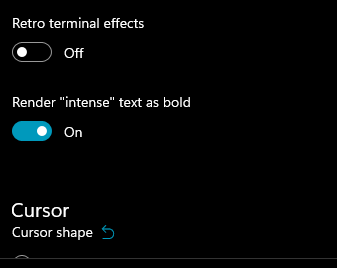
This adds a new setting `intenseTextStyle`. It's a per-appearance, control setting, defaulting to `"all"`.
* When set to `"all"` or `["bold", "bright"]`, then we'll render text as both **bold** and bright (1.10 behavior)
* When set to `"bold"`, `["bold"]`, we'll render text formatted with `^[[1m` as **bold**, but not bright
* When set to `"bright"`, `["bright"]`, we'll render text formatted with `^[[1m` as bright, but not bold. This is the pre 1.10 behavior
* When set to `"none"`, we won't do anything special for it at all.
## references
* I last did this in #10648. This time it's an enum, so we can add bright in the future. It's got positive wording this time.
* ~We will want to add `"bright"` as a value in the future, to disable the auto intense->bright conversion.~ I just did that now.
* #5682 is related
## PR Checklist
* [x] Closes#10576
* [x] I seriously don't think we have an issue for "disable intense is bright", but I'm not crazy, people wanted that, right? https://github.com/microsoft/terminal/issues/2916#issuecomment-544880423 was the closest
* [x] I work here
* [x] Tests added/passed
* [x] https://github.com/MicrosoftDocs/terminal/pull/381
## Validation Steps Performed
<!--  -->
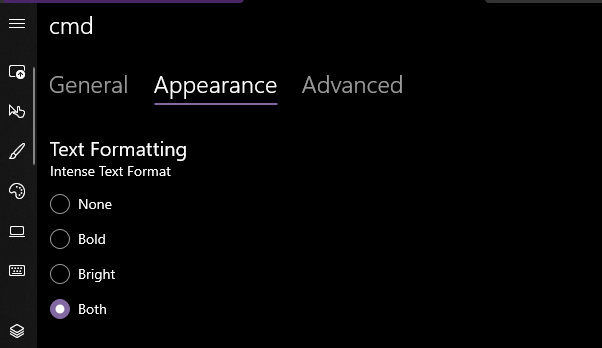
Yea that works. Printed some bold text, toggled it on, the text was no longer bold. hooray.
### EDIT, 10 Aug
```json
"intenseTextStyle": "none",
"intenseTextStyle": "bold",
"intenseTextStyle": "bright",
"intenseTextStyle": "all",
"intenseTextStyle": ["bold", "bright"],
```
all work now. Repro script:
```sh
printf "\e[1m[bold]\e[m[normal]\e[34m[blue]\e[1m[bold blue]\e[m\n"
```
## Summary of the Pull Request
Do not invoke terminal resize logic if view port dimensions didn't change
## PR Checklist
* [x] Closes#10857
* [x] CLA signed.
* [ ] Tests added/passed
* [ ] Documentation updated.
* [ ] Schema updated.
* [ ] I've discussed this with core contributors already.
## Detailed Description of the Pull Request / Additional comments
Short-circuit `ControlCore::_doResizeUnderLock` if the dimensions of the
required view port are equal to the dimensions of the current view port
#### ⚠️ targets #10051

## Summary of the Pull Request

This updates our `ThrottledFunc`s to take a dispatcher parameter. This means that we can use the `Windows::UI::Core::CoreDispatcher` in the `TermControl`, where there's always a `CoreDispatcher`, and use a `Windows::System::DispatcherQueue` in `ControlCore`/`ControlInteractivity`. When running in-proc, these are always the _same thing_. However, out-of-proc, the core needs a dispatcher queue that's not tied to a UI thread (because the content proces _doesn't have a UI thread!_).

This lets us get rid of the output event, because we don't need to bubble that event out to the `TermControl` to let it throttle that update anymore.

## References
* Tear-out: #1256
* Megathread: #5000
* Project: https://github.com/microsoft/terminal/projects/5

## PR Checklist
* [x] This is a part of #1256
* [x] I work here
* [n/a] Tests added/passed
* [n/a] Requires documentation to be updated

## Detailed Description of the Pull Request / Additional comments

Fortunately, `winrt::resume_foreground` works the same on both a `CoreDispatcher` and a `DispatcherQueue`, so this wasn't too hard!

## Validation Steps Performed

This was validated in `dev/migrie/oop/the-whole-thing` (or `dev/migrie/oop/connection-factory`, I forget which), and I made sure that it worked both in-proc and x-proc. Not only that, _it wasn't any slower_!This reverts commit 04b751faa70680bf0296063deacec4657c6ff9d6.
Adds support for users to be able to set font features and axes (see the spec for more details!)
## Detailed Description
**CustomTextLayout**
- Asks the `DxFontRenderData` for the font features when getting glyphs
- _If any features have been set/updated, we always skip the "isTextSimple" shortcut_
- Asks the `_formatInUse` for any font axes when mapping characters in `_AnalyzeFontFallback`
**DxFontRenderData**
- Stores a map of font features (initialized to the [standard feature list])
- Stores a map of font axes
- Has methods to add font features/axes to the map or update existing ones
- Has methods to retrieve the font features/axes
- Sets the font axes in the `IDWriteTextFormat` when creating it
## Validation Steps Performed
It works!
[standard feature list]: ac5aef67d1/DrawableObject.ixx (L802)
Specified in #10457
Related to #1790Closes#759Closes#5828
## Summary of the Pull Request

This forces the `TermControl` to only use `ControlCore` and `ControlInteractivity` via their WinRT projections. We want this, because WinRT projections can be used across process boundaries. In the future, `ControlCore` and `ControlInteractivity` are going to be living in a different process entirely from `TermControl`. By enforcing this boundary now, we can make sure that they will work seamlessly in the future.

## References
* Tear-out: #1256
* Megathread: #5000
* Project: https://github.com/microsoft/terminal/projects/5

## PR Checklist
* [x] Closes https://github.com/microsoft/terminal/projects/5#card-50760270
* [x] I work here
* [x] Tests added/passed
* [n/a] Requires documentation to be updated

## Detailed Description of the Pull Request / Additional comments

Most all this was just converting pure c++ types to winrt types when possible. I've added a couple helper projections with `til` converters, which made most of this really easy.

The "`MouseButtonState` needs to be composed of `Int32`s instead of `bool`s" is MENTAL. I have no idea why this is, but when I had the control OOP in the sample, that would crash when trying to de-marshal the bools. BODGY.

The biggest changes are in the way the UIA stuff is hooked up. The UiaEngine needs to be attached directly to the `Renderer`, and it can't be easily projected, so it needs to live next to the `ControlCore`. But the `TermControlAutomationPeer` needed the `UiaEngine` to help implement some interfaces.

Now, there's a new layer we've introduced. `InteractivityAutomationPeer` does the `ITextProvider`, `IControlAccessibilityInfo` and the `IUiaEventDispatcher` thing. `TermControlAutomationPeer` now has a
`InteractivityAutomationPeer` stashed inside itself, so that it can ask the interactivity layer to do the real work. We still need the `TermControlAutomationPeer` though, to be able to attach to the real UI tree.

## Validation Steps Performed

The terminal behaves basically the same as before.

Most importantly, I whipped out Accessibility Insights, and the Terminal looks the same as before.
## Summary of the Pull Request
This implements `GetAttributeValue` and `FindAttribute` for `UiaTextRangeBase` (the shared `ITextRangeProvider` for Conhost and Windows Terminal). This also updates `UiaTracing` to collect more useful information on these function calls.
## References
#7000 - Epic
[Text Attribute Identifiers](https://docs.microsoft.com/en-us/windows/win32/winauto/uiauto-textattribute-ids)
[ITextRangeProvider::GetAttributeValue](https://docs.microsoft.com/en-us/windows/win32/api/uiautomationcore/nf-uiautomationcore-itextrangeprovider-getattributevalue)
[ITextRangeProvider::FindAttribute](https://docs.microsoft.com/en-us/windows/win32/api/uiautomationcore/nf-uiautomationcore-itextrangeprovider-findattribute)
## PR Checklist
* [X] Closes#2161
* [X] Tests added/passed
## Detailed Description of the Pull Request / Additional comments
- `TextBuffer`:
- Exposes a new `TextBufferCellIterator` that takes in an end position. This simplifies the logic drastically as we can now use this iterator to navigate through the text buffer. The iterator can also expose the position in the buffer.
- `UiaTextRangeBase`:
- Shared logic & helper functions:
- Most of the text attributes are stored as `TextAttribute`s in the text buffer. To extract them, we generate an attribute verification function via `_getAttrVerificationFn()`, then use that to verify if a given cell has the desired attribute.
- A few attributes are special (i.e. font name, font size, and "is read only"), in that they are (1) acquired differently and (2) consistent across the entire text buffer. These are handled separate from the attribute verification function.
- `GetAttributeValue`: Retrieve the attribute verification of the first cell in the range. Then, verify that the entire range has that attribute by iterating through the text range. If a cell does not have that attribute, return the "reserved mixed attribute value".
- `FindAttribute`: Iterate through the text range and leverage the attribute verification function to find the first contiguous range with that attribute. Then, make the end exclusive and output a `UiaTextRangeBase`. This function must be able to perform a search backwards, so we abstract the "start" and "end" into `resultFirstAnchor` and `resultSecondAnchor`, then perform post processing to output a valid `UiaTextRangeBase`.
- `UiaTracing`:
- `GetAttributeValue`: Log uia text range, desired attribute, resulting attribute metadata, and the type of the result.
- `FindAttribute`: Log uia text range, desired attribute and attribute metadata, if we were searching backwards, the type of the result, and the resulting text range.
- `AttributeType` is a nice way to understand/record if the result was either of the reserved UIA values, a normal result, or an error.
- `UiaTextRangeTests`:
- `GetAttributeValue`:
- verify that we know which attributes we support
- test each of the known text attributes (expecting 100% code coverage for `_getAttrVerificationFn()`)
- `FindAttribute`:
- test each of the known _special_ text attributes
- test `IsItalic`. NOTE: I'm explicitly only testing one of the standard text attributes because the logic is largely the same between all of them and they leverage `_getAttrVerificationFn()`.
## Validation Steps Performed
- @codeofdusk has been testing this Conhost build
- Tests added for Conhost and shared implementation
- Windows Terminal changes were manually verified using accessibility insights and NVDA
## PR Checklist
* [x] Closes random crash that @lhecker sent me on Teams
* [x] I work here.

## Detailed Description of the Pull Request / Additional comments
- Any change to the renderer engine has to be done under lock. Leonard gave me a crash where the dirty rectangles changed out from under the renderer thread. By inspection, only one spot in `ControlCore` is modifying the engine outside of lock.... here. The dump is too far along to definitively prove the issue and it's sort of a race so its difficult to repro. But the theory is sound that all writes to the dirty regions must be done under lock. So here's a fix.
<!-- Enter a brief description/summary of your PR here. What does it fix/what does it change/how was it tested (even manually, if necessary)? -->
## Summary of the Pull Request
Adds a global setting, `experimental.detectHyperlinks`, that controls whether we automatically detect links and make them clickable. Default is set to true.
<!-- Please review the items on the PR checklist before submitting-->
## PR Checklist
* [x] Closes#9981
* [x] CLA signed. If not, go over [here](https://cla.opensource.microsoft.com/microsoft/Terminal) and sign the CLA
* [ ] Tests added/passed
* [ ] Documentation updated. If checked, please file a pull request on [our docs repo](https://github.com/MicrosoftDocs/terminal) and link it here: #xxx
* [x] Schema updated.
* [x] I work here
<!-- Describe how you validated the behavior. Add automated tests wherever possible, but list manual validation steps taken as well -->
## Validation Steps Performed
When `detectHyperlinks` is set to false, links do not underline on hover and are not clickable.
## Summary of the Pull Request

This PR changes the DxEngine to create a swapchain HANDLE, then have the TermControl attach _that_ handle to the SwapChainPanel, rather than returning the swapchain via a `IDXGISwapChain1`.

I didn't write this code originally, @miniksa helped me out. The original commit was so succinct that I didn't think there was anything else to add or take away.

I'm going to need this for tear-out (#1256), so that I can have the content process create swap chain handles, then duplicate those handles out to the window process that will end up embedding the content.

## References

* [`DCompositionCreateSurfaceHandle`](https://docs.microsoft.com/en-us/windows/win32/api/dcomp/nf-dcomp-dcompositioncreatesurfacehandle)
* [`CreateSwapChainForCompositionSurfaceHandle`](https://docs.microsoft.com/en-us/windows/win32/api/dxgi1_3/nf-dxgi1_3-idxgifactorymedia-createswapchainforcompositionsurfacehandle)
* [`CreateSwapChainForComposition`](https://docs.microsoft.com/en-us/windows/win32/api/dxgi1_2/nf-dxgi1_2-idxgifactory2-createswapchainforcomposition)
* Tear-out: #1256
* Megathread: #5000
* Project: https://github.com/microsoft/terminal/projects/5

## PR Checklist
* [x] Closes https://github.com/microsoft/terminal/projects/5#card-50760249
* [x] I work here
* [ ] Tests added/passed
* [n/a] Requires documentation to be updated

## Detailed Description of the Pull Request / Additional comments

This reverts commit c113b65d9b15028281f6383909a73dba6af55bfc.

That commit reverted 30b833547928d6dcbf88d49df0dbd5b3f6a7c879

## Validation Steps Performed

* [x] Built and ran the Terminal, it still seems to work
* [x] Does a TDR still work? or do we need to recreate the handle, or something.
* [x] Does this work on Win7? I honestly have no idea how DX compatibility works. Presumably, the WPF version uses the `ForHwnd` path, so this will still work, but I don't know if this will suddenly fail to launch on Win7 or something. Tagging in @miniksa.
## Summary of the Pull Request

ControlCore::AttachUiaEngine receives a IRenderEngine as a raw pointer,
which TermControl owns. We must ensure that we first destroy the
ControlCore before the UiaEngine instance (both owned by TermControl).
Otherwise a deallocated IRenderEngine is accessed when
ControlCore calls Renderer::TriggerTeardown.

## References

This crash was introduced in #10031.

## PR Checklist
* [x] I work here
* [x] Tests added/passed

## Validation Steps Performed

* Run accevent.exe to cause a UiaEngine to be attached to a TermControl.
* Close the current tab
* Ensured no crashes occur
## Summary of the Pull Request
ControlCore's _renderer (IRenderTarget) is allocated as std::unique_ptr,
but is given to Terminal::CreateFromSettings as a reference.
ControlCore::Close deallocates the _renderer, but if ThrottledFuncs
are still scheduled to call ControlCore::UpdatePatternLocations
it'll cause Terminal::UpdatePatterns to be called, which in turn ends up
accessing the deallocated IRenderTarget reference and lead to a crash.
A proper solution with shared pointers is nontrivial and should be
attempted at a later point in time. This solution moves the teardown of
the _renderer into ControlCore::~ControlCore, where we can be certain
that no further strong references are held by ThrottledFuncs.
## PR Checklist
* [x] Closes#9910
* [x] I work here
* [x] Tests added/passed
## Validation Steps Performed
The crash is a race condition and inherently hard to reproduce.
During validation this PR didn't appear to introduce new crashes.
## Summary of the Pull Request
Brace yourselves, it's finally here. This PR does the dirty work of splitting the monolithic `TermControl` into three components. These components are:
* `ControlCore`: This encapsulates the `Terminal` instance, the `DxEngine` and `Renderer`, and the `Connection`. This is intended to everything that someone might need to stand up a terminal instance in a control, but without any regard for how the UX works.
* `ControlInteractivity`: This is a wrapper for the `ControlCore`, which holds the logic for things like double-click, right click copy/paste, selection, etc. This is intended to be a UI framework-independent abstraction. The methods this layer exposes can be called the same from both the WinUI TermControl and the WPF control.
* `TermControl`: This is the UWP control. It's got a Core and Interactivity inside it, which it uses for the actual logic of the terminal itself. TermControl's main responsibility is now
By splitting into smaller pieces, it will enable us to
* write unit tests for the `Core` and `Interactivity` bits, which we desparately need
* Combine `ControlCore` and `ControlInteractivity` in an out-of-proc core process in the future, to enable tab tearout.
However, we're not doing that work quite yet. There's still lots of work to be done to enable that, thought this is likely the biggest portion.
Ideally, this would just be methods moved wholesale from one file to another. Unfortunately, there are a bunch of cases where that didn't work as well as expected. Especially when trying to better enforce the boundary between the classes.
We've got a couple tests here that I've added. These are partially examples, and partially things I ran into while implementing this. A bunch of things from #7001 can go in now that we have this.
This PR is gonna be a huge pain to review - 38 files with 3,730 additions and 1,661 deletions is nothing to scoff at. It will also conflict 100% with anything that's targeting `TermControl`. I'm hoping we can review this over the course of the next week and just be done with it, and leave plenty of runway for 1.9 bugs in post.
## References
* In pursuit of #1256
* Proc Model: #5000
* https://github.com/microsoft/terminal/projects/5
## PR Checklist
* [x] Closes#6842
* [x] Closes https://github.com/microsoft/terminal/projects/5#card-50760249
* [x] Closes https://github.com/microsoft/terminal/projects/5#card-50760258
* [x] I work here
* [x] Tests added/passed
* [n/a] Requires documentation to be updated
## Detailed Description of the Pull Request / Additional comments
* I don't love the names `ControlCore` and `ControlInteractivity`. Open to other names.
* I added a `ICoreState` interface for "properties that come from the `ControlCore`, but consumers of the `TermControl` need to know". In the future, these will all need to be handled specially, because they might involve an RPC call to retrieve the info from the core (or cache it) in the window process.
* I've added more `EventArgs` to make more events proper `TypedEvent`s.
* I've changed how the TerminalApp layer requests updated TaskbarProgress state. It doesn't need to pump TermControl to raise a new event anymore.
* ~~Something that snuck into this branch in the very long history is the switch to `DCompositionCreateSurfaceHandle` for the `DxEngine`. @miniksa wrote this originally in 30b8335, I'm just finally committing it here. We'll need that in the future for the out-of-proc stuff.~~
* I reverted this in c113b65d9. We can revert _that_ commit when we want to come back to it.
* I've changed the acrylic handler a decent amount. But added tests!
* All the `ThrottledFunc` things are left in `TermControl`. Some might be able to move down into core/interactivity, but once we figure out how to use a different kind of Dispatcher (because a UI thread won't necessarily exist for those components).
* I've undoubtably messed up the merging of the locking around the appearance config stuff recently
## Validation Steps Performed
I've got a rolling list in https://github.com/microsoft/terminal/issues/6842#issuecomment-810990460 that I'm updating as I go.






