### `OSC 9001; CmdNotFound; <missingCmd>`
Adds support for custom OSC "command not found" sequence `OSC 9001;
CmdNotFound; <missingCmd>`. Upon receiving the "CmdNotFound" variant
with the missing command payload, we send the missing command up to the
Quick Fix menu and add it in as `winget install <missingCmd>`.
### Quick Fix UI
The Quick Fix UI is a new UI surface that lives in the gutter (left
padding) of your terminal. The button appears if quick fixes are
available. When clicked, a list of suggestions appears in a flyout. If
there is not enough space in the gutter, the button will be presented in
a collapsed version that expands to a normal size upon hovering over it.
The Quick Fix UI was implemented similar to the context menu. The UI
itself lives in TermControl, but it can be populated by other layers
(i.e. TermApp layer).
Quick Fix suggestions are also automatically loaded into the Suggestions
UI.
If a quick fix is available and a screen reader is attached, we dispatch
an announcement that quick fixes are available to notify the user that
that's the case.
Spec: #17005#16599
### Follow-ups
- #17377: Add a key binding for quick fix
- #17378: Use winget to search for packages using `missingCmd`
---------
Co-authored-by: Dustin L. Howett <duhowett@microsoft.com>
Co-authored-by: Dustin L. Howett <dustin@howett.net>
While `double` is probably generally preferable for UI code,
our application is essentially a complex wrapper wrapper around
DWrite, D2D and D3D, all of which use `float` exclusively.

Of course it also uses XAML, but that one uses `float` for roughly
1/3rd of its API functions, so I'm not sure what it prefers.
Additionally, it's mostly a coincidence that we use WinUI/XAML for
Windows Terminal whereas DWrite/D2D/D3D are effectively essential.
This is demonstrated by the fact that we have a `HwndTerminal`,
while there's no alternative to e.g. D3D on Windows.

The goal of this PR is that DIP based calculations never end up
mixing `float` and `double`. This PR also changes opacity-related
values to `float` because I felt like that fits the theme.
This changes `NewTabArgs`, `SplitPaneArgs`, and `NewWindowArgs` to
accept a `INewContentArgs`, rather than just a `NewTerminalArgs`. This
allows a couple things:
* Users can open arbitrary types of panes with the existing `splitPane`,
`newWindow` actions, just by passing `"type": "scartchpad"` (for
example). This is a lot more flexible than re-defining different
`"openScratchpad"`, `"openTasksPane"`, etc, etc actions for every kind
of pane.
* This allows us to use the existing machinery of session restore to
also restore non-terminal panes.
The `type` property was added to `newTab`, `splitPane`, `newWindow`.
When omitted, we still just treat the json as a blob of NewTerminalArgs.
There's not actually any other kinds of `INewContentArgs` in this PR
(other than the placeholder `GenericContentArgs`). In
[`dev/migrie/fhl/md-pane`](https://github.com/microsoft/terminal/compare/dev/migrie/f/tasks-pane...dev/migrie/fhl/md-pane),
I have a type of pane that would LOVE to add some args here. So that's
forward-thinking.
There's really just two stealth types of pane for now: `settings`, and
`scratchpad`. Those I DON'T have as constants or anything in this PR.
They probably should be? Though, I suspect around the time of the tasks
& MD panes, I'll come up with whatever structure I actually want them to
take.
### future considerations here
* In the future, this should allow extensions to say "I know how to host
`foo` content", for 3p content.
* The `wt` CLI args were not yet updated to also accept `--type` yet.
There's no reason we couldn't easily do that.
* I considered adding `ICanHasCommandline` to allow arbitrary content to
generate a `wt` commandline-serializable string. Punted on that for now.
## other PRs
* #16170
* #16171
* #16172
* #16895
* #16914 <-- you are here
Closes#17014
This changeset allows Windows Terminal to dump its buffer contents as
UTF-16LE VT text onto disk and restore it later. This functionality is
enabled whenever `persistedWindowLayout` is being used.
Closes#961Closes#16741
## Validation Steps Performed
* Open multiple windows with multiple tabs and restart the app
Everything's restored ✅
* Reopen a tab with output from `RenderingTests.exe`
Everything's restored ✅
* Closing tabs and windows with Ctrl+W deletes their buffer dumps ✅
* Closing tabs doesn't create buffer dumps ✅
This PR is a few things:

* part the first: Convert the `compatibility.reloadEnvironmentVariables`
setting to a per-profile one.
* The settings should migrate it from the user's old global place to the
new one.
  * We also added it to "Profile>Advanced" while I was here.
* Adds a new pair of commandline flags to `new-tab` and `split-pane`:
`--inheritEnvironment` / `--reloadEnvironment`
* On `wt` launch, bundle the entire environment that `wt` was spawned
with, and put it into the `Remoting.CommandlineArgs`, and give them to
the monarch (and ultimately, down to `TerminalPage` with the
`AppCommandlineArgs`). DO THIS ALWAYS.
* As a part of this, we’ll default to _reloading_ if there’s no explicit
commandline set, and _inheriting_ if there is.
* For example, `wt -- cmd` would inherit, and `wt -p “Command Prompt”`
would reload.[^1]
* This is a little wacky, but we’re trying to separate out the
intentions here:
* `wt -- cmd` feels like “I want to run cmd.exe (in a terminal tab)”.
That feels like the user would _like_ environment variables from the
calling process. They’re doing something more manual, so they get more
refined control over it.
* `wt` (or `wt -p “Command Prompt”`) is more like, “I want to run the
Terminal (or, my Command Prompt profile) using whatever the Terminal
would normally do”. So that feels more like a situation where it should
just reload by default. (Of course, this will respect their settings
here)

## References and Relevant Issues

https://github.com/microsoft/terminal/issues/15496#issuecomment-1692450231
has more notes.

## Detailed Description of the Pull Request / Additional comments
This is so VERY much plumbing. I'll try to leave comments in the
interesting parts.

## PR Checklist
- [x] This is not _all_ of #15496. We're also going to do a `-E foo=bar`
arg on top of this.
- [x] Tests added/passed
- [x] Schema updated

[^1]: In both these cases, plus the `environment` setting, of course.
Added --appendCommandLine flag that when set, appends the command to the
preset command in the profile instead of replacing it.
Previously, there was no good way to launch wt while running a command
appended to the set command in the profile. Some uses include profiles
that are set to login or start an application.
Additional comments: Looking for a review, and expecting additional
changes that needs to be done. For example, I am not really sure on how
to include the the option's information in the CallForHelp() screen.
Also, would be great if someone could guide me on including tests for
this new feature. Thanks!
Closes#5528
---------
Co-authored-by: Charles Liu <hliu729@outlook.com>
_targets #14943_

When this is true, this will re-use the existing commandline to
pre-filter the results. This is especially helpful for completing a
suggestion based on the text that's already been typed.

Like with command history, this requires that shell integration is
enabled before it will work.## Summary of the Pull Request

## References and Relevant Issues

See also #13445
As spec'd in #14864

## Validation Steps Performed

Tested manually
This adds support for a new action, `showSuggestions`, as described in
#14864. This adds just one `source` currently, `recentCommands`. This
requires shell integration to be enabled in the shell to work properly.
When it is enabled, activating that action will invoke the suggestions
UI as a palette, populated with `sendInput` actions for each of the
user's recent commands.
* These don't persist across reboots.
* These are per-control.
There's mild plans to remedy that in a follow-up, though that needs a
bit more design consideration.
Closes#14779
## Summary of the Pull Request
Adds a dismiss selection option to the "copy" action.
## PR Checklist
- [x] Closes#15371
- [x] Tests added/passed
- [x] Documentation updated
- If checked, please file a pull request on [our docs
repo](https://github.com/MicrosoftDocs/terminal) and link it here:
MicrosoftDocs/terminal#686
- [x] Schema updated (if necessary)
---------
Co-authored-by: Carlos Zamora <carlos.zamora@microsoft.com>
This PR adds a `searchWeb` command to search the selected text on the web.
Arguments:
- `queryUrl`: URL of the web page to launch (the selected text will be
inserted where the first `%s` is found in the query string)
To make the search text more "compact" and handle multi-line selections,
I'm concatenating the selected lines and replacing consecutive
whitespaces with a single space (we may change this with something more
clever in case).
## Validation Steps Performed
Manual testing with single, multi-line, block selections.
Closes#10175
---------
Co-authored-by: Marco Pelagatti <marco.pelagatti@iongroup.com>
Co-authored-by: Mike Griese <migrie@microsoft.com>
Adds a "Select command" and a "Select output" entry to the right-click
context menu when the user has shell integration enabled. This lets the
user quickly right-click on a command and select the entire commandline
or all of its output.

This was a "I'm waiting for reviews" sorta idea. Seemed like a
reasonable combination of features. Related to #13445, #11000.

Tested manually.

---------

Co-authored-by: Dustin L. Howett <duhowett@microsoft.com>
Adds two new commands, `selectOutput` and `selectCommand`. These don't
do much without shell integration enabled, unfortunately. If you do
enable it, however, you can use these commands to quickly navigate the
history to select whole commands (or their output).
Some sample JSON:
```json
{ "keys": "ctrl+shift+<", "command": { "action": "selectCommand", "direction": "prev" } },
{ "keys": "ctrl+shift+>", "command": { "action": "selectCommand", "direction": "next" } },
{ "keys": "ctrl+shift+[", "command": { "action": "selectOutput", "direction": "prev" } },
{ "keys": "ctrl+shift+]", "command": { "action": "selectOutput", "direction": "next" } },
```
**Demo gifs** in
https://github.com/microsoft/terminal/issues/4588#issuecomment-1352042789closes#4588
Tested manually.
<details>
<summary>CMD.exe user? It's dangerous to go alone! Take this.</summary>
Surely, there's a simpler way to do it, this is adapted from my own
script.
```cmd
prompt $e]133;D$e\$e]133;A$e\$e\$e]9;9;$P$e\$e[30;107m[$T]$e[97;46m$g$P$e[36;49m$g$e[0m$e[K$_$e[0m$e[94m%username%$e[0m@$e[32m%computername%$e[0m$G$e]133;B$e\
```
</details>
Upgrading clang-format lead to a few changes in the formatting
of code inside macros. Apart from the upgrade, I've also spent
some time removing all options from .clang-format that are
redundant with `BasedOnStyle: Microsoft`.
_Lo! Harken to me, for I shall divulge the heart of the tab tear-out
saga. Verily, this PR shall bestow upon thee the power to move tabs and
panes between windows by means of pre-defined actions. Though be warned,
it does not yet grant thee the power to drag and drop them as thou
mayest desire. Yet, the same plumbing that underpins this work shall
remain steadfast. Behold, the majority of this undertaking concerns the
elevation of the RequestMoveContent event from the TerminalPage to the
very summit of the Monarch. From thence, a great AttachContent method
shall descend back to the lowest depths. Furthermore, there are minor
revisions to TermControl that shall enable thee to better detach the
content and attach it to a new one._

This is the most important part of the tab tear-out saga. This PR
enables the user to move tabs and panes between windows using
pre-defined actions. It does _not_ enable the user to drag/drop them
yet, but the same fundamental plumbing will still apply. Most of the PR
is plumbing the `RequestMoveContent` event up from the `TerminalPage` up
to the `Monarch`, and then plumbing an `AttachContent` method back down.
There are also small changes to `TermControl` to better support
detaching the content and attaching to a new one.

For testing, I recommend:

```json
        { "keys": "f1", "command": { "action": "moveTab", "window": "1" } },
        { "keys": "f2", "command": { "action": "moveTab", "window": "2" } },

        { "keys": "f3", "command": { "action": "movePane", "window": "1" } },
        { "keys": "f4", "command": { "action": "movePane", "window": "2" } },

        { "keys": "shift+f3", "command": { "action": "movePane", "window": "1", "index": 3 } },
        { "keys": "shift+f4", "command": { "action": "movePane", "window": "2", "index": 3 } },
```

* Related to #1256
* Related to #5000

---------

Co-authored-by: Carlos Zamora <carlos.zamora@microsoft.com>
After this commit a user may specify fractional font sizes.
Support was only implemented for AtlasEngine however.
DxEngine continues to use rounded (integer) font sizes.
Closes#6678
## Validation Steps Performed
* Install a bitmap font that requires fractional font sizes
(e.g. Terminus TTF, https://files.ax86.net/terminus-ttf/)
* Set font size to something integer (e.g. 14pt)
Glyphs are blurry ✅
* Set font size to something fractional (e.g. 13.5pt)
Glyphs are crisp ✅
## Summary of the Pull Request
As described in #9583, this change implements the legacy conhost "EnableColorSelection" feature.
## Detailed Description of the Pull Request / Additional comments
@zadjii-msft was super nice and provided the outline/plumbing (WinRT classes and such) as a hackathon-type project (thank you!)--a "SelectionColor" runtimeclass, a ColorSelection method on the ControlCore runtimeclass, associated plumbing through the layers; plus the action-and-args plumbing to allow hooking up a basic "ColorSelection" action, which allows you to put actions in your settings JSON like so:
```json
{
"command":
{
"action": "experimental.colorSelection",
"foreground": "#0f3"
},
"keys": "alt+4"
},
```
On top of that foundation, I added a couple of things:
* The ability to specify indexes for colors, in addition to RGB and RRGGBB colors.
- It's a bit hacky, because there are some conversions that fight against sneaking an "I'm an index" flag in the alpha channel.
* A new "matchMode" parameter on the action, allowing you to say if you want to only color the current selection ("0") or all matches ("1").
- I made it an int, because I'd like to enable at least one other "match mode" later, but it requires me/someone to fix up search.cpp to handle regex first.
- Search used an old UIA "ColorSelection" method which was previously `E_NOTIMPL`, but is now wired up. Don't know what/if anything else uses this.
* An uber-toggle setting, "EnableColorSelection", which allows you to set a single `bool` in your settings JSON, to light up all the keybindings you would expect from the legacy "EnableColorSelection" feature:
- alt+[0..9]: color foreground
- alt+shift+[0..9]: color foreground, all matches
- ctrl+[0..9]: color background
- ctrl+shift+[0..9]: color background, all matches
* A few of the actions cannot be properly invoked via their keybindings, due to #13124. `*!*` But they work if you do them from the command palette.
* If you have "`EnableColorSelection : true`" in your settings JSON, but then specify a different action in your JSON that uses the same key binding as a color selection keybinding, your custom one wins, which I think is the right thing.
* I fixed what I think was a bug in search.cpp, which also affected the legacy EnableColorSelection feature: due to a non-inclusive coordinate comparison, you were not allowed to color a single character; but I see no reason why that should be disallowed. Now you can make all your `X`s red if you like.
"Soft" spots:
* I was a bit surprised at some of the helpers I had to provide in textBuffer.cpp. Perhaps there are existing methods that I didn't find?
* Localization? Because there are so many (40!) actions, I went to some trouble to try to provide nice command/arg descriptions. But I don't know how localization works…
<!-- Please review the items on the PR checklist before submitting-->
## PR Checklist
* [x] Closes#9583
* [x] CLA signed. If not, go over [here](https://cla.opensource.microsoft.com/microsoft/Terminal) and sign the CLA
* [ ] Tests added/passed *(what would be the right place to add tests for this?)*
* [ ] Documentation updated. If checked, please file a pull request on [our docs repo](https://github.com/MicrosoftDocs/terminal) and link it here: #xxx
* [ ] Schema updated. *(is this needed?)*
* [x] I've discussed this with core contributors already. If not checked, I'm ready to accept this work might be rejected in favor of a different grand plan. Issue number where discussion took place: #xxx
## Validation Steps Performed
Just manual testing.
Adds support for marks in the scrollbar. These marks can be added in 3
ways:
* Via the iterm2 `OSC 1337 ; SetMark` sequence
* Via the `addMark` action
* Automatically when the `experimental.autoMarkPrompts` per-profile
setting is enabled.
#11000 has more tracking for the big-picture for this feature, as well
as additional follow-ups. This set of functionality seemed complete
enough to send a review for now. That issue describes these how I wish
these actions to look in the fullness of time. This is simply the v0.1
from the hackathon last month.
#### Actions
* `addMark`: add a mark to the buffer. If there's a selection, use
place the mark covering at the selection. Otherwise, place the mark
on the cursor row.
- `color`: a color for the scrollbar mark. This is optional - defaults
to the `foreground` color of the current scheme if omitted.
* `scrollToMark`
- `direction`: `["first", "previous", "next", "last"]`
* `clearMark`: Clears marks at the current postition (either the
selection if there is one, or the cursor position.
* `clearAllMarks`: Don't think this needs explanation.
#### Per-profile settings
* `experimental.autoMarkPrompts`: `bool`, default `false`.
* `experimental.showMarksOnScrollbar`: `bool`
## PR Checklist
* [x] Closes#1527
* [x] Closes#6232
## Detailed Description of the Pull Request / Additional comments
This is basically hackathon code. It's experimental! That's okay! We'll
figure the rest of the design in post.
Theoretically, I should make these actions `experimental.` as well, but
it seemed like since the only way to see these guys was via the
`experimental.showMarksOnScrollbar` setting, you've already broken
yourself into experimental jail, and you know what you're doing.
Things that won't work as expected:
* resizing, ESPECIALLY reflowing
* Clearing the buffer with ED sequences / Clear Buffer
I could theoretically add velocity around this in the `TermControl`
layer. Always prevent marks from being visible, ignore all the actions.
Marks could still be set by VT and automark, but they'd be useless.
Next up priorities:
* Making this work with the FinalTerm sequences
* properly speccing
* adding support for `showMarksOnScrollbar: flags(categories)`, so you
can only display errors on the scrollbar
* adding the `category` flag to the `addMark` action
## Validation Steps Performed
I like using it quite a bit. The marks can get noisy if you have them
emitted on every prompt and the buffer has 9000 lines. But that's the
beautiful thing, the actions work even if the marks aren't visible, so
you can still scroll between prompts.
<details>
<summary>Settings blob</summary>
```jsonc
// actions
{ "keys": "ctrl+up", "command": { "action": "scrollToMark", "direction": "previous" }, "name": "Previous mark" },
{ "keys": "ctrl+down", "command": { "action": "scrollToMark", "direction": "next" }, "name": "Next mark" },
{ "keys": "ctrl+pgup", "command": { "action": "scrollToMark", "direction": "first" }, "name": "First mark" },
{ "keys": "ctrl+pgdn", "command": { "action": "scrollToMark", "direction": "last" }, "name": "Last mark" },
{ "command": { "action": "addMark" } },
{ "command": { "action": "addMark", "color": "#ff00ff" } },
{ "command": { "action": "addMark", "color": "#0000ff" } },
{ "command": { "action": "clearAllMarks" } },
// profiles.defaults
"experimental.autoMarkPrompts": true,
"experimental.showMarksOnScrollbar": true,
```
</details>
Adds an action which can be used to change the opacity at runtime. This is a follow up to some of the other work I had been doing around opacity and settings previewing at the end of the year.
> edit: pseudo-spec
>
> * `adjustOpacity`:
> * `"opacity"`: (**required**) an integer number to set the opacity to.
> * `"relative"`: (defaults to `true`)
> * If false, set the opacity to the given value, which should be between [0, 100].
> * If true, then use `opacity` as a relative adjustment to the current opacity. So the implementation would get the current opacity for this pane, then add this action's opacity to that value. Should be between [-100, 100]
>
> This would allow both setting exactly 25% opacity with an action, and binding an action that increases/decreases the opacity one {amount}
It's preview-able too, which is neat.

* [x] Closes#11205
* [x] I work here
* [x] Docs updated: https://github.com/MicrosoftDocs/terminal/pull/477
This adds an action for the context menu entry we added in #11062. That PR added support for exporting the buffer, exclusively through the tab item's context menu. This adds an action that can additionally be bound, which also can export the buffer to a file. This action accepts a `path` param. If empty/ommitted, then the Terminal will prompt for the file to export the buffer to.

* Does a part of #9700
* Spec in #11090, but I doubt this is contentious
* [x] This will satisfy #12052
* [x] I work here
* [x] docs added: https://github.com/MicrosoftDocs/terminal/pull/479
## Summary of the Pull Request
This is the resurrection of #8514 and #11310. WE determined that we didn't want to do #11308 after all, so this should be profile auto-elevation, without the warning.
This PR adds two features:
* the `elevate: bool` property to profiles
- If the user is running unelevated, **and** `elevate` is set to `true`, then instead of opening a new tab, we'll open an elevated Terminal window with the profile.
- Otherwise, we'll just open a new tab in the existing window. This includes cases where the window is elevated, and the profile is set to `elevate:false`. `elevate:false` basically just means "do nothing special with me".
* the `elevate: bool?` property to `NewTerminalArgs` (`newTab`, `splitPane`)
- This allows a user to create an action that will elevate the profile, even if the profile is not otherwise set to auto-elevate.
- `elevate:null` (_the default_) does not change the profile's elevation status. The action will use whatever is set by the profile.
- `elevate:true` will attempt to auto-elevate the profile
- `elevate:false` will do nothing special.
## References
* #5000 for obvious reasons
* Spec'd in #8455
## PR Checklist
* [x] Closes#632
* [x] I work here
* [x] Tests added/passed
* [ ] Requires documentation to be updated - sure does, but that'll come all at the end.
## Detailed Description of the Pull Request / Additional comments
After playing with de-elevation a bit, it turns out it behaves weirdly with packaged applications. I can try and ask `explorer.exe` to launch the process on our behalf. However, if the thing we're launching is an execution alias (`wt.exe`), and we're elevated, then the child process will _still launch elevated_.
There's also something super BODGEY at work here. `ShellExecute` is the function we use to ask the OS to elevate something for us. But `ShellExecute` needs to be able to send a window message to the process that called it (if the caller was a WINDOWS subsystem application). So if we die immediately after calling `ShellExecute`, then the elevated process never actually spawns - sad. So we're adding a helper process, `elevate-shim.exe`, that lives in our process. That'll be the one that actually calls `ShellExecute`, so that it can live for the duration of the UAC prompt.
## Validation Steps Performed
* Ran tests
* Opened a bunch of terminal tabs at various different elevation levels
* opened new splits too
* In the defaults (base layer) as well, for madness
Some settings to use for testing
<details>
```jsonc
"keybindings" :
[
////////// ELEVATION ///////////////
{ "keys": "f1", "name": "ELEVATED TAB", "icon": "\uEA18", "command": { "action": "newTab", "elevate": true } },
{ "keys": "f2", "name": "ELEVATED, Color", "icon": "\uEA18", "command": {
"action": "newTab", "elevate": true, "commandline": "PowerShell.exe", "startingDirectory": "C:\\Windows", "tabColor": "#bbaa00"
} },
{ "keys": "f3", "name": "unelevated ELEVATED", "icon": "🙃", "command": {
"action": "newTab", "elevate": false, "profile": "elevated cmd"
} },
//////////////////////////////
],
"profiles":
{
"defaults":
{
"elevate": true,
},
"list":
[
{
"hidden":false,
"name" : "cmd",
"commandline" : "cmd.exe",
"guid": "{0caa0dad-35be-5f56-a8ff-afceeeaa6101}",
"startingDirectory" : "%USERPROFILE%",
"opacity" : 20
},
{
"name" : "the COOLER cmd",
"commandline" : "c:\\windows\\system32\\cmd.exe",
"startingDirectory" : "%USERPROFILE%",
},
{
"name" : "the sneaky cmd",
"commandline" : "c:\\windows\\system32\\cmd.exe /k echo sneaky sneaks",
"startingDirectory" : "%USERPROFILE%",
},
{
"name": "elevated cmd",
"commandline": "cmd.exe /k echo This profile is always elevated",
"startingDirectory" : "well this is garbage",
"elevate": true,
"background": "#9C1C0C",
"tabColor": "#9C1C0C",
"colorScheme": "Desert"
},
{
"name": "unelevated cmd",
"commandline": "cmd.exe /k echo This profile is just as elevated as you started with",
"elevate": false,
"background": "#1C0C9C",
"tabColor": "#1C0C9C",
"colorScheme": "DotGov",
"useAcrylic": true
},
]
```
</details>
Also try:
* `wtd nt -p "elevated cmd" ; sp -p "elevated cmd"`
* `wtd nt -p "elevated cmd" ; nt -p "elevated cmd"`
This was merged manually via
```
git diff dev/migrie/f/non-terminal-content-elevation-warning dev/migrie/f/632-on-warning-dialog > ..\632.patch
git apply ..\632.patch --ignore-whitespace --reject
```
This commit adds additional information to the persisted window layouts.
- Runtime tab titles
- Focus, Maximized, and Fullscreen modes.
Also,
- Adds actions for Set{Focus,FullScreen} that take a boolean
to work in addition to the current Toggle{Focus, Fullscreen} actions.
- Adds SetMaximized that takes a boolean.
This adds the capability to maximize (resp restore) a window using
standard terminal actions.
This also involves hooking up a good amount of state tracking between
the terminal page and the window to see when maximize state has changed
so that it can be persisted.
- These actions are not added to the default settings, but they could be.
The intention is that they could assist with automation (and was originally)
how I planned on persisting the state instead of augmenting the LaunchMode.
- The fullscreen/maximized saving isn't perfect because we don't have a
way to save the non-maximized/fullscreen size, so exiting the modes
won't restore whatever the previous size was.
References #9800Closes#11878Closes#11426
00fe2b0 made the mistake of hashing the pointer of `NewTerminalArgs` instances
instead of their content. This commit calls `NewTerminalArgs::Hash` instead.

## PR Checklist
* [x] I work here
* [x] Tests added/passed

## Validation Steps Performed
* New test passes ✅
This commit serves two purposes:
* Simplify construction of hashes for non-trivial structs
  This is especially helpful for ActionArgs
* Improve hash quality by not needlessly throwing away entropy

`til::hasher` is modeled after Rust's `std:#️⃣:Hasher` and works similar.
The idea is simple: A stateful hash function can hash multiple unrelated fields,
without loosing entropy by running a finalizer after hashing each interim field.
This is especially useful for modern hash functions, which often have a wider
internal state than the output width. Additionally this improves performance
for hash functions with complex finalizers.

Most of this is of course a bit moot right now, considering that `til::hasher`
is still based on STL's FNV1a algorithm, which offers a very poor hash quality.
But counterintuitively, FNV1a actually benefits most from this PR: Since it
lacks a finalizer entirely, this commit greatly improves hash quality as
it encodes more data into FNV's state and thus improves randomness.

## PR Checklist
* [x] I work here
* [x] Tests added/passed

## Validation Steps Performed
* No unusual behavior ✅
* Adds the `cppwinrt_utils.h` to the include path for all winrt projects.
* Adds the file to the pch.h's for every project, so you don't need to include it in every header.
* Replaces some usages of `DECLARE_EVENT`/`DEFINE_EVENT` with `WINRT_CALLBACK`, which will do it in a oneliner
* Adds more `BASIC_FACTORY` usage.
* [x] Closes#2456
It's 92 files with one-line changes, don't be scared.
This adds x-macros for each of the actions, greatly reducing the amount of boilerplate needed for each action args.
Originally, I wanted to do more with this, but I think the x-macros we've discovered properly treads the line of ease-of-use and native c++ support, with how much it'll do for us
* [x] Closes#3475
* [x] Sure enough, the tests still pass.
* [ ] mmmmmmm 
## Summary of the Pull Request
In `settings.json` there's an `actions` array to configure keybindings.
The action `globalSummon` has an argument called `dropdownDuration`.
The settings editor deleted this argument from the settings because of a typo in `ActionArgs.h`.
## PR Checklist
* [x] Closes#11400
* [x] CLA signed
* [ ] Tests added/passed
* [ ] Documentation updated
* [ ] Schema updated
* [ ] I've discussed this with core contributors already. If not checked, I'm ready to accept this work might be rejected in favor of a different grand plan.
## Detailed Description of the Pull Request / Additional comments
There was a `JsonUtils::GetValueForKey` instead of a `JsonUtils::SetValueForKey`.
This is what happens when such code is not autogenerated.
## Validation Steps Performed
None
<!-- Enter a brief description/summary of your PR here. What does it fix/what does it change/how was it tested (even manually, if necessary)? -->
## Summary of the Pull Request
Continuation of https://github.com/microsoft/terminal/pull/10972 to handle multiple windows, requires that to be merged first.
<!-- Other than the issue solved, is this relevant to any other issues/existing PRs? -->
## References
<!-- Please review the items on the PR checklist before submitting-->
## PR Checklist
* [x] Also closes#766
* [x] CLA signed. If not, go over [here](https://cla.opensource.microsoft.com/microsoft/Terminal) and sign the CLA
* [ ] Tests added/passed
* [ ] Documentation updated. If checked, please file a pull request on [our docs repo](https://github.com/MicrosoftDocs/terminal) and link it here: #xxx
* [x] Schema updated.
* [ ] I've discussed this with core contributors already. If not checked, I'm ready to accept this work might be rejected in favor of a different grand plan. Issue number where discussion took place: #xxx
<!-- Provide a more detailed description of the PR, other things fixed or any additional comments/features here -->
## Detailed Description of the Pull Request / Additional comments
Rough changelog:
Normally saving is triggered to occur every 30s, or sooner if a window is created/closed. The existing behavior of saving on last close is maintained to bypass that throttling. The automatic saving allows for crash recovery. Additionally all window layouts will be saved upon taking the `quit` action.
For loading we will check if we are the first window, that there are any saved layouts, and if the setting is enabled, and then depending on if we were given command line args or startup actions.
- create a new window for each saved layout, or
- take the first layout for our self and then a new window for each other layout.
This also saves the layout when the quit action is taken.
Misc changes
- A -s,--saved argument was added to the command line to facilitate opening all of the windows with the right settings. This also means that while a terminal session is running you can do wt -s idx to open a copy of window idx. There isn't a stable ordering of which idx each window gets saved as (it is whatever the iteration order of _peasants is), so it is just a cute hack for now.
- All position calculation has been moved up to AppHost this does mean we need to awkwardly pass around positions in a couple of unexpected places, but no solution was perfect.
- Renamed "Open tabs from a previous session" to "Open windows from a previous session". (not reflected in video below)
- Now save runtime tab color and window names
- Only enabled for non-elevated windows
- Add some change tracking to ApplicationState
<!-- Describe how you validated the behavior. Add automated tests wherever possible, but list manual validation steps taken as well -->
## Validation Steps Performed
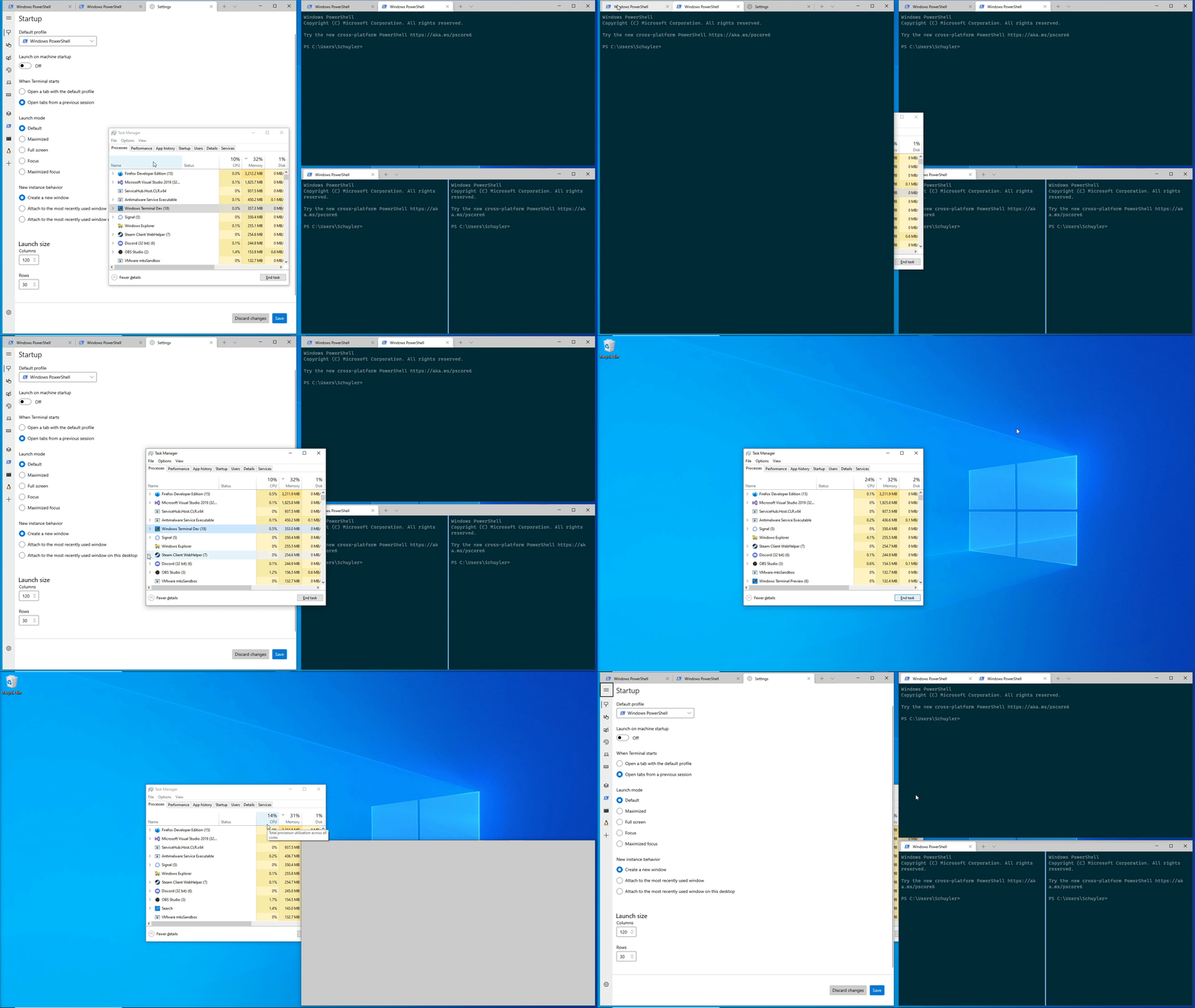
<!-- Enter a brief description/summary of your PR here. What does it fix/what does it change/how was it tested (even manually, if necessary)? -->
## Summary of the Pull Request
Adds directional modifiers for SplitState and convert those to the appropriate horizontal/vertical when splitting a pane.
<!-- Other than the issue solved, is this relevant to any other issues/existing PRs? -->
## References
<!-- Please review the items on the PR checklist before submitting-->
## PR Checklist
* [x] Closes#4340
* [x] CLA signed. If not, go over [here](https://cla.opensource.microsoft.com/microsoft/Terminal) and sign the CLA
* [ ] Tests added/passed
* [x] Documentation updated. If checked, please file a pull request on [our docs repo](https://github.com/MicrosoftDocs/terminal) and link it here: #xxx
* [x] Schema updated.
* [ ] I've discussed this with core contributors already. If not checked, I'm ready to accept this work might be rejected in favor of a different grand plan. Issue number where discussion took place: #xxx
<!-- Provide a more detailed description of the PR, other things fixed or any additional comments/features here -->
## Detailed Description of the Pull Request / Additional comments
"vertical" and "horizontal" splits were removed from `defaults.json`, but code was added to parse those as `right` and `down` respectively. It is also the case that if a user has a custom hotkey for `split: vertical` it will override the default for `split: right`.
<!-- Describe how you validated the behavior. Add automated tests wherever possible, but list manual validation steps taken as well -->
## Validation Steps Performed
Split the pane using each of the new directional movements
## Summary of the Pull Request
Fixes the serialisation of the findMatch action so that the direction is stored.
## PR Checklist
* [x] Closes#11225
* [x] CLA signed. If not, go over [here](https://cla.opensource.microsoft.com/microsoft/Terminal) and sign the CLA
* [x] Tests added/passed
* [ ] Documentation updated. If checked, please file a pull request on [our docs repo](https://github.com/MicrosoftDocs/terminal) and link it here: #xxx
* [ ] Schema updated.
* [ ] I've discussed this with core contributors already. If not checked, I'm ready to accept this work might be rejected in favor of a different grand plan. Issue number where discussion took place: #xxx
## Validation Steps Performed
Added a test and tested manually.
This commit adds initial support for saving window layout on application
close.
Done:
- Add user setting for if tabs should be maintained.
- Added events to track the number of open windows for the monarch, and
then save if you are the last window closing.
- Saves layout when the user explicitly hits the "Close Window" button.
- If the user manually closed all of their tabs (through the tab x
button or through closing all panes on the tab) then remove any saved
state.
- Saves in the ApplicationState file a list of actions the terminal can
perform to restore its layout and the window size/position
information.
- This saves an action to focus the correct pane, but this won't
actually work without #10978. Note that if you have a pane zoomed, it
does still zoom the correct pane, but when you unzoom it will have a
different pane selected.
Todo:
- multiple windows? Right now it can only handle loading/saving one
window.
- PR #11083 will save multiple windows.
- This also sometimes runs into the existing bug where multiple tabs
appear to be focused on opening.
Next Steps:
- The business logic of when the save is triggered can be adjusted as
necessary.
- Right now I am taking the pragmatic approach and just saving the state
as an array of objects, but only ever populate it with 1, that way
saving multiple windows in the future could be added without breaking
schema compatibility. Selfishly I'm hoping that handling multiple
windows could be spun off into another pr/feature for now.
- One possible thing that can maybe be done is that the commandline can
be augmented with a "--saved ##" attribute that would load from the
nth saved state if it exists. e.g. if there are 3 saved windows, on
first load it can spawn three wt --saved {0,1,2} that would reopen the
windows? This way there also exists a way to load a copy of a previous
window (if it is in the saved state).
- Is the application state something that is planned to be public/user
editable? In theory the user could since it is just json, but I don't
know what it buys them over just modifying their settings and
startupActions.
Validation Steps Performed:
- The happy path: open terminal -> set setting to true -> close terminal
-> reopen and see tabs. Tested with powershell/cmd/wsl windows.
- That closing all panes/tabs on their own will remove the saved
session.
- Open multiple windows, close windows and confirm that the last window
closed saves its state.
The generated file stores a sequence of actions that will be executed to
restore the terminal to its saved form.
References #8324
This is also one of the items on microsoft/terminal#5000Closes#766
## Summary of the Pull Request
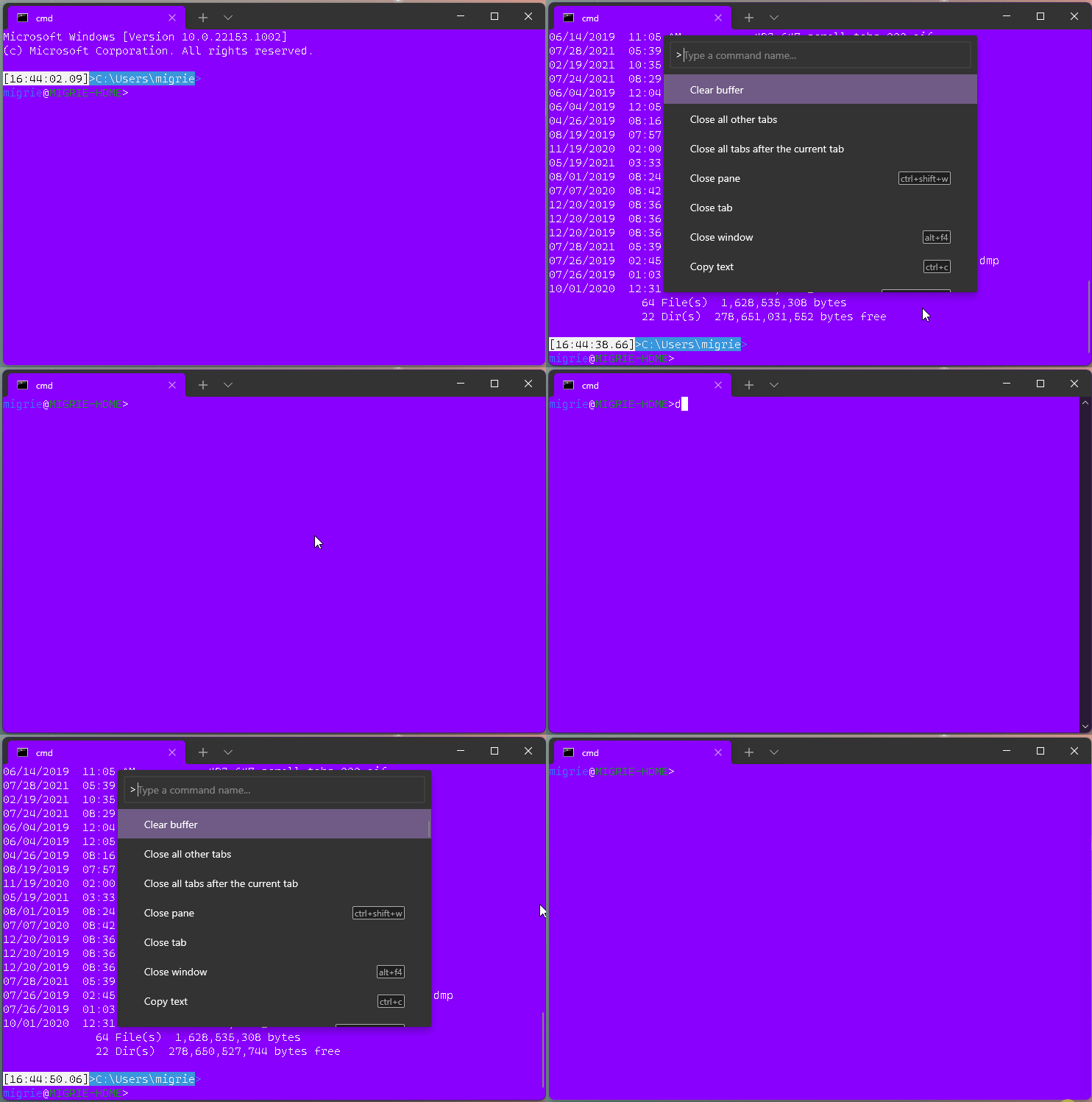
This adds a new action, `clearBuffer`. It accepts 3 values for the `clear` type:
* `"clear": "screen"`: Clear the terminal viewport content. Leaves the scrollback untouched. Moves the cursor row to the top of the viewport (unmodified).
* `"clear": "scrollback"`: Clear the scrollback. Leaves the viewport untouched.
* `"clear": "all"`: (**default**) Clear the scrollback and the visible viewport. Moves the cursor row to the top of the viewport (unmodified).
"Clear Buffer" has also been added to `defaults.json`.
## References
* From microsoft/vscode#75141 originally
## PR Checklist
* [x] Closes#1193
* [x] Closes#1882
* [x] I work here
* [x] Tests added/passed
* [ ] Requires documentation to be updated
## Detailed Description of the Pull Request / Additional comments
This is a bit tricky, because we need to plumb it all the way through conpty to clear the buffer. If we don't, then conpty will immediately just redraw the screen. So this sends a signal to the attached conpty, and then waits for conpty to draw the updated, cleared, screen back to us.
## Validation Steps Performed
* works for each of the three clear types as expected
* tests pass.
* works even with `ping -t 8.8.8.8` as you'd hope.
<!-- Enter a brief description/summary of your PR here. What does it fix/what does it change/how was it tested (even manually, if necessary)? -->
## Summary of the Pull Request
Add a new action that can contain multiple other actions.
<!-- Other than the issue solved, is this relevant to any other issues/existing PRs? -->
## References
<!-- Please review the items on the PR checklist before submitting-->
## PR Checklist
* [x] Closes#3992
* [x] CLA signed. If not, go over [here](https://cla.opensource.microsoft.com/microsoft/Terminal) and sign the CLA
* [ ] Tests added/passed
* [ ] Documentation updated. If checked, please file a pull request on [our docs repo](https://github.com/MicrosoftDocs/terminal) and link it here: #xxx
* [x] Schema updated.
* [ ] I've discussed this with core contributors already. If not checked, I'm ready to accept this work might be rejected in favor of a different grand plan. Issue number where discussion took place: #xxx
<!-- Provide a more detailed description of the PR, other things fixed or any additional comments/features here -->
## Detailed Description of the Pull Request / Additional comments
Creates a shortcut action that allows a list of actions to be specified as arguments. Steals a bunch of the serialization code from my other pr. Overall, because I had the serialization code written already, this was remarkably easy.
I can't think of any combined action to be added to the defaults, so I think this is just a thing for the documentation unless someone else has a good example. I know there are lot of times when the recommended workaround is "make an action with commandline wt.exe ..." and this could be a good replacement for that, but that is all personalized.
I didn't add this to the command line parsing, since the command line is already a way to run multiple actions.
<!-- Describe how you validated the behavior. Add automated tests wherever possible, but list manual validation steps taken as well -->
## Validation Steps Performed
Created a new command, confirmed that "Move right->down" showed up in the command palette, and that running it did the correct behavior (moving right one pane, then down one pane).
```
{
"command": {
"action": "multipleActions",
"name": "Move right->down",
"actions": [
{"action": "moveFocus", "direction": "right" },
{"action": "moveFocus", "direction": "down" },
]
}
}
```
When creating `startupAction` use `TabSwitcherMode::Disabled` in action args
to disable the tab switcher and prevent MRU logic to be applied.
Closes#10070
<!-- Enter a brief description/summary of your PR here. What does it fix/what does it change/how was it tested (even manually, if necessary)? -->
## Summary of the Pull Request
Add functionality to move a pane to another tab. If the tab index is greater than the number of current tabs a new tab will be created with the pane as its root. Similarly, if the last pane on a tab is moved to another tab, the original tab will be closed.
This is largely complete, but I know that I'm messing around with things that I am unfamiliar with, and would like to avoid footguns where possible.
<!-- Other than the issue solved, is this relevant to any other issues/existing PRs? -->
## References
#4587
<!-- Please review the items on the PR checklist before submitting-->
## PR Checklist
* [x] Closes#7075
* [x] CLA signed. If not, go over [here](https://cla.opensource.microsoft.com/microsoft/Terminal) and sign the CLA
* [ ] Tests added/passed
* [x] Documentation updated. If checked, please file a pull request on [our docs repo](https://github.com/MicrosoftDocs/terminal) and link it here: #xxx
* [x] Schema updated.
* [ ] I've discussed this with core contributors already. If not checked, I'm ready to accept this work might be rejected in favor of a different grand plan. Issue number where discussion took place: #xxx
<!-- Provide a more detailed description of the PR, other things fixed or any additional comments/features here -->
## Detailed Description of the Pull Request / Additional comments
Things done:
- Moving a pane to a new tab appears to work. Moving a pane to an existing tab mostly works. Moving a pane back to its original tab appears to work.
- Set up {Attach,Detach}Pane methods to add or remove a pane from a pane. Detach is slightly different than Close in that we want to persist the tree structure and terminal controls.
- Add `Detached` event on a pane that can be subscribed to to remove other event handlers if desired.
- Added simple WalkTree abstraction for one-off recursion use cases that calls a provided function on each pane in order (and optionally terminates early).
- Fixed an in-prod bug with closing panes. Specifically, if you have a tree (1; 2 3) and close the 1 pane, then 3 will lose its borders because of these lines clearing the border on both children https://github.com/microsoft/terminal/blob/main/src/cascadia/TerminalApp/Pane.cpp#L1197-L1201 .
To do:
- Right now I have `TerminalTab` as a friend class of `Pane` so I can access some extra properties in my `WalkTree` callbacks, but there is probably a better choice for the abstraction boundary.
Next Steps:
- In a future PR Drag & Drop handlers could be added that utilize the Attach/Detach infrastructure to provide a better UI.
- Similarly once this is working, it should be possible to convert an entire tab into a pane on an existing tab (Tab::DetachRoot on original tab followed by Tab::AttachPane on the target tab).
- Its been 10 years, I just really want to use concepts already.
<!-- Describe how you validated the behavior. Add automated tests wherever possible, but list manual validation steps taken as well -->
## Validation Steps Performed
Manual testing by creating pane(s), and moving them between tabs and creating new tabs and destroying tabs by moving the last remaining pane.
<!-- Enter a brief description/summary of your PR here. What does it fix/what does it change/how was it tested (even manually, if necessary)? -->
## Summary of the Pull Request
Add functionality to swap a pane with an adjacent (Up/Down/Left/Right) neighbor.
<!-- Other than the issue solved, is this relevant to any other issues/existing PRs? -->
## References
This work potentially touches on: #1000#2398 and #4922
<!-- Please review the items on the PR checklist before submitting-->
## PR Checklist
* [x] Closes a component of #1000 (partially, comment), #4922 (partially, `SwapPanes` function is added but not hooked up, no detach functionality)
* [x] CLA signed. If not, go over [here](https://cla.opensource.microsoft.com/microsoft/Terminal) and sign the CLA
* [x] Tests added/passed
* [ ] Documentation updated. If checked, please file a pull request on [our docs repo](https://github.com/MicrosoftDocs/terminal) and link it here: #xxx
* [x] Schema updated.
* [ ] I've discussed this with core contributors already. If not checked, I'm ready to accept this work might be rejected in favor of a different grand plan. Issue number where discussion took place: #xxx
<!-- Provide a more detailed description of the PR, other things fixed or any additional comments/features here -->
## Detailed Description of the Pull Request / Additional comments
Its been a while since I've written C++ code, and it is my first time working on a Windows application. I hope that I have not made too many mistakes.
Work currently done:
- Add boilerplate/infrastructure for argument parsing, hotkeys, event handling
- Adds the `MovePane` function that finds the focused pane, and then tries to find
a pane that is visually adjacent to according to direction.
- First pass at the `SwapPanes` function that swaps the tree location of two panes
- First working version of helpers `_FindFocusAndNeighbor` and `_FindNeighborFromFocus`
that search the tree for the currently focused pane, and then climbs back up the tree
to try to find a sibling pane that is adjacent to it.
- An `_IsAdjacent' function that tests whether two panes, given their relative offsets, are adjacent to each other according to the direction.
Next steps:
- Once working these functions (`_FindFocusAndNeighbor`, etc) could be utilized to also solve #2398 by updating the `NavigateFocus` function.
- Do we want default hotkeys for the new actions?
<!-- Describe how you validated the behavior. Add automated tests wherever possible, but list manual validation steps taken as well -->
## Validation Steps Performed
At this point, compilation and manual testing of functionality (with hotkeys) by creating panes, adding distinguishers to each pane, and then swapping them around to confirm they went to the right location.
## Summary of the Pull Request
Updates the `closeTab` action to optionally take an index.
## PR Checklist
* [x] Closes#7180
* [x] CLA signed. If not, go over [here](https://cla.opensource.microsoft.com/microsoft/Terminal) and sign the CLA
* [ ] Tests added/passed
* [x] Documentation updated. If checked, please file a pull request on [our docs repo](https://github.com/MicrosoftDocs/terminal) and link it here: MicrosoftDocs/terminal#347
* [x] Schema updated.
* [ ] I've discussed this with core contributors already. If not checked, I'm ready to accept this work might be rejected in favor of a different grand plan. Issue number where discussion took place: #xxx
## Validation Steps Performed
Added the following configuration to `settings.json` and validated both key combinations behaved as expected. Also opened the command palette and ensured that the actions were displayed.
```json
{ "command": "closeTab", "keys": "ctrl+shift+delete" },
{ "command": { "action": "closeTab", "index": 0 }, "keys": "ctrl+shift+end" }
```
## Summary of the Pull Request
#10297 found a bug in `ActionMap` where the `ToggleCommandPalette` key chord could not be found using `GetKeyBindingForAction`.

This was caused by the following:
- `AddAction`: when adding the action, the `ActionAndArgs` is basically added as `{ToggleCommandPalette, ToggleCommandLineArgs{}}` (Note the default ctor used for the action args)
- `GetKeyBindingForAction`: we're searching for an `ActionAndArgs` structured as `{ToggleCommandPalette, nullptr}`
- Since these are _technically_ two different actions, we are unable to find it.

This issue was fixed by making the `Hash(ActionAndArgs)` function smarter! If the `ActionAndArgs` has no args, but the `ShortcutAction` _supports_ args, generate the args using the default ctor.

By making `Hash()` smarter, everybody benefits from this logic! We can basically now enforce that `ActionAndArgs{ <X>, nullptr } == ActionAndArgs{ <X>, <default_ctor> }`.

## Validation Steps Performed
- Added a test.
- Tested this on #10297's branch and this does fix the bug
## Summary of the Pull Request
Adds support for the `focusPane` action, and the `focus-pane` subcommand. These allow the user to focus a pane by it's ID.
* `focusPane` accepts an `id`, identifying the id of the pane to focus.
* `focus-pane`, `fp` requires the parameter `--target,-t` to ID the pane it's going to focus.
## PR Checklist
* [x] Closes#5803
* [x] Closes#5464
* [x] I work here
* [x] Tests added/passed
* [ ] Requires documentation to be updated - oh no
## Detailed Description of the Pull Request / Additional comments
The ID isn't _totally_ useful right now, since users can't see them. But they're there, and used in-order. This is just slightly more ergonomic for complicated commandlines than `mf up; mf left`
## Validation Steps Performed
Tested in command palette
Tested a variety of commandlines. `wtd -w 0 mf down ; sp` and `wtd -w 0 fp -t 1 ; sp` gave me special difficulty.
## Summary of the Pull Request

This PR builds on the `ActionMap` PR (#6900) by leveraging `ActionMap` to serialize actions. From the top down, the process is now as follows:
- `CascadiaSettings`: remove the hack of copying whatever we had for actions before.
- `GlobalAppSettings`: serialize the `ActionMap` to `"actions": []`
- `ActionMap`: iterate over the internal `_ActionMap` (list of actions) and serialize each `Command`
- `Command`: **THIS IS WHERE THE MAGIC HAPPENS!** For _each_ key mapping, serialize an action. Only the first one needs to include the name and icon.
- `ActionAndArgs`: Find the relevant `IActionArgs` parser and serialize the `ActionAndArgs`.
- `ActionArgs`: **ANNOYING CHANGE** Serialize any args that are set. We _need_ each setting to be saved as a `std::optional`. As with inheritance, this allows us to distinguish an explicit setting to the default value (sometimes `null`) vs an implicit "give me the default value". This allows us to serialize only the relevant details of each action, rather than writing _all_ of the args.

## References
- #8100: Inheritance/Layering for lists
   - This tracks layering and better serialization for color schemes _and_ actions. This PR resolves half of that issue. The next step is to apply the concepts used in this PR (and #9621) to solve the similar problem for color schemes.
- #6900: Actions page

## Validation Steps Performed
Tests added!
#### ⚠️ this pr targets #9977

## Summary of the Pull Request

This adds support for part of the `monitor` property for `globalSummon`. It also goes a little off-spec:

```json
"monitor": "any"|"toCurrent"|"toMouse"
```

* `monitor`: This controls the monitor that the window will be summoned from/to
  - `"any"`: Summon the MRU window, regardless of which monitor it's currently on.
  - `"toCurrent"`/omitted: (_default_): Summon the MRU window **TO** the monitor with the current **foreground** window.
  - [**NEW**] `"toMouse"`: Summon the MRU window **TO** the monitor where the **mouse** cursor is.

When I was playing with this, It felt like `toMouse` was always what I wanted, not `toCurrent`. We can always just comment that out if we think that's contentious - I'm aware I didn't originally spec that.

## References
* Original thread: #653
* Spec: #9274
* megathread: #8888

## PR Checklist
* [x] Closes https://github.com/microsoft/terminal/projects/5#card-60325291
* [x] I work here
* [ ] Tests added/passed
* [ ] Requires documentation to be updated 😢

## Detailed Description of the Pull Request / Additional comments

I made `toMouse` the default because it felt better. fite-me.jpg

## Validation Steps Performed
my ever evolving blob:

```jsonc
    { "keys": "ctrl+`", "command": { "action": "quakeMode" } },
    { "keys": "ctrl+1", "command": { "action": "globalSummon" } },
    // { "keys": "ctrl+2", "command": { "action": "globalSummon", "desktop": "toCurrent" } },
    // { "keys": "ctrl+2", "command": { "action": "globalSummon", "toggleVisibility": false } },
    // { "keys": "ctrl+2", "command": { "action": "globalSummon", "dropdownDuration": 2000 } },
    { "keys": "ctrl+2", "command": { "action": "globalSummon", "monitor": "any" } },
    // { "keys": "ctrl+3", "command": { "action": "globalSummon", "desktop": "onCurrent" } },
    { "keys": "ctrl+3", "command": { "action": "globalSummon", "monitor": "toMouse" } },
    // { "keys": "ctrl+4", "command": { "action": "globalSummon", "desktop": "any" } },
    { "keys": "ctrl+4", "command": { "action": "globalSummon", "monitor": "toMouse", "dropdownDuration": 500 } },
    { "keys": "ctrl+5", "command": { "action": "globalSummon", "dropdownDuration": 500 } },
```
## Summary of the Pull Request

Adds the `dropdownDuration` property to `globalSummon`. This controls how fast the window appears on the screen when summoned from minimized. It similarly controls the speed for sliding out of view when the window is dismissed with `"toggleVisibility": true`.

`dropdownDuration` specifies the duration in **milliseconds**. This defaults to `0` for `globalSummon`, and defaults to `200` for `quakeMode`. 200 was picked because, according to [`AnimateWindow`](https://docs.microsoft.com/en-us/windows/win32/api/winuser/nf-winuser-animatewindow):

>  Typically, an animation takes 200 milliseconds to play.

Do note that you won't be able to interact with the window during the animation! Input sent during the dropdown will arrive at the end of the animation, but input sent during the slide-up _won't_. Avoid setting this to large values!

The gifs are in Teams.

## References
* Original thread: #653
* Spec: #9274
* megathread: #8888

## PR Checklist
* [x] Closes https://github.com/microsoft/terminal/projects/5#card-59030824
* [x] I work here
* [x] Tests added/passed
* [n/a] Requires documentation to be updated

## Detailed Description of the Pull Request / Additional comments

I had the following previously in the doc comments, but it feels better in the PR body:

- This was chosen because it was easier to implement and generally nicer than:
  * `AnimateWindow`, which would show the window borders for the duration of
    the animation, and occasionally just plain not work. Additionally, for
    `AnimateWindow` to work, the window much not be visible, so we'd need to
    first restore the window, then hide it, then animate it. That would flash
    the taskbar.
  * `SetWindowRgn` on the root HWND, which caused the xaml content to shift to
    the left, and caused a black bar to be drawn on the right of the window.
    Presumably, `SetWindowRgn` and `DwmExtendFrameIntoClientArea` did not play
    well with each other.
  * `SetWindowPos(..., SWP_NOSENDCHANGING)`, which worked the absolute best for
    longer animations, and is the closest to the actual implementation of
    `AnimateWindow`. This would resize the ROOT window, without sending resizes
    to the XAML island, allowing the content to _not_ reflow. but for a
    duration of 200ms, would only ever display ~2 frames. That's basically
    not even animation anymore, it's now just an "appear". Since that's how
    long the default animation is, if felt silly to have it basically not
    work by default.
- If a future reader would like to implement this better, **they should feel
  free to**, and not mistake my notes here as expertise. These are research
  notes into the dark and terrible land that is Win32 programming. I'm no expert.

## Validation Steps Performed

This is the blob of json I'm testing with these days:

```jsonc
        { "keys": "ctrl+`", "command": { "action": "quakeMode" } },
        { "keys": "ctrl+1", "command": { "action": "globalSummon" } },
        // { "keys": "ctrl+2", "command": { "action": "globalSummon", "desktop": "toCurrent" } },
        // { "keys": "ctrl+2", "command": { "action": "globalSummon", "toggleVisibility": false } },
        { "keys": "ctrl+2", "command": { "action": "globalSummon", "dropdownDuration": 2000 } },
        { "keys": "ctrl+3", "command": { "action": "globalSummon", "desktop": "onCurrent" } },
        { "keys": "ctrl+4", "command": { "action": "globalSummon", "desktop": "any" } },
```

* <kbd>ctrl+\`</kbd> will summon the quake window with a _quick_ animation
* <kbd>ctrl+2</kbd> will summon the window with a  s l o w  animation
This entirely removes `KeyMapping` from the settings model, and builds on the work done in #9543 to consolidate all actions (key bindings and commands) into a unified data structure (`ActionMap`).
## References
#9428 - Spec
#6900 - Actions page
Closes#7441
## Detailed Description of the Pull Request / Additional comments
The important thing here is to remember that we're shifting our philosophy of how to interact/represent actions. Prior to this, the actions arrays in the JSON would be deserialized twice: once for key bindings, and again for commands. By thinking of every entry in the relevant JSON as a `Command`, we can remove a lot of the context switching between working with a key binding vs a command palette item.
#9543 allows us to make that shift. Given the work in that PR, we can now deserialize all of the relevant information from each JSON action item. This allows us to simplify `ActionMap::FromJson` to simply iterate over each JSON action item, deserialize it, and add it to our `ActionMap`.
Internally, our `ActionMap` operates as discussed in #9428 by maintaining a `_KeyMap` that points to an action ID, and using that action ID to retrieve the `Command` from the `_ActionMap`. Adding actions to the `ActionMap` automatically accounts for name/key-chord collisions. A `NameMap` can be constructed when requested; this is for the Command Palette.
Querying the `ActionMap` is fairly straightforward. Helper functions were needed to be able to distinguish an explicit unbinding vs the command not being found in the current layer. Internally, we store explicitly unbound names/key-chords as `ShortcutAction::Invalid` commands. However, we return `nullptr` when a query points to an unbound command. This is done to hide this complexity away from any caller.
The command palette still needs special handling for nested and iterable commands. Thankfully, the expansion of iterable commands is performed on an `IMapView`, so we can just expose `NameMap` as a consolidation of `ActionMap`'s `NameMap` with its parents. The same can be said for exposing key chords in nested commands.
## Validation Steps Performed
All local tests pass.
This adds a `toggleVisibility` parameter to `globalSummon`.
* When `true` (default): when you press the global summon keybinding, and the window is currently the foreground window, we'll minimize the window.
* When `false`, we'll just do nothing.

## References
* Original thread: #653
* Spec: #9274
* megathread: #8888

## PR Checklist
* [x] Checks a box in #8888
* [x] closes https://github.com/microsoft/terminal/projects/5#card-59030814
* [x] I work here
* [ ] No tests for this one.
* [ ] yes yes eventually I'll come back on the docs

## Detailed Description of the Pull Request / Additional comments

I've got nothing extra to add here. This one's pretty simple. I'm only targeting #9954 since that one laid so much foundation to build on, with the `SummonBehavior`

## Validation Steps Performed

Played with this for a while, and it's amazing.
This adds support for the `desktop` param to the `globalSummon` action. It accepts 3 values:
* `toCurrent` (default): The window moves to the current desktop when it's summoned
* `any`: We don't care what desktop the window is on. We'll go to the desktop the window is on when we summon it.
* `onCurrent`: We'll only try to summon the MRU window on this desktop when summoning a window.
  * When combined with `name`, if there's a window matching `name`, we'll move it to this desktop.
  * If there's not a window on this desktop, and `name` is omitted, then we'll make a new window.

`quakeMode` was also updated to use `toCurrent` behavior by default.

## References
* Original thread: #653
* Spec: #9274
* megathread: #8888

## PR Checklist
* [x] Checks some boxes in #8888
* [x] closes https://github.com/microsoft/terminal/projects/5#card-59030845
* [x] I work here
* [x] Tests added
* [n/a] Requires documentation to be updated

## Detailed Description of the Pull Request / Additional comments

S/O to https://github.com/microsoft/PowerToys, who graciously let us use `VirtualDesktopUtils` for figuring out what desktop is the current desktop. Yea, that's all we needed that entire file for. No, there isn't an API for this (_surprised-pikachu.png_)

## Validation Steps Performed

Played with this for a while, and it's amazing.
Adds support for two new actions:
* `globalSummon`, which can be used to activate a window using a _global_ (READ: OS-level) hotkey.
- accepts an optional `name` argument. When provided, this will attempt to summon with the given name. When omitted, we'll try to summon the most recent window.
* `quakeMode` which is `globalSummon` for the `_quake` window.
These actions are stored in the actions array, but are read by the `WindowsTerminal` level and bound to the OS in `IslandWindow`. The monarch registers for these keybindings with the OS. When one is pressed, the monarch will recieve a `WM_HOTKEY` message. It'll use that to look up the corresponding action args. It'll use those to try and summon the right window.
## References
* #8888: Quake mode megathread
* #9274: Spec (**guys seriously i just need one more ✔️**)
* #9785: The start of granting "\_quake" super powers
## PR Checklist
* [x] Closes#653 - I'm gonna say this closes it for now, though we have _many_ follow-ups in #8888
* [x] I work here
* [x] Tests added/passed
## Validation Steps Performed
* Validated that it works with `win` keys
* Validated that it works without `win` keys
* Validated that it hot-reloads
* Validated that it moves to the new monarch
* Validated that you can bind both `globalSummon` and `quakeMode` at the same time and do different things
* Validated that you can bind `globalSummon` with a name and it creates that name if it doesn't already exist
## Summary of the Pull Request
Allow schemes to be previewed as the user hovers over them in the Command Palette.

## References
* Branched off of #8392, which is why the commit history is so polluted. 330a8e8 : 544b2fd has the interesting commits
* #5400: cmdpal megathread
### Potential follow-ups
* changing the font size
* changing the font face
* changing the opacity of acrylic
## PR Checklist
* [x] Closes#6689, a last straggling FHL PR
* [x] I work here
* [ ] Tests added/passed
* [n/a] Requires documentation to be updated - I don't think so
## Detailed Description of the Pull Request / Additional comments
This works by inserting a "preview" `TerminalSettings` into the settings hierarchy, before the `TermControl`'s runtime settings, and after the ones from the actual `CascadiaSettings`. This allows us to modify that preview settings object, then discard it when we're done with the preview.
This could also be used for other settings in the future - I built it to be extensible to other `ShortcutAction`s, though I haven't implemented those yet.
## Validation Steps Performed
* Select a colorscheme - it becomes the active one
* `colortool -x <scheme>` after selecting a scheme - colortool overrides the selected scheme
* Select a colorscheme after a `colortool -x <scheme>` after selecting a scheme - the scheme in the palette becomes the active one
* Pressing <kbd>esc</kbd> at any point to dismiss the command palette - scheme returns to the previous one
* reloading the settings - returns to the scheme in the settings
## Summary of the Pull Request
This PR adds support for renaming windows.
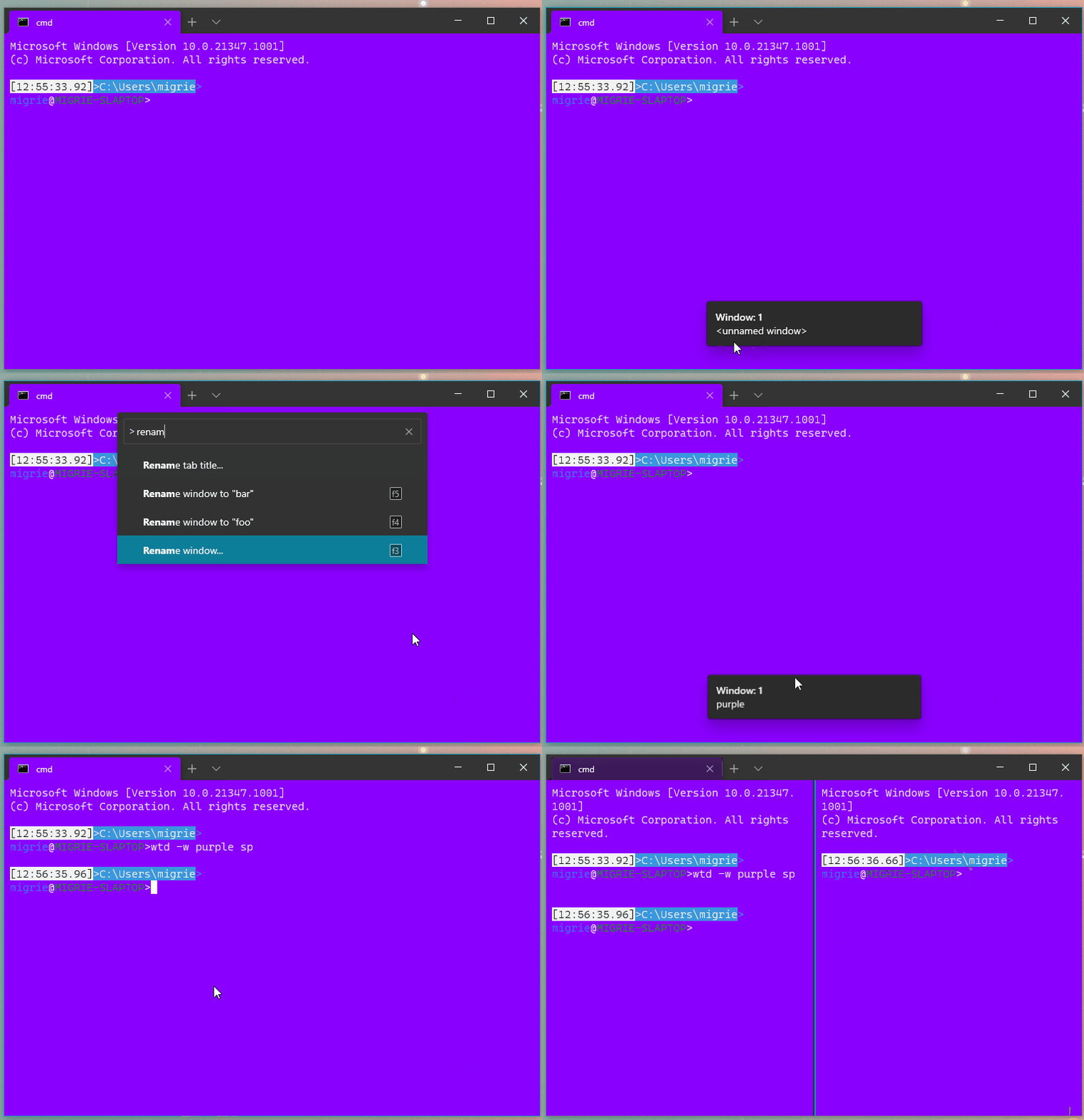
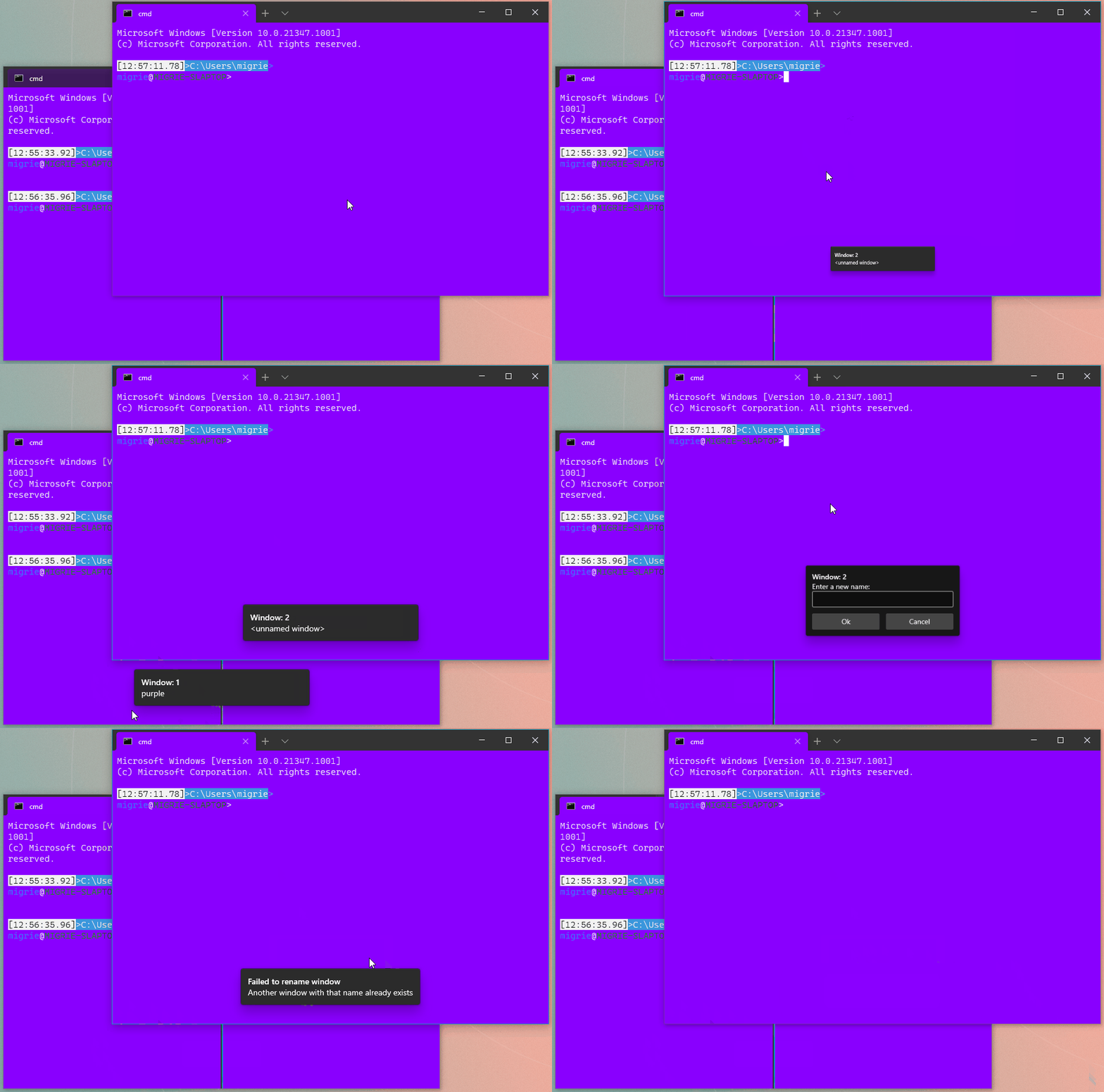
It does so through two new actions:
* `renameWindow` takes a `name` parameter, and attempts to set the window's name
to the provided name. This is useful if you always want to hit <kbd>F3</kbd>
and rename a window to "foo" (READ: probably not that useful)
* `openWindowRenamer` is more interesting: it opens a `TeachingTip` with a
`TextBox`. When the user hits Ok, it'll request a rename for the provided
value. This lets the user pick a new name for the window at runtime.
In both cases, if there's already a window with that name, then the monarch will
reject the rename, and pop a `Toast` in the window informing the user that the
rename failed. Nifty!
## References
* Builds on the toasts from #9523
* #5000 - process model megathread
## PR Checklist
* [x] Closes https://github.com/microsoft/terminal/projects/5#card-50771747
* [x] I work here
* [x] Tests addded (and pass with the help of #9660)
* [ ] Requires documentation to be updated
## Detailed Description of the Pull Request / Additional comments
I'm sending this PR while finishing up the tests. I figured I'll have time to sneak them in before I get the necessary reviews.
> PAIN: We can't immediately focus the textbox in the TeachingTip. It's
> not technically focusable until it is opened. However, it doesn't
> provide an even tto tell us when it is opened. That's tracked in
> microsoft/microsoft-ui-xaml#1607. So for now, the user _needs_ to
> click on the text box manually.
> We're also not using a ContentDialog for this, because in Xaml
> Islands a text box in a ContentDialog won't recieve _any_ keypresses.
> Fun!
## Validation Steps Performed
I've been playing with
```json
{ "keys": "f1", "command": "identifyWindow" },
{ "keys": "f2", "command": "identifyWindows" },
{ "keys": "f3", "command": "openWindowRenamer" },
{ "keys": "f4", "command": { "action": "renameWindow", "name": "foo" } },
{ "keys": "f5", "command": { "action": "renameWindow", "name": "bar" } },
```
and they seem to work as expected
This is entirely self-serving. In my go-to config, I like having some of
the panes for a given profile in a different color scheme. This will let
a user pass `--colorScheme <scheme name>` to manually override the
scheme for that profile. Neat!
## Summary of the Pull Request

Currently, when the MRU is enabled we lose the keybinding allowing us to
go forward/backward (aka right/left in LTR) in the tab view.

To fix that, this PR introduces "tabSwitcherMode" optional parameter to
the prevTab / nextTab commands.
If it is not provided the global setting will be used.


So if you want to go to adjacent tabs, even if MRU is enabled on the
system level you can use:
```
{ "command": { "action": "prevTab", "tabSwitcherMode": "inOrder" }, "keys": "ctrl+f1"}
{ "command": { "action": "nextTab", "tabSwitcherMode": "inOrder" }, "keys": "ctrl+f2"}
```
or even
```
{"command": { "action": "prevTab", "tabSwitcherMode": "disabled" }, "keys": "ctrl+f1"}
{ "command": { "action": "nextTab", "tabSwitcherMode": "disabled" }, "keys": "ctrl+f2"}
```
if you don't want tab switcher to show up

<!-- Please review the items on the PR checklist before submitting-->
## PR Checklist
* [x] Closes https://github.com/microsoft/terminal/issues/9330
* [x] CLA signed.
* [x] Tests added/passed
* [ ] Documentation updated - not yet. Waiting for approval.
* [x] Schema updated.
* [ ] I've discussed this with core contributors already.







