VSCodium 1.45.0 cannot authenticate with Github #1250

Closed
opened 2025-09-10 23:51:31 -05:00 by giteasync · 51 comments
Owner

Originally created by @penyuan on GitHub.

Describe the bug
VSCodium 1.45.0 cannot authenticate with Github.

Please confirm that this problem is VSCodium-specific

  • This bug doesn't happen if I use Microsoft's Visual Studio Code. It only happens in VSCodium.

Please confirm that the issue/resolution isn't already documented

To Reproduce
Steps to reproduce the behavior:

  1. Clone a Github repository and work on it, committing changes, work on branches locally, etc.
  2. Push to remote or publish a branch, etc.
  3. Click "Allow" on the dialog that says "The extension 'Git' wants to sign in using Github."
  4. Click "Open" on the dialog that says "Do you want VSCodium to open the external website?"
  5. A page launches in my web browser (Firefox 76.0.1) with the header "Authorize Visual Studio Code to access GitHub", click "Continue." (I wonder if this shows the problem because VSCodium is identifying itself to Github as Visual Studio Code???)
  6. It fails with a page that says "Oh no! An error occurred! Please restart the sign in process from the editor. Forbidden".

Expected behavior
Github web authentication to succeed without error.

Screenshots
Here is the Github error page:

Desktop (please complete the following information):

  • OS: RHEL 8.2 (Gnome 3.32.2 in Xorg mode with Linux kernel 4.18.0)
  • Architecture: x86_64
  • Version: 1.45.0

Additional context
This does not happen with Microsoft's build of Visual Studio Code.

Originally created by @penyuan on GitHub. **Describe the bug** VSCodium 1.45.0 cannot authenticate with Github. **Please confirm that this problem is VSCodium-specific** - [x] This bug doesn't happen if I use Microsoft's Visual Studio Code. It only happens in VSCodium. **Please confirm that the issue/resolution isn't already documented** - [x] I checked [the Docs page](https://github.com/VSCodium/vscodium/blob/master/DOCS.md) and my issue is not mentioned there. **To Reproduce** Steps to reproduce the behavior: 1. Clone a Github repository and work on it, committing changes, work on branches locally, etc. 2. Push to remote or publish a branch, etc. 3. Click "Allow" on the dialog that says "The extension 'Git' wants to sign in using Github." 4. Click "Open" on the dialog that says "Do you want VSCodium to open the external website?" 5. A page launches in my web browser (Firefox 76.0.1) with the header "Authorize Visual Studio Code to access GitHub", click "Continue." (**I wonder if this shows the problem because VSCodium is identifying itself to Github as Visual Studio Code???**) 6. It fails with a page that says "Oh no! An error occurred! Please restart the sign in process from the editor. Forbidden". **Expected behavior** Github web authentication to succeed without error. **Screenshots** Here is the Github error page: ![](https://framapic.org/UIpNRvRQy5ZI/wwJZFIkjlSuJ) **Desktop (please complete the following information):** - OS: RHEL 8.2 (Gnome 3.32.2 in Xorg mode with Linux kernel 4.18.0) - Architecture: x86_64 - Version: 1.45.0 **Additional context** This does **not** happen with Microsoft's build of Visual Studio Code.
giteasync added the
bug
label 2025-09-10 23:51:31 -05:00
Author
Owner

@marcorichetta commented on GitHub:

Hi @penyuan.

I tried the solutions on the linked issue but none of them worked for me. Maybe it's related to Github's backend but I don't know really.

VSCodium

Version: 1.45.0
Commit: d69a79b73808559a91206d73d7717ff5f798f23c
OS: Linux x64 5.6.11-1-MANJARO

Extension info

Name: GitHub Pull Requests and Issues
Id: github.vscode-pull-request-github
Version: 0.16.0

@marcorichetta commented on GitHub: Hi @penyuan. I tried the solutions on the linked issue but none of them worked for me. Maybe it's related to Github's backend but I don't know really. ### VSCodium Version: 1.45.0 Commit: d69a79b73808559a91206d73d7717ff5f798f23c OS: Linux x64 5.6.11-1-MANJARO ### Extension info Name: GitHub Pull Requests and Issues Id: github.vscode-pull-request-github Version: 0.16.0
Author
Owner

@penyuan commented on GitHub:

That's too bad. Hopefully someone can chime in with a possible solution.

@penyuan commented on GitHub: That's too bad. Hopefully someone can chime in with a possible solution.
Author
Owner

@penyuan commented on GitHub:

Thank you @marcorichetta! I've subscribed to the issue #1778 you linked to, looks like it is an ongoing issue.

How can we help fix it?

@penyuan commented on GitHub: Thank you @marcorichetta! I've subscribed to the issue #1778 you linked to, looks like it is an ongoing issue. How can we help fix it?
Author
Owner

@h3adHunter commented on GitHub:

Hi, it's happening to me too, i updated today to 1.45.1, tried to push from Source control and have the same problem. If you choose to sign in using github clicking in Allow this takes you to your browser, where the problem is (I assume that's some github certificate with Visual Studio Code).
If you press Cancel instead of Allow, vscodium prompts you to enter your user and password and everything is ok.

A good workaround would be to set github source control plugin form vscodium to not request you to sign in using your browser and instead directly show the user/password prompts right there in vscodium.

If you know how to do it let me know hahaha
I'll be looking for it along the week

@h3adHunter commented on GitHub: Hi, it's happening to me too, i updated today to 1.45.1, tried to push from Source control and have the same problem. If you choose to sign in using github clicking in Allow this takes you to your browser, where the problem is (I assume that's some github certificate with Visual Studio Code). If you press Cancel instead of Allow, vscodium prompts you to enter your user and password and everything is ok. A good workaround would be to set github source control plugin form vscodium to not request you to sign in using your browser and instead directly show the user/password prompts right there in vscodium. If you know how to do it let me know hahaha I'll be looking for it along the week
Author
Owner

@marcorichetta commented on GitHub:

Related => https://github.com/microsoft/vscode-pull-request-github/issues/1778#issue-614883422

Also from the wiki of the Github PR Extension, although this issue is related with Github Auth.

@marcorichetta commented on GitHub: Related => https://github.com/microsoft/vscode-pull-request-github/issues/1778#issue-614883422 Also from the [wiki of the Github PR Extension](https://github.com/microsoft/vscode-pull-request-github/wiki#3-why-isnt-the-extension-starting), although this issue is related with Github Auth.
Author
Owner

@stripedpajamas commented on GitHub:

Yeah I'm able to reproduce this on my machine as well. Next step would be to see if a self-built "Code - OSS" has this same issue. Would be good to dig through the microsoft/vscode-pull-request-github code to figure out what it's expecting. I suspect the issue is on the https://vscode-auth.github.com side though, and I'm not sure where that code is (or if its open source at all).

@stripedpajamas commented on GitHub: Yeah I'm able to reproduce this on my machine as well. Next step would be to see if a self-built "Code - OSS" has this same issue. Would be good to dig through the [microsoft/vscode-pull-request-github](https://github.com/microsoft/vscode-pull-request-github) code to figure out what it's expecting. I suspect the issue is on the https://vscode-auth.github.com side though, and I'm not sure where that code is (or if its open source at all).
Author
Owner

@penyuan commented on GitHub:

This solution seems to work for me as a viable workaround, and I didn't even need to use the GitHub PR extension since I triggered it with the built-in git push function, thank you @marcorichetta!

Now, how can we get a more comprehensive fix?

@penyuan commented on GitHub: This solution seems to work for me as a viable workaround, and I didn't even need to use the GitHub PR extension since I triggered it with the built-in git push function, thank you @marcorichetta! Now, how can we get a more comprehensive fix?
Author
Owner

@penyuan commented on GitHub:

Hi.

I was able to authenticate with the steps from the linked issue on the GH PR extension.

Tomorrow I'll try to share a gif with the steps.

Awesome, thank you! Can't wait to see the GIF. 😃

@penyuan commented on GitHub: > Hi. > > I was able to authenticate with the steps from the linked issue on the GH PR extension. > > Tomorrow I'll try to share a gif with the steps. Awesome, thank you! Can't wait to see the GIF. :smiley:
Author
Owner

@marcorichetta commented on GitHub:

I "forced" the authentication via Github PR extension

Tested on 2 computers.

Manjaro

Version: 1.45.0
Commit: d69a79b73808559a91206d73d7717ff5f798f23c
OS: Linux x64 5.6.11-1-MANJARO

KDE Neon

Version: 1.45.1
OS: Linux x64 4.15.0-101-generic
Distro: KDE Neon 5.18.5

Extension info

Name: GitHub Pull Requests and Issues
Id: github.vscode-pull-request-github
Version: 0.16.0

  1. After installing the extension, close codium and execute it via command line passing this parameter. (Explanation)
codium --enable-proposed-api Github.vscode-pull-request-github
  1. You should be prompted with this window. Click Sign In and then Allow

image

image


  1. Copy the link.

image

  1. Paste it on your browser and change vscodium => vscode
+ ?callbackUri=vscode://vscode.github-authentication/did-authenticate...
- ?callbackUri=vscodium://vscode.github-authentication/did-authenticate...
  1. Click Continue on the page asking to Authorize Visual Studio Code to access Github.

  2. You should be redirected to another page where you actually give permission to VSCode for Github. Click on Authorize.

  3. The first time I gave the permission, I got the 801 Error.

  4. I repeated the process from steps 1 to 5 and after clicking continue on step 5 I got a success message.

image

  1. Now you have to replace vscode => vscodium at the start of the token.
+ vscodium://vscode.github-authentication/did-authenticate...
- vscode://vscode.github-authentication/did-authenticate...

⚠️ Take a look at the copied token because you may have to trim whitespaces on each end.

  1. Back to VSCodium, click on the Signing in to github.com and enter your token. I believe that it also asks for username and password.
    image

🎉

image

@marcorichetta commented on GitHub: I "forced" the authentication via [Github PR extension](https://marketplace.visualstudio.com/items?itemName=GitHub.vscode-pull-request-github) Tested on 2 computers. ### Manjaro Version: 1.45.0 Commit: d69a79b73808559a91206d73d7717ff5f798f23c OS: Linux x64 5.6.11-1-MANJARO ### KDE Neon Version: 1.45.1 OS: Linux x64 4.15.0-101-generic Distro: KDE Neon 5.18.5 ### Extension info Name: GitHub Pull Requests and Issues Id: github.vscode-pull-request-github Version: 0.16.0 1. After installing the extension, close codium and execute it via command line passing this parameter. ([Explanation](https://github.com/microsoft/vscode-pull-request-github/wiki#3-why-isnt-the-extension-starting)) ```bash codium --enable-proposed-api Github.vscode-pull-request-github ``` 2. You should be prompted with this window. Click **Sign In** and then **Allow** ![image](https://user-images.githubusercontent.com/19599150/82449030-f54a4c80-9a80-11ea-9d66-bb31f6c50929.png) ![image](https://user-images.githubusercontent.com/19599150/82449094-101cc100-9a81-11ea-929a-055a37ce3425.png) *** 3. **Copy** the link. ![image](https://user-images.githubusercontent.com/19599150/82449147-2460be00-9a81-11ea-89ce-88b22d74d6e4.png) 4. Paste it on your browser and change **vscodium => vscode** ```diff + ?callbackUri=vscode://vscode.github-authentication/did-authenticate... - ?callbackUri=vscodium://vscode.github-authentication/did-authenticate... ``` 5. Click **Continue** on the page asking to _Authorize Visual Studio Code to access Github_. 6. You should be redirected to another page where you actually give permission to **VSCode for Github**. Click on **Authorize**. 7. The first time I gave the permission, I got the **801 Error**. 8. I repeated the process from steps 1 to 5 and after clicking continue on step 5 I got a success message. ![image](https://user-images.githubusercontent.com/19599150/82450470-1dd34600-9a83-11ea-8f9f-4e46c717dcd2.png) 9. Now you have to replace `vscode => vscodium` at the start of the token. ```diff + vscodium://vscode.github-authentication/did-authenticate... - vscode://vscode.github-authentication/did-authenticate... ``` :warning: **Take a look at the copied token because you may have to trim whitespaces on each end.** 10. Back to VSCodium, click on the **Signing in to github.com** and enter your token. I believe that it also asks for username and password. ![image](https://user-images.githubusercontent.com/19599150/82450814-90442600-9a83-11ea-984d-9aa6419a80d7.png) ## :tada: ![image](https://user-images.githubusercontent.com/19599150/82456662-ea94b500-9a8a-11ea-8f2e-1360d62b1bfb.png)
Author
Owner

@marcorichetta commented on GitHub:

Hi.

I was able to authenticate with the steps from the linked issue on the GH PR extension.

Tomorrow I'll try to share a gif with the steps.

@marcorichetta commented on GitHub: Hi. I was able to authenticate with the steps from the linked issue on the GH PR extension. Tomorrow I'll try to share a gif with the steps.
Author
Owner

@vazra commented on GitHub:

@stripedpajamas I got this error with
VSCodium Version: 1.47.3
GitHub Pull Requests and Issues Version : v0.18.1
MacOS v10.14.6 (18G2022)

Screenshot 2020-07-29 at 1 38 45 PM

the URL being redirected is
https://vscode-auth.github.com/authorize/?callbackUri=vscodium://vscode.github-authentication/did-authenticate%253FwindowId%253D1&scope=read:user%20repo%20user:email&state=xxxx&responseType=code&authServer=https://github.com

@vazra commented on GitHub: @stripedpajamas I got this error with VSCodium Version: `1.47.3` GitHub Pull Requests and Issues Version : `v0.18.1` MacOS `v10.14.6 (18G2022)` <img width="705" alt="Screenshot 2020-07-29 at 1 38 45 PM" src="https://user-images.githubusercontent.com/7609895/88774453-1924bf80-d1a1-11ea-85fb-e0307ba62b1d.png"> the URL being redirected is https://vscode-auth.github.com/authorize/?callbackUri=vscodium://vscode.github-authentication/did-authenticate%253FwindowId%253D1&scope=read:user%20repo%20user:email&state=xxxx&responseType=code&authServer=https://github.com
Author
Owner

@codeconcept commented on GitHub:

What solved it for me (Codium on Windows 10) was to install the latest version of my git client from https://git-scm.com/
Now it works with git 2.27.0

@codeconcept commented on GitHub: What solved it for me (Codium on Windows 10) was to install the latest version of my git client from https://git-scm.com/ Now it works with git 2.27.0
Author
Owner

@vazra commented on GitHub:

What solved it for me (Codium on Windows 10) was to install the latest version of my git client from https://git-scm.com/
Now it works with git 2.27.0

I tried this in Mac (ver. 2.27.0), didn't work for me.

@vazra commented on GitHub: > What solved it for me (Codium on Windows 10) was to install the latest version of my git client from https://git-scm.com/ > Now it works with git 2.27.0 I tried this in Mac (ver. 2.27.0), didn't work for me.
Author
Owner

@stripedpajamas commented on GitHub:

Is anyone still experiencing this in 1.47.x ?

@stripedpajamas commented on GitHub: Is anyone still experiencing this in 1.47.x ?
Author
Owner

@marcorichetta commented on GitHub:

@stripedpajamas Not on my pc right now but tomorrow I'll try and I'll comment here.

@marcorichetta commented on GitHub: @stripedpajamas Not on my pc right now but tomorrow I'll try and I'll comment here.
Author
Owner

@voiduserid commented on GitHub:

Didn't worked for me,
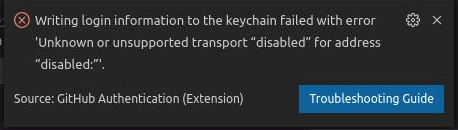
After passing token at step 10, I got this error:
new

OS: Debian GNU/Linux 10 (buster) x86_64
Kernel: 4.9.212-antix.1-amd64-smp
VSCodium Version: 1.48.2
GitHub Pull Requests and Issues Version : v0.19.0
GitHub Authentication Version : v0.0.1

@voiduserid commented on GitHub: Didn't worked for me, After passing token at step 10, I got this error: ![new](https://user-images.githubusercontent.com/36713242/92109621-06318a80-edf2-11ea-913b-1223d08e9e58.png) OS: Debian GNU/Linux 10 (buster) x86_64 Kernel: 4.9.212-antix.1-amd64-smp VSCodium Version: 1.48.2 GitHub Pull Requests and Issues Version : v0.19.0 GitHub Authentication Version : v0.0.1
Author
Owner

@Trevor-van-L commented on GitHub:

marcorichetta's workaround worked for me. Two notes:

  • I had to be logged out of github when I opened the authentication link. (I used container tabs)
  • the whitespace is there in the copied token. it seems like a throwaway remark but do double check it :)
@Trevor-van-L commented on GitHub: marcorichetta's workaround worked for me. Two notes: - I had to be logged out of github when I opened the authentication link. (I used container tabs) - the whitespace is there in the copied token. it seems like a throwaway remark but do double check it :)
Author
Owner

@ldexterldesign commented on GitHub:

macOS, 10.15.6 (19G2021)
VSCodium, 1.48.1

If you press Cancel instead of Allow, vscodium prompts you to enter your user and password and everything is ok. @h3adHunter

Worked for me 🤷‍♂️

Will follow up after I've done a fresh macOS install to see if this is a quirk of my OS or a VSCodium bug, the latter being likely if so many others are experiencing the issue too

Stating the obvious but, this issue will be a quick turn off for new (VSCodium) users so hope it's top priority to fix

Hope this helps

Sincerely

@ldexterldesign commented on GitHub: macOS, 10.15.6 (19G2021) VSCodium, 1.48.1 > If you press Cancel instead of Allow, vscodium prompts you to enter your user and password and everything is ok. @h3adHunter Worked for me 🤷‍♂️ Will follow up after I've done a fresh macOS install to see if this is a quirk of my OS or a VSCodium bug, the latter being likely if so many others are experiencing the issue too Stating the obvious but, this issue will be a quick turn off for new (VSCodium) users so hope it's top priority to fix Hope this helps Sincerely
Author
Owner

@marcorichetta commented on GitHub:

@stripedpajamas I still get the same error as @vazra.

Information

Linux x64 4.15.0-112-generic
KDE Neon 5.18.5
VSCodium Version: 1.47.3

Extension
Version: 0.18.0
Name: GitHub Pull Requests and Issues

@marcorichetta commented on GitHub: @stripedpajamas I still get the same error as @vazra. ### Information Linux x64 4.15.0-112-generic KDE Neon 5.18.5 VSCodium Version: **1.47.3** **Extension** Version: **0.18.0** Name: GitHub Pull Requests and Issues
Author
Owner

@Nek-12 commented on GitHub:

I have almost the same setup as @vazra except I'm on ArchLinux. Can't get past that message. Refreshing the page or trying again doesn't help.

Version: 1.47.3
Electron: 7.3.2
Chrome: 78.0.3904.130
Node.js: 12.8.1
V8: 7.8.279.23-electron.0
OS: Linux x64 5.7.11-arch1-1
- - - - - -   
Name: GitHub Pull Requests and Issues
Id: github.vscode-pull-request-github
Description: Pull Request and Issue Provider for GitHub
Version: 0.18.0
Publisher: GitHub
VS Marketplace Link: https://marketplace.visualstudio.com/items?itemName=GitHub.vscode-pull-request-github

I have found a workaround though, but I wouldn't advise using it for security reasons.
You can create a new access token in "Developer Settings" of your GitHub Profile. Since I don't know what permissions does Github PR need, I tried granting almost everything, and it worked. Granting only the access to repos and gists (what JetBrains IDEs require) doesn't work. Then just ignore the authorization page and paste your custom access token into the field in VSCode.

@Nek-12 commented on GitHub: I have almost the same setup as @vazra except I'm on ArchLinux. Can't get past that message. Refreshing the page or trying again doesn't help. ``` Version: 1.47.3 Electron: 7.3.2 Chrome: 78.0.3904.130 Node.js: 12.8.1 V8: 7.8.279.23-electron.0 OS: Linux x64 5.7.11-arch1-1 - - - - - - Name: GitHub Pull Requests and Issues Id: github.vscode-pull-request-github Description: Pull Request and Issue Provider for GitHub Version: 0.18.0 Publisher: GitHub VS Marketplace Link: https://marketplace.visualstudio.com/items?itemName=GitHub.vscode-pull-request-github ``` I have found a workaround though, but I wouldn't advise using it for security reasons. You can create a new access token in "Developer Settings" of your GitHub Profile. Since I don't know what permissions does Github PR need, I tried granting almost everything, and it worked. Granting only the access to repos and gists (what JetBrains IDEs require) doesn't work. Then just ignore the authorization page and paste your custom access token into the field in VSCode.
Author
Owner

@Cipher0009 commented on GitHub:

If anyone is still facing issues with this, a solution which worked for me was just connecting my git via ssh. I found this article online if it might be of help to anyone

https://www.freecodecamp.org/news/git-ssh-how-to/

@Cipher0009 commented on GitHub: If anyone is still facing issues with this, a solution which worked for me was just connecting my git via ssh. I found this article online if it might be of help to anyone https://www.freecodecamp.org/news/git-ssh-how-to/
Author
Owner

@pat-s commented on GitHub:

Faced this issue on macOS with vscodium v1.51

https://github.com/VSCodium/vscodium/issues/401#issuecomment-631502370 worked for me though I needed to be signed out of GitHub. The simplest way is to do it in a private browser window.

@pat-s commented on GitHub: Faced this issue on macOS with vscodium v1.51 https://github.com/VSCodium/vscodium/issues/401#issuecomment-631502370 worked for me though I needed to be signed out of GitHub. The simplest way is to do it in a private browser window.
Author
Owner

@eMPai-git commented on GitHub:

Faced this issue on Linux with vscodium v1.50.1

#401 (comment) worked for me though I needed to be signed out of GitHub.

Same for me. Thanks for the workaround.

@eMPai-git commented on GitHub: Faced this issue on Linux with vscodium v1.50.1 > [#401 (comment)](https://github.com/VSCodium/vscodium/issues/401#issuecomment-631502370) worked for me though I needed to be signed out of GitHub. Same for me. Thanks for the workaround.
Author
Owner

@daiyam commented on GitHub:

The solution of @marcorichetta is working.
But the GitHub authentication extension can accept a personal access token but only in a test environment.
I thinks it would be better to make a patch to make it work everywhere and just ask for a personal access token. There won't be any confusion.
What do you think?

@daiyam commented on GitHub: The solution of @marcorichetta is working. But the GitHub authentication extension can accept a personal access token but only in a test environment. I thinks it would be better to make a patch to make it work everywhere and just ask for a personal access token. There won't be any confusion. What do you think?
Author
Owner

@CITIZENDOT commented on GitHub:

Is anyone still experiencing this in 1.47.x ?

My VSCodium version is 1.51.1. I did experience this and @marcorichetta answer worked fine for me.

@CITIZENDOT commented on GitHub: > Is anyone still experiencing this in 1.47.x ? My VSCodium version is 1.51.1. I did experience this and @marcorichetta answer worked fine for me.
Author
Owner

@SkippTekk commented on GitHub:

Sadly enough i'm still getting this same issue, I'm on OpenSuse using VSCodium 1.52.1 and it's still failing to add my token even after changing the URL as stated above from VSCodium to VScode or what ever it was.

@SkippTekk commented on GitHub: Sadly enough i'm still getting this same issue, I'm on OpenSuse using VSCodium 1.52.1 and it's still failing to add my token even after changing the URL as stated above from VSCodium to VScode or what ever it was.
Author
Owner

@NH3R717 commented on GitHub:

Switching:
https://vscode-auth.github.com/authorize/?callbackUri=vscodium://vscode.github-authentication...

to

https://vscode-auth.github.com/authorize/?callbackUri=vscode://vscode.github-authentication...

worked for me.

@NH3R717 commented on GitHub: Switching: https://vscode-auth.github.com/authorize/?callbackUri=vscodium://vscode.github-authentication... to https://vscode-auth.github.com/authorize/?callbackUri=vscode://vscode.github-authentication... worked for me.
Author
Owner

@GitMensch commented on GitHub:

@stripedpajamas Do you see any option to work around this in the code? If not: Are you fine with me adding an entry to DOCS.md about how to solve these and related issues and close this issue?

@GitMensch commented on GitHub: @stripedpajamas Do you see any option to work around this in the code? If not: Are you fine with me adding an entry to DOCS.md about how to solve these and related issues and close this issue?
Author
Owner

@simonsan commented on GitHub:

This is pure gold, thank you!

@simonsan commented on GitHub: This is pure gold, thank you!
Author
Owner

@stripedpajamas commented on GitHub:

I don't know of a way to make the work around in code cleanly, but PRs welcome. I agree with adding the DOCS entry and closing these up.

@stripedpajamas commented on GitHub: I don't know of a way to make the work around in code cleanly, but PRs welcome. I agree with adding the DOCS entry and closing these up.
Author
Owner

@stripedpajamas commented on GitHub:

@marcorichetta I haven't figured out what part of VSCode (or some built-in extension) is generating the link... if someone does find it, it seems plausible that we could patch it to produce a better link.

@stripedpajamas commented on GitHub: @marcorichetta I haven't figured out what part of VSCode (or some built-in extension) is generating the link... if someone does find it, it seems plausible that we could patch it to produce a better link.
Author
Owner

@madeddy commented on GitHub:

Sadly enough i'm still getting this same issue, I'm on OpenSuse using VSCodium 1.52.1 and it's still failing to add my token even after changing the URL as stated above from VSCodium to VScode or what ever it was.

You need to go with the solution described here: login fail workaround At least for me did it work. A big thank you to the user @marcorichetta !

Having such a bug after nearly 9 months still open and possibly untouched, is in my book a confession of failure for the project. Guess i need soon a new editor.

@madeddy commented on GitHub: > Sadly enough i'm still getting this same issue, I'm on OpenSuse using VSCodium 1.52.1 and it's still failing to add my token even after changing the URL as stated above from VSCodium to VScode or what ever it was. You need to go with the solution described here: [login fail workaround](https://github.com/VSCodium/vscodium/issues/401#issuecomment-631502370) At least for me did it work. A big thank you to the user @marcorichetta ! Having such a bug after nearly 9 months still open and possibly untouched, is in my book a confession of failure for the project. Guess i need soon a new editor.
Author
Owner

@madeddy commented on GitHub:

You may want to try Theia or, if you're always on in any case GitPod ...

Thanks for the pointers. Will see if needed in the end. Yes, i haven't given up hope it gets fixed soon enough.

I think it's a bit too much to say the project is a failure ...

Dang it! This sounded perhaps harder as intended or misleading. I think its not really possible to translate the word i had in mind (Armutszeugnis) to english. I meant to say its a sign/proof of shortcomings.

Edit: I found mentions on other projects related to vscode/ext. about the same issue. This seems browser related in some way. https://github.com/microsoft/vscode-pull-request-github/issues/1221
https://github.com/microsoft/vscode/issues/113163

Greets

@madeddy commented on GitHub: > You may want to try Theia or, if you're always on in any case GitPod ... Thanks for the pointers. Will see if needed in the end. Yes, i haven't given up hope it gets fixed soon enough. > I think it's a bit too much to say the project is a failure ... Dang it! This sounded perhaps harder as intended or misleading. I think its _not really_ possible to translate the word i had in mind (Armutszeugnis) to english. I meant to say its a sign/proof of shortcomings. Edit: I found mentions on other projects related to vscode/ext. about the same issue. This seems browser related in some way. https://github.com/microsoft/vscode-pull-request-github/issues/1221 https://github.com/microsoft/vscode/issues/113163 Greets
Author
Owner

@GitMensch commented on GitHub:

For myself the procedure worked fine with different versions of VSCodium by changing the URL before opening it in the browser and then on the way back changing it again.

Having such a bug after nearly 9 months still open and possibly untouched, is in my book a confession of failure for the project. Guess i need soon a new editor.

Yes madeddy, if an integration of an external component is that important for you (no matter that it actually works with a workaround) this seems the case.
You may want to try Theia or, if you're always on in any case GitPod (that definitely has a good working GitHub integration), in both common vsix extensions work fine.

@GitMensch commented on GitHub: For myself the procedure worked fine with different versions of VSCodium by changing the URL before opening it in the browser and then on the way back changing it again. > Having such a bug after nearly 9 months still open and possibly untouched, is in my book a confession of failure for the project. Guess i need soon a new editor. Yes madeddy, if an integration of an external component is that important for you (no matter that it actually works with a workaround) this seems the case. You may want to try Theia or, if you're always on in any case GitPod (that definitely has a good working GitHub integration), in both common vsix extensions work fine.
Author
Owner

@marcorichetta commented on GitHub:

@SkippTekk Did you make sure there are no whitespaces in the copied token?

Thanks for the ping @madeddy 👍

Having such a bug after nearly 9 months still open and possibly untouched, is in my book a confession of failure for the project. Guess i need soon a new editor.

I think it's a bit too much to say the project is a failure, but I understand that you may have other priorities like @GitMensch says.


@stripedpajamas I'm not familiar with the code but is there a way to "transform" the links so you don't have to do it manually? Or is this part of some Github extension code?

@marcorichetta commented on GitHub: @SkippTekk Did you make sure there are no whitespaces in the copied token? Thanks for the ping @madeddy :+1: > Having such a bug after nearly 9 months still open and possibly untouched, is in my book a confession of failure for the project. Guess i need soon a new editor. I think it's a bit too much to say the project is a failure, but I understand that you may have other priorities like @GitMensch says. *** @stripedpajamas I'm not familiar with the code but is there a way to "transform" the links so you don't have to do it manually? Or is this part of some Github extension code?
Author
Owner

@tsilvs commented on GitHub:

Any rough estimate on when will this be fixed?

Or maybe there's something one could do on their own as a workaround? A config file modification perhaps?

This

to fix the issue, 2 urls need to be changed:

  • ?callbackUri=vscodium://vscode.github-authentication/did-authenticate... -> ?callbackUri=vscode://vscode.github-authentication/did-authenticate...
  • vscode://vscode.github-authentication/did-authenticate... -> vscodium://vscode.github-authentication/did-authenticate...

is a valid one-time solution. But something better than doing it every time would be much more convenient and productive.

@tsilvs commented on GitHub: Any rough estimate on when will this be fixed? Or maybe there's something one could do on their own as a workaround? A config file modification perhaps? [This](https://github.com/VSCodium/vscodium/issues/401#issuecomment-770459691) > to fix the issue, 2 urls need to be changed: > * `?callbackUri=vscodium://vscode.github-authentication/did-authenticate...` -> `?callbackUri=vscode://vscode.github-authentication/did-authenticate...` > * `vscode://vscode.github-authentication/did-authenticate...` -> `vscodium://vscode.github-authentication/did-authenticate...` is a valid one-time solution. But something better than doing it every time would be much more convenient and productive.
Author
Owner

@daiyam commented on GitHub:

I've done a PR using the Personal Access Token (#672). It's easier to use.

@daiyam commented on GitHub: I've done a PR using the Personal Access Token (#672). It's easier to use.
Author
Owner

@daiyam commented on GitHub:

@stripedpajamas It's extensions/github-authentication/src/githubServer.ts.

But to fix the issue, 2 urls need to be changed:

  • ?callbackUri=vscodium://vscode.github-authentication/did-authenticate... -> ?callbackUri=vscode://vscode.github-authentication/did-authenticate...
  • vscode://vscode.github-authentication/did-authenticate... -> vscodium://vscode.github-authentication/did-authenticate...

The first one can be changed in the extension whereas the second can't . It's being generated by the auth relay vscode-auth.github.com.

But that extension support Personal Access Token so it can be a good alternative.

@daiyam commented on GitHub: @stripedpajamas It's `extensions/github-authentication/src/githubServer.ts`. But to fix the issue, 2 urls need to be changed: - `?callbackUri=vscodium://vscode.github-authentication/did-authenticate...` -> `?callbackUri=vscode://vscode.github-authentication/did-authenticate...` - `vscode://vscode.github-authentication/did-authenticate...` -> `vscodium://vscode.github-authentication/did-authenticate...` The first one can be changed in the extension whereas the second can't . It's being generated by the auth relay `vscode-auth.github.com`. But that extension support Personal Access Token so it can be a good alternative.
Author
Owner

@marcorichetta commented on GitHub:

I'm not sure I understand if the solution provided by @daiyam is possible or if we will continue to rely on the Github auth relay, which may change in the future.

At the moment our best bet is to create a new DOCS entry with the information gathered here.

@marcorichetta commented on GitHub: I'm not sure I understand if the solution provided by @daiyam is possible or if we will continue to rely on the Github auth relay, which may change in the future. At the moment our best bet is to create a new DOCS entry with the information gathered here.
Author
Owner

@pat-s commented on GitHub:

Could someone lock this issue to prevent all these spam comments? (Feel free to delete this one here as well)

@pat-s commented on GitHub: Could someone lock this issue to prevent all these spam comments? (Feel free to delete this one here as well)
Author
Owner

@illumincrotty commented on GitHub:

Couldn't get it to work on Firefox but switching to Chrome did the trick!

@illumincrotty commented on GitHub: Couldn't get it to work on Firefox but switching to Chrome did the trick!
Author
Owner

@GitMensch commented on GitHub:

That patch looks super cool (replaces the current GH access procedure by a popup asking for the GH-PAT to be entered once). I do wonder where the resulting token is stored (I guess that's possibly "wherever the token was stored before").

In any case: can someone that builds VSCodium test that and drop a note there? It looks like we can very soon finally close this issue!

@GitMensch commented on GitHub: That patch looks super cool (replaces the current GH access procedure by a popup asking for the GH-PAT to be entered once). I do wonder where the resulting token is stored (I guess that's possibly "wherever the token was stored before"). In any case: can someone that builds VSCodium test that and drop a note there? It looks like we can very soon finally close this issue!
Author
Owner

@amsalimsema commented on GitHub:

Personally I was experiencing this issue after resetting my Windows. By default the authentication prompt opens edge, so I copied the browser URL and pasted it in chrome, vscode - github authentication was a success. Hope it works for anyone still having this issue.

@amsalimsema commented on GitHub: Personally I was experiencing this issue after resetting my Windows. By default the authentication prompt opens edge, so I copied the browser URL and pasted it in chrome, vscode - github authentication was a success. Hope it works for anyone still having this issue.
Author
Owner

@cerberus10 commented on GitHub:

this issue is still happening, I was able to use the manual token add as a workaround but cant publish to github only initialize a git repository, all of this in the lastest version dor Ubuntu 20.04 .

@cerberus10 commented on GitHub: this issue is still happening, I was able to use the manual token add as a workaround but cant publish to github only initialize a git repository, all of this in the lastest version dor Ubuntu 20.04 .
Author
Owner

@daiyam commented on GitHub:

@GitMensch On macOS, it's stored in the keychain.

@daiyam commented on GitHub: @GitMensch On macOS, it's stored in the keychain.
Author
Owner

@daiyam commented on GitHub:

@Yazir I've just released an extension to sync the settings/resources into a local folder or a remote git.
You can find it here on OpenVSX or on VSMarketplace.
More features will come...

@daiyam commented on GitHub: @Yazir I've just released an extension to sync the settings/resources into a local folder or a remote git. You can find it here on [OpenVSX](https://open-vsx.org/extension/zokugun/sync-settings) or on [VSMarketplace](https://marketplace.visualstudio.com/items?itemName=zokugun.sync-settings). More features will come...
Author
Owner

@rugk commented on GitHub:

The guide form https://github.com/VSCodium/vscodium/issues/401#issuecomment-631502370 is awesome, however for all Linux users looking for how to start VsCodium with that parameter given there I inspected the .desktop file and then you can build yourself such a command line:

$ flatpak run --command=/app/bin/codium --file-forwarding com.vscodium.codium --no-sandbox --unity-launch GitHub.vscode-pull-request-github

The rest of the instructions stay the same.

@rugk commented on GitHub: The guide form https://github.com/VSCodium/vscodium/issues/401#issuecomment-631502370 is awesome, however for all Linux users looking for how to start VsCodium with that parameter given there [I inspected the `.desktop` file](https://github.com/flatpak/flatpak/issues/1286#issuecomment-354554684) and then you can build yourself such a command line: ``` $ flatpak run --command=/app/bin/codium --file-forwarding com.vscodium.codium --no-sandbox --unity-launch GitHub.vscode-pull-request-github ``` The rest of the instructions stay the same.
Author
Owner

@Yazir commented on GitHub:

@marcorichetta provided a good solution to the problem, but I was dissapointed to see that settings sync (feature that I wanted the github auth in the first place) is unavailable. Albeit not VSCodium's fault.
https://github.com/microsoft/vscode/issues/105310#issuecomment-693262654

Note to anyone still wanting to sign in:
OS: Windows 10
Authentication wouldn't work on Firefox, worked on Chrome though

@Yazir commented on GitHub: @marcorichetta provided a good solution to the problem, but I was dissapointed to see that settings sync (feature that I wanted the github auth in the first place) is unavailable. Albeit not VSCodium's fault. https://github.com/microsoft/vscode/issues/105310#issuecomment-693262654 Note to anyone still wanting to sign in: OS: Windows 10 Authentication wouldn't work on Firefox, worked on Chrome though
Author
Owner

@GGORG0 commented on GitHub:

For me, it didn't ask if i wanted to copy the url, it just opened it. Every time i was getting error 801, but after remembering that firefox has offline mode, i enabled it, opened the sign in url, changed it and then disabled offline mode so that it could actually load the page. And it worked!

@GGORG0 commented on GitHub: For me, it didn't ask if i wanted to copy the url, it just opened it. Every time i was getting error 801, but after remembering that firefox has offline mode, i enabled it, opened the sign in url, changed it and then disabled offline mode so that it could actually load the page. And it worked!
Author
Owner

@daiyam commented on GitHub:

I need more people to upvote #672 so it can move forward. Beta-testers are welcome.

@daiyam commented on GitHub: I need more people to upvote #672 so it can move forward. Beta-testers are welcome.
Author
Owner

@daiyam commented on GitHub:

Since 1.60, VSCodium is using Personal Access Token to sign in.

@daiyam commented on GitHub: Since 1.60, VSCodium is using Personal Access Token to sign in.
Sign in to join this conversation.
1 Participants
Notifications
Due Date
No due date set.
Dependencies

No dependencies set.

Reference: VSCodium/vscodium#1250
No description provided.