Inconsistent icon on Windows #1066

Closed
opened 2025-09-10 23:49:51 -05:00 by giteasync · 2 comments
Owner

Originally created by @ghost on GitHub.

Describe the bug
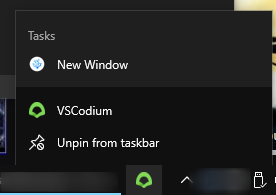
After updating to 1.53 the icon when pinned to the taskbar, and not open, uses the old green icon. It still launches vscodium and the open window uses the blue and white icon as expected. However, when opened the icon in the top left of the window is yet another, different icon.

I noticed this after an upgrade, not sure if the same behavior is present on new installations.

Start Menu icon seems to be the correct blue and white one.

Please confirm that this problem is VSCodium-specific

  • This bug doesn't happen if I use Microsoft's Visual Studio Code. It only happens in VSCodium.

Please confirm that the issue/resolution isn't already documented

To Reproduce
Steps to reproduce the behavior:

  1. Update VSCodium to 1.53
  2. Observe pinned taskbar icon
  3. Observe running taskbar icon
  4. Observe window icon

Expected behavior
All icons are consistent

Screenshots

screenshot_2021-02-07_17-45-41
screenshot_2021-02-07_17-45-53
screenshot_2021-02-07_17-46-53

Desktop (please complete the following information):

  • OS: Windows 10 Pro
  • Architecture: x64
  • Version: 1.53

Additional context
n/a

Originally created by @ghost on GitHub. **Describe the bug** After updating to 1.53 the icon when pinned to the taskbar, and not open, uses the old green icon. It still launches vscodium and the open window uses the blue and white icon as expected. However, when opened the icon in the top left of the window is yet another, different icon. I noticed this after an upgrade, not sure if the same behavior is present on new installations. Start Menu icon seems to be the correct blue and white one. **Please confirm that this problem is VSCodium-specific** - [x] This bug doesn't happen if I use Microsoft's Visual Studio Code. It only happens in VSCodium. **Please confirm that the issue/resolution isn't already documented** - [x] I checked [the Docs page](https://github.com/VSCodium/vscodium/blob/master/DOCS.md) and my issue is not mentioned there. **To Reproduce** Steps to reproduce the behavior: 1. Update VSCodium to 1.53 2. Observe pinned taskbar icon 3. Observe running taskbar icon 4. Observe window icon **Expected behavior** All icons are consistent **Screenshots** ![screenshot_2021-02-07_17-45-41](https://user-images.githubusercontent.com/70103789/107163161-a8d7d180-696d-11eb-906d-44be38c6b01f.png) ![screenshot_2021-02-07_17-45-53](https://user-images.githubusercontent.com/70103789/107163164-ac6b5880-696d-11eb-9e2f-188fead71d7d.png) ![screenshot_2021-02-07_17-46-53](https://user-images.githubusercontent.com/70103789/107163167-aecdb280-696d-11eb-94b1-a99f1304dca8.png) **Desktop (please complete the following information):** - OS: Windows 10 Pro - Architecture: x64 - Version: 1.53 **Additional context** n/a
giteasync added the
bug
label 2025-09-10 23:49:51 -05:00
Author
Owner

@stripedpajamas commented on GitHub:

This should be fixed in next release now that https://github.com/VSCodium/vscodium/pull/633 is merged.

@stripedpajamas commented on GitHub: This should be fixed in next release now that https://github.com/VSCodium/vscodium/pull/633 is merged.
Author
Owner

@Eviepayne commented on GitHub:

Switching back to the old icon did not fix this consistency issue.

image

@Eviepayne commented on GitHub: Switching back to the old icon did not fix this consistency issue. ![image](https://user-images.githubusercontent.com/59463208/109658202-5769cf00-7b34-11eb-9c83-0b9e0f520e85.png)
Sign in to join this conversation.
1 Participants
Notifications
Due Date
No due date set.
Dependencies

No dependencies set.

Reference: VSCodium/vscodium#1066
No description provided.